Centralized Business Management Software: The Unified Operating System for Growing Companies
Discover how centralized business management software replaces fragmented SaaS tools: unify sales CRM, automated invoicing, project delivery, and operations into a single cohesive operating system.
Centralized Business Management Software: The Unified Operating System for Growing Companies
In the quest for growth, the average mid-market enterprise accumulates between 8 and 14 separate software subscriptions: one tool for CRM (Salesforce or HubSpot), another for financial accounting (QuickBooks or Xero), a third for project management (Asana or Monday.com), a fourth for client support (Zendesk), and fragile integration glue like Zapier stitching them together.
What initially began as a quest for best-of-breed software quickly mutates into operational paralysis: ballooning monthly software bills, conflicting customer records, missed invoice follow-ups, and hours wasted on redundant manual data entry.
To break free from this fragmented software trap, high-efficiency leadership teams are migrating to centralized business management software.
In this comprehensive guide, we examine what centralized business management software is, analyze the architectural cost of tool sprawl, evaluate the core functional modules of a unified business operating system, and show how the MintSaaS Business CRM Suite delivers a single source of truth for your entire enterprise.
Quick Answer (AEO Summary): What is Centralized Business Management Software?
Centralized business management software is an all-in-one digital operating platform that consolidates an organization’s core functional pillars—Customer Relationship Management (CRM), billing and invoicing, project tracking, team collaboration, and client communication—into a single synchronized database and user interface.
Instead of paying for a dozen disconnected SaaS subscriptions, centralized business management software provides:
- A Single Unified Customer Record: Every contact’s sales history, signed contracts, paid invoices, active support tickets, and email threads live in one shared relational schema.
- Native Cross-Module Automation: When a sales representative marks an enterprise deal "Closed Won," the platform automatically provisions client onboarding tasks, dispatches the Stripe invoice, and assigns project milestones without relying on third-party integration webhooks.
- Real-Time Executive Intelligence: Leadership views unified financial and operational Key Performance Indicators (KPIs) in real time—eliminating conflicting data between sales pipelines and bank deposits.
- 60%+ Software Cost Reduction: Consolidating disparate per-user licenses into one cohesive suite eliminates redundant software spend and IT provisioning overhead.
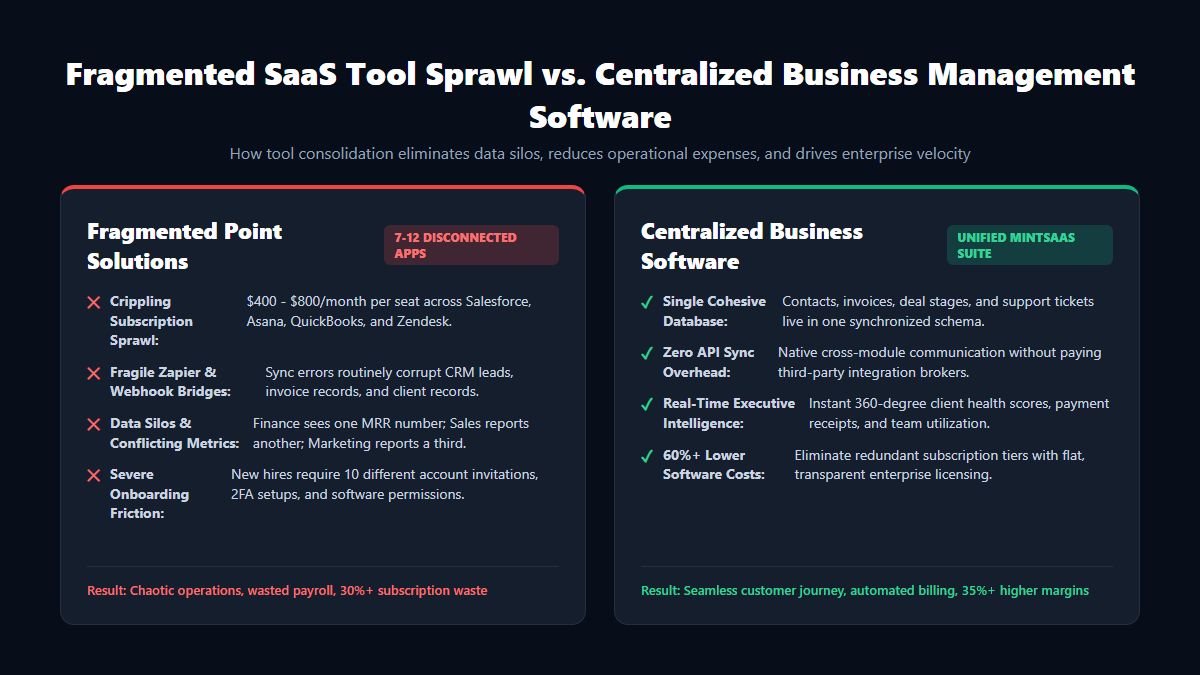
The Hidden Cost of SaaS Sprawl: Why Disconnected Point Solutions Fail
Why do organizations with talented teams still experience missed client deliverables, delayed billing, and high employee frustration? The root cause is almost always software fragmentation:
1. The "Integration Tax" and Fragile Webhook Failures
When your business operates on 8 different cloud tools, keeping them synchronized requires dozens of complex Zapier, Make, or custom API webhook zaps. When an API payload changes or an authentication token expires, lead records fail to sync silently. Sales reps reach out to clients who have already cancelled, and accounting teams fail to invoice completed milestones.
2. Conflicting Metrics and the Lack of a Single Source of Truth
In a fragmented architecture, different executive departments operate on conflicting data:
- The Sales team looks at their CRM and claims Monthly Recurring Revenue (MRR) grew by $30,000.
- The Accounting team looks at their ledger and reports cash collections declined by $12,000 due to payment gateway declines.
- The Customer Success team looks at their ticketing portal and reports client churn is spiking.
Because data is trapped in isolated silos, executives spend executive meetings debating whose numbers are accurate rather than making strategic growth decisions. Centralized business management software eliminates this conflict by housing all business events in a single, ACID-compliant PostgreSQL foundation.
3. The Cognitive Tax of Context Switching
Studies conducted by the American Psychological Association show that switching between multiple workplace software applications costs employees up to 40% of their productive working hours. Employees spend their days hunting for files across Google Drive, searching for customer agreements in DocuSign, checking task statuses in Asana, and pasting details into QuickBooks.
The 4 Architectural Layers of Centralized Business Management Software
To successfully replace 8 to 12 disconnected SaaS tools, enterprise-grade centralized business management software must be built on four robust technological layers:
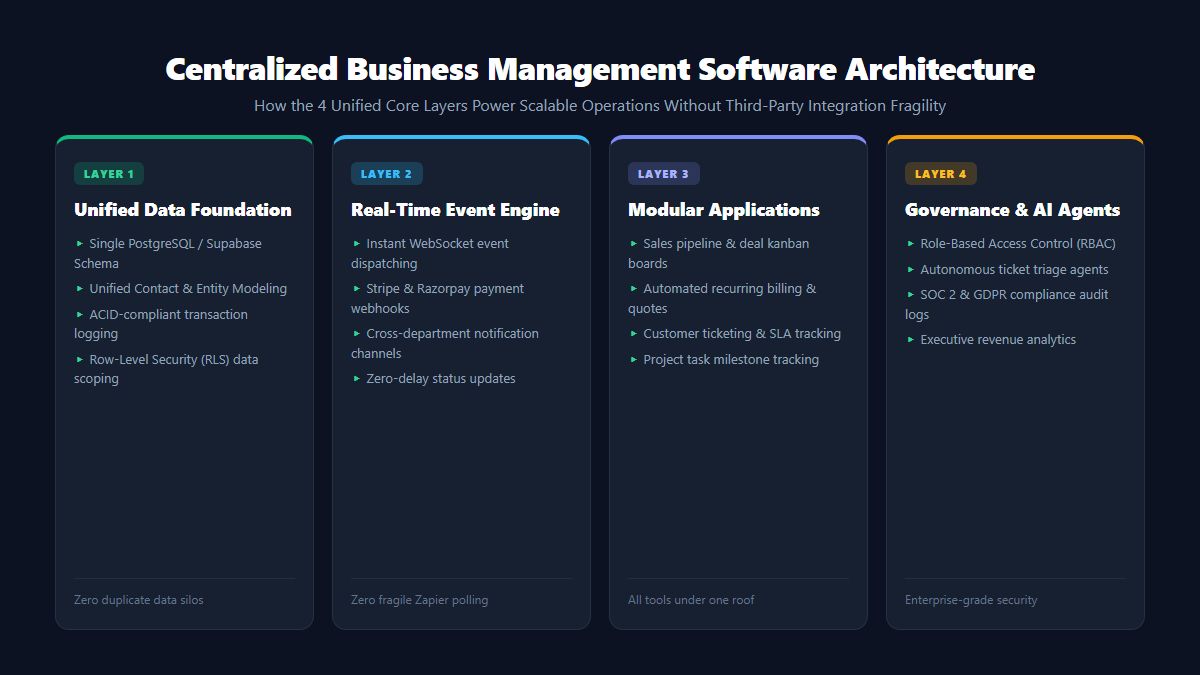
| Architecture Layer | Core Components | Operational Advantage |
|---|---|---|
| 1. Unified Data Foundation | Single PostgreSQL / Supabase Schema, Row-Level Security (RLS) | Eliminates duplicate contact entries; guarantees atomic transactions |
| 2. Real-Time Event Bus | WebSockets, Webhooks, In-Memory Event Streaming | Instant cross-module notification triggers without polling latency |
| 3. Integrated Business Modules | Sales CRM, Automated Billing, Milestone PM, Helpdesk | End-to-end customer lifecycle management inside one tab |
| 4. AI & Autonomous Governance | Role-Based Access Control (RBAC), AI Agent Triage | Automates repetitive administrative busywork with zero token waste |
Core Modules of an All-in-One Centralized Business Management Platform
What specific business capabilities does modern centralized business management software provide? Let us examine the essential modules that drive corporate velocity:
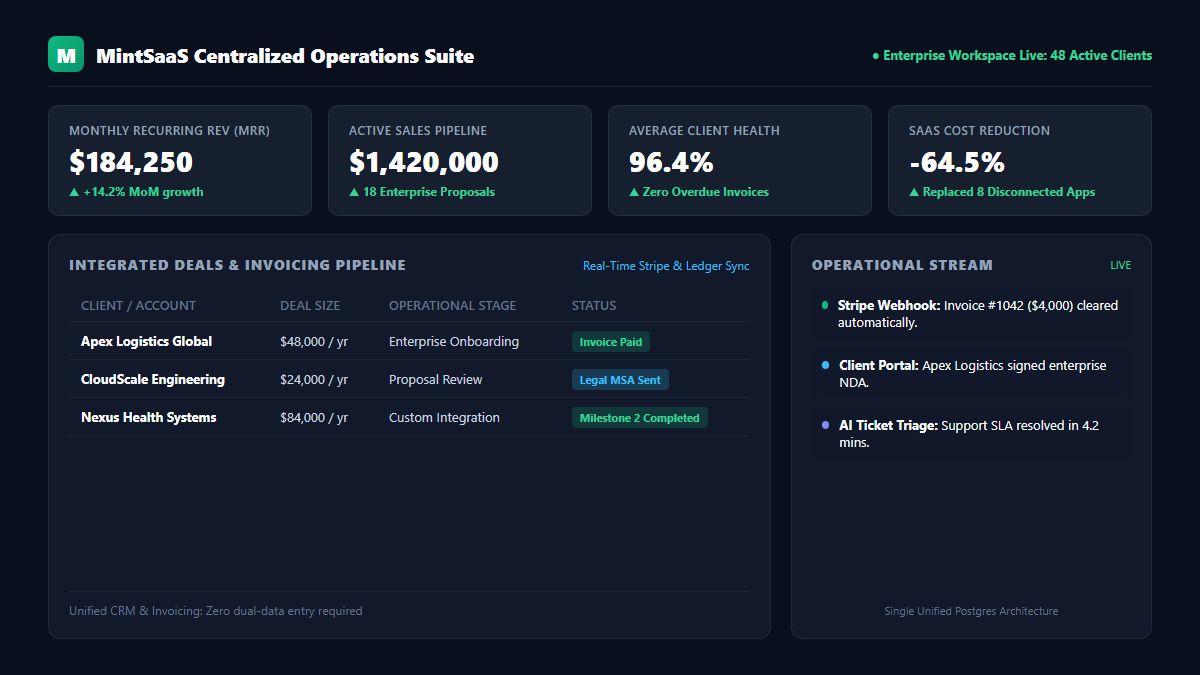
1. Comprehensive Sales CRM & Opportunity Pipelines
The heart of any enterprise is its revenue engine. In centralized business management software, the CRM does not merely store business cards; it acts as an active sales execution cockpit:
- Visual Kanban deal stages (Lead Ingestion ➔ Discovery Call ➔ Proposal Delivered ➔ Contract Negotiation ➔ Closed Won).
- Automated email synchronization and activity tracking.
- Client health scoring based on communication frequency, platform login activity, and invoice timeliness.
2. Integrated Billing, Invoicing & Financial Operations
Traditional CRMs treat billing as an afterthought, forcing accounting teams to re-type client names and billing addresses into external accounting platforms.
In a centralized platform:
- Invoices generate automatically upon milestone approval or contract sign-off.
- Native integration with global payment gateways (such as Stripe, Razorpay, and ACH direct debit) reconciles collections immediately.
- Automatic recurring subscription billing, tax calculation, and automated dunning workflows (reminders for expired credit cards) reduce involuntary churn by up to 45%.
3. Project Delivery & Milestone Management
Once an opportunity is won, delivering on client expectations is seamless:
- Project workspaces are provisioned with standardized templates matching the purchased service package.
- Tasks, deliverable deadlines, team assignments, and client feedback are directly linked to the customer account.
- Both your internal delivery team and the external client collaborate within a unified client portal, eliminating endless email reply chains.
4. Client Communication & Support Helpdesk
Support must never be disconnected from account history:
- When a customer submits an inquiry or bug report, the support agent instantly sees their lifetime account value, active contract tier, and recent invoice payments.
- High-value VIP clients are automatically routed to senior account managers with expedited Service Level Agreements (SLAs).
- Integrated autonomous AI agents (such as those in the MintSaaS AI Agents Platform) triage initial tickets and provide instant resolutions to common queries 24/7.
Financial Analysis: Cost Savings of SaaS Tool Consolidation
Migrating to centralized business management software provides one of the clearest returns on investment (ROI) in enterprise IT. Consider the typical monthly software spend of a 25-person professional services or SaaS company:
| Software Category | Typical Disconnected Point Solutions | Monthly Cost (25 Seats) | Centralized MintSaaS Equivalent |
|---|---|---|---|
| CRM & Sales Pipeline | Salesforce Sales Cloud / HubSpot Pro | $2,500 / mo | Included in Unified Platform |
| Invoicing & Billing | QuickBooks Online Advanced + Chargebee | $650 / mo | Included in Unified Platform |
| Project & Task Management | Asana Business / Monday.com Pro | $750 / mo | Included in Unified Platform |
| Customer Support Helpdesk | Zendesk Suite Team | $1,375 / mo | Included in Unified Platform |
| Integration Middleware | Zapier Enterprise / Make Pro | $450 / mo | Native Direct Sync ($0) |
| Client Portal & Document Vault | Copilot / Clinked Client Portal | $600 / mo | Included in Unified Platform |
| TOTAL ANNUAL SOFTWARE EXPENSE | Disconnected Stack | $75,900 / year | $18,000 / year (76% Savings) |
Beyond saving over $57,000 annually in direct subscription licensing, businesses eliminate the hidden cost of integration maintenance, IT onboarding hours, and revenue lost to dropped customer leads.
Step-by-Step Migration: Transitioning to Centralized Business Management Software
Migrating your company’s operational foundation may feel daunting, but following a structured phased roadmap ensures zero downtime and complete data integrity:
Phase 1: Audit & Rationalize Existing Tools
Begin by mapping every software tool currently in use across your organization. Identify who uses each application, what data resides within it, and where manual data copying occurs. Flag all redundant and abandoned subscriptions for cancellation.
Phase 2: Cleanse and Normalize Core Contact Data
Before importing records into your new centralized business management software, clean your contact database. Merge duplicate client accounts, archive outdated leads, and ensure standardized formatting across phone numbers, tax IDs, and email addresses.
Phase 3: Configure Core Financial & Sales Pipelines
Establish your primary sales pipeline stages, upload your standard service contracts, and connect your payment processing gateways (Stripe / Razorpay). Verify that payment webhooks trigger proper ledger events.
Phase 4: Migrate Projects and Onboard Teams
Import active customer projects and deliverable milestones. Conduct role-specific training sessions:
- Train the Sales team on deal tracking and automated quote generation.
- Train Operations on project delivery boards and client document sharing.
- Train Finance on automated accounts receivable and revenue dashboards.
For advanced automation workflows that eliminate repetitive daily administration, review our complete operational blueprint on How to Automate Repetitive Tasks in Business.
Key Best Practices for Maximizing Efficiency
To get the highest operational yield from your centralized business management software, implement these proven leadership practices:
- Mandate the Platform as the Single Source of Truth: Establish a strict corporate policy: "If a conversation, agreement, or invoice is not logged in the central platform, it does not exist." This prevents employees from creating rogue spreadsheets on their desktops.
- Implement Role-Based Access Control (RBAC): Protect sensitive financial data while empowering employees. Sales representatives should see customer contact info and deal values, but cannot view total corporate payroll or tax filings.
- Automate Document Handshakes: Connect your client contracts directly to client-side document utilities like the MintSaaS PDF Toolkit. Review, rotate, compress, and sign legal exhibits without ever leaving your browser.
- Leverage Autonomous AI Agents for Routine Tasks: Incorporate intelligent automation to draft meeting follow-up notes, summarize long client email threads, and monitor account health metrics automatically.
Frequently Asked Questions (FAQ)
What types of businesses benefit most from centralized business management software?
While companies of all sizes benefit, professional service firms, digital agencies, consultancies, B2B SaaS companies, and distributed service teams experience the most dramatic gains. Any organization managing clients, project milestones, and recurring billing simultaneously saves hundreds of hours by eliminating disconnected tools.
Is our data secure when everything is centralized in one platform?
Yes. Leading centralized business management software utilizes modern enterprise database architectures (such as PostgreSQL with Row-Level Security and AES-256 encryption at rest). Having your data stored within one professionally managed, SOC 2 compliant environment is significantly safer than scattering company data across 10 different third-party websites with varying password standards.
Will centralized software lack features compared to dedicated point solutions?
While hyper-specialized tools may have niche, complex features, 95% of businesses only utilize the core 20% of features in platforms like Salesforce or Asana. Centralized business management software delivers robust, production-grade functionality across every core business discipline, while providing the enormous advantage of native data synchronization and zero integration maintenance.
How does centralized business management software improve customer satisfaction?
Clients interact with an organization that feels completely unified. When a customer reaches out with a question, any team member can immediately see their project status, previous conversations, and billing history without placing them on hold or asking them to repeat themselves.
Can we integrate our specialized industry tools with centralized software?
Yes. Modern centralized platforms offer open REST APIs and webhook listeners, allowing you to connect specialized domain tools (like custom ERPs, warehouse hardware, or CAD systems) into your centralized corporate database.
Conclusion: Transform Your Business into an Integrated Enterprise
SaaS tool fatigue and fragmented data silos represent a massive invisible drain on modern business growth. Fragmented point solutions create operational friction, divide company focus, and inflate operating costs.
By migrating to centralized business management software, you empower your leadership, sales, delivery, and finance teams to operate from a single, cohesive source of truth.
Streamline your company’s operations today: explore the MintSaaS Business CRM Suite, automate repetitive business tasks with our AI Agents Directory, and supercharge your team's day-to-day workflow with the MintSaaS Productivity Suite.
More from MintSaaS Dispatch
Handcrafted technical insights and developer tools.