Mac Software Management: The Complete 2026 Enterprise Fleet & MDM Guide
Master Mac software management for modern business: Apple Declarative Device Management (DDM), automated zero-touch app deployments, package management, and software asset licensing.
Mac Software Management: The Complete 2026 Enterprise Fleet & MDM Guide
Across startups, high-growth technology scaleups, and Fortune 500 enterprises, Apple Silicon has become the dominant workstation platform for software engineers, product designers, and corporate executives. The extraordinary battery life, raw computational throughput, and developer-friendly UNIX environment of macOS have cemented the Mac as the enterprise machine of choice.
However, supporting hundreds or thousands of distributed MacBooks introduces complex IT challenges: unpatched zero-day vulnerabilities, shadow IT application sprawl, license non-compliance, and fragmented developer toolchains.
To maintain security, regulatory audit readiness, and operational agility, modern IT and DevOps organizations must establish robust mac software management.
In this architectural guide, we break down what mac software management involves in 2026, explore Apple’s revolutionary Declarative Device Management (DDM) framework, evaluate automated application packaging pipelines, and demonstrate how to govern software asset licensing using the MintSaaS Mac & Windows Platform.
Quick Answer (AEO Summary): What is Mac Software Management?
Mac software management refers to the automated operational framework, tooling, and policies utilized by IT and DevOps teams to remotely deploy, update, inventory, license, and secure software applications across macOS endpoints.
A modern mac software management system encompasses four core technical capabilities:
- Zero-Touch Provisioning (ADE): Enrolling brand-new Apple devices via Apple Business Manager (ABM) so software bundles install automatically upon first unboxing.
- Declarative Device Management (DDM): Leveraging macOS’s native autonomous policy engine to enforce software patches and configuration profiles with zero server-polling latency.
- Automated Application Packaging (.pkg / .dmg): Building, signing, and deploying corporate software repositories through tools like Munki, Homebrew Cask, or commercial MDMs without disturbing active user workflows.
- Software Asset Management (SAM) & License Auditing: Tracking active software seat utilization, enforcing cryptographic compliance keys, and revoking unassigned seats via platforms like the MintSaaS Licensing Suite.
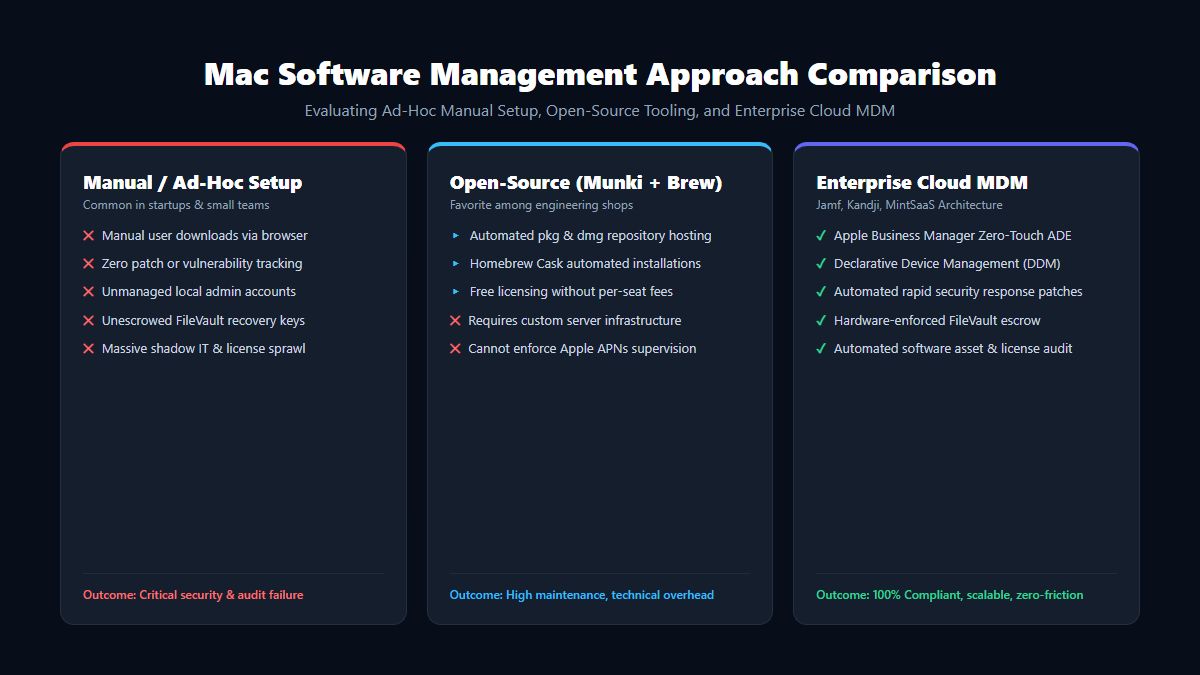
Why Ad-Hoc Mac Management Fails at Scale
In early-stage companies, Mac administration typically begins organically: employees download apps through Safari, install command-line tools via random curl scripts, and update macOS whenever prompted.
As an organization grows past 20 endpoints, this unmanaged approach becomes an existential liability:
1. Unmanaged Local Administrator Rights
When developers possess unrestricted root privileges, they frequently disable built-in macOS security layers like System Integrity Protection (SIP) or Gatekeeper to run unsigned internal scripts. If a single developer workstation is compromised via a malicious npm package or phishing payload, attackers inherit full kernel-adjacent access to your codebase and internal network.
2. The Patch Lag Vulnerability Gap
Operating systems and software runtimes frequently disclose critical Common Vulnerabilities and Exposures (CVEs). When software patching relies on voluntary user action, compliance rarely exceeds 40%. Mac software management automates Rapid Security Responses (RSR), enforcing critical security patches within an SLA of under 24 hours without waiting for user permission.
3. Rampant SaaS & Desktop License Sprawl
Engineering organizations routinely overpay for software by 30% to 50% because licenses are purchased on individual corporate credit cards and abandoned when employees transition between projects or leave the company. Comprehensive mac software management links installed software packages to centralized license verification APIs (such as MintSaaS License Verification), automatically reclaiming unused seats.
4. Failure of SOC 2 and ISO 27001 Audits
Enterprise compliance frameworks require cryptographic proof that all corporate laptops enforce full-disk encryption (FileVault 2), maintain up-to-date malware definitions (XProtect), and log all installed binaries. Without automated mac software management, compiling audit evidence requires weeks of manual inventory spreadsheets.
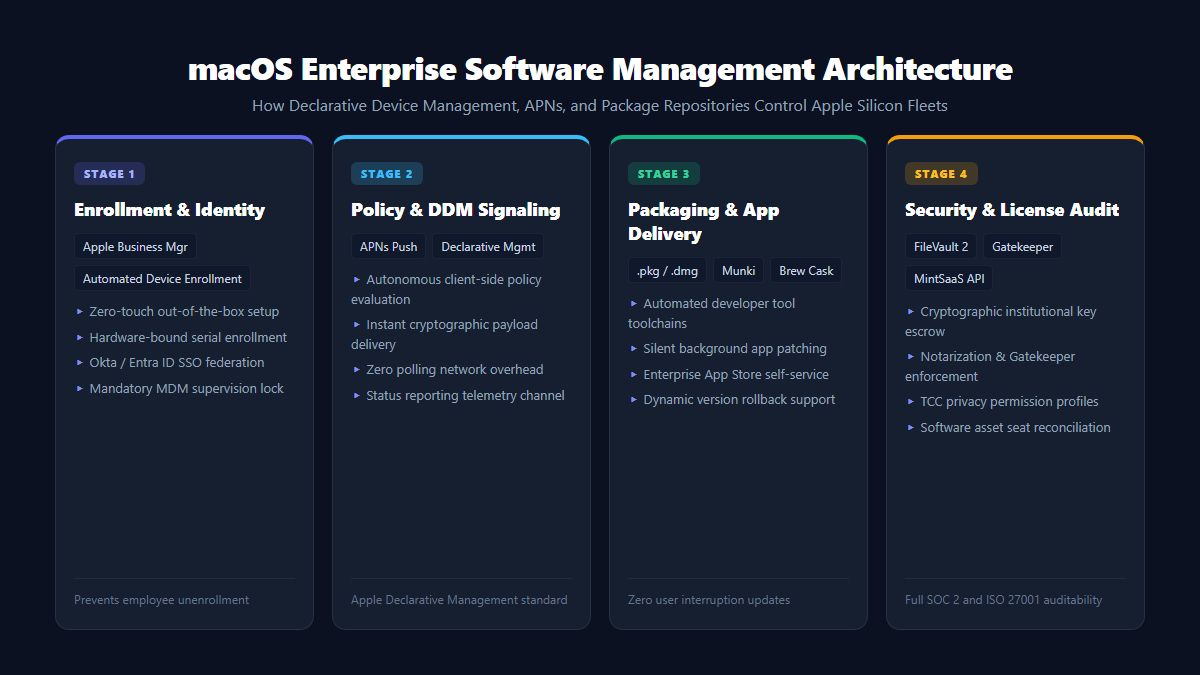
The 4 Stages of the Modern Mac Software Management Lifecycle
To establish a scalable macOS device ecosystem, enterprise IT architects structure mac software management around four operational phases:
| Management Stage | Primary Mechanism | Industry Tools & Standards | Operational Benefit |
|---|---|---|---|
| 1. Enrollment & Onboarding | Apple Business Manager (ABM), Automated Device Enrollment (ADE) | Apple Business Manager, Okta SSO, Entra ID | 100% Zero-touch setup; user never visits IT desk |
| 2. Policy & Profile Signaling | Apple Push Notification service (APNs), Declarative Device Management | Apple DDM, JSON Declarations, MDM Core | Real-time policy enforcement with zero network polling |
| 3. Application Distribution | Managed App Distribution, Custom Packaging | Munki, Homebrew Cask, Jamf Pro, Kandji, Mosyle | Silent background installs of .pkg, .dmg, and App Store apps |
| 4. Cryptographic Security & SAM | Institutional FileVault Keys, Gatekeeper, TCC Profiles | macOS TCC, MintSaaS Licensing Engine | Total data encryption at rest and audit compliance |
Understanding Apple’s Declarative Device Management (DDM)
The most significant architectural evolution in mac software management is Apple's transition from legacy reactive MDM protocol commands to Declarative Device Management (DDM).
┌────────────────────────────────────────────────────────┐
│               Legacy Reactive MDM Protocol             │
├────────────────────────────────────────────────────────┤
│ MDM Server ──(APNs Wakeup)──> Mac Endpoint             │
│ Mac Endpoint ──(Check-in HTTP Poll)──> MDM Server      │
│ MDM Server ──(Sends Single Command)──> Mac Endpoint    │
│ Mac Endpoint ──(Executes & Acknowledges)──> MDM Server │
│ [Heavy network overhead, latency, server-dependent]   │
└────────────────────────────────────────────────────────┘

┌────────────────────────────────────────────────────────┐
│        Modern Declarative Device Management (DDM)      │
├────────────────────────────────────────────────────────┤
│ MDM Server ──(Synchronizes JSON Declarations)──> Mac   │
│ Mac Autonomous Engine evaluates internal state locally │
│ (Trigger: "macOS version < 15.1" -> Enforces Update)   │
│ Mac Endpoint ──(Publishes State Status Channel)──> MDM │
│ [Zero-latency, autonomous client execution, offline]   │
└────────────────────────────────────────────────────────┘
How DDM Revolutionizes Mac Software Management
In legacy MDM architectures, the management server had to constantly poll hundreds of laptops to check if an application was installed or if the OS was out of date.
Under Apple’s Declarative model:
- Declarations as State: The IT administrator delivers a declarative policy to the Mac once (e.g., "Ensure Docker Desktop 4.35 is present and FileVault encryption is enabled").
- Autonomous Local Execution: The client Mac monitors its own state. If an employee uninstalls Docker or disables a configuration profile, the macOS operating system detects the drift locally and immediately re-applies the policy.
- Asynchronous Status Channels: The Mac proactively informs the management server of state changes rather than waiting for server inquiries, reducing network bandwidth overhead by over 80%.
Application Packaging & Deployment Strategies for macOS
Executing seamless mac software management requires mastering the three distinct methods by which macOS software is packaged and deployed:
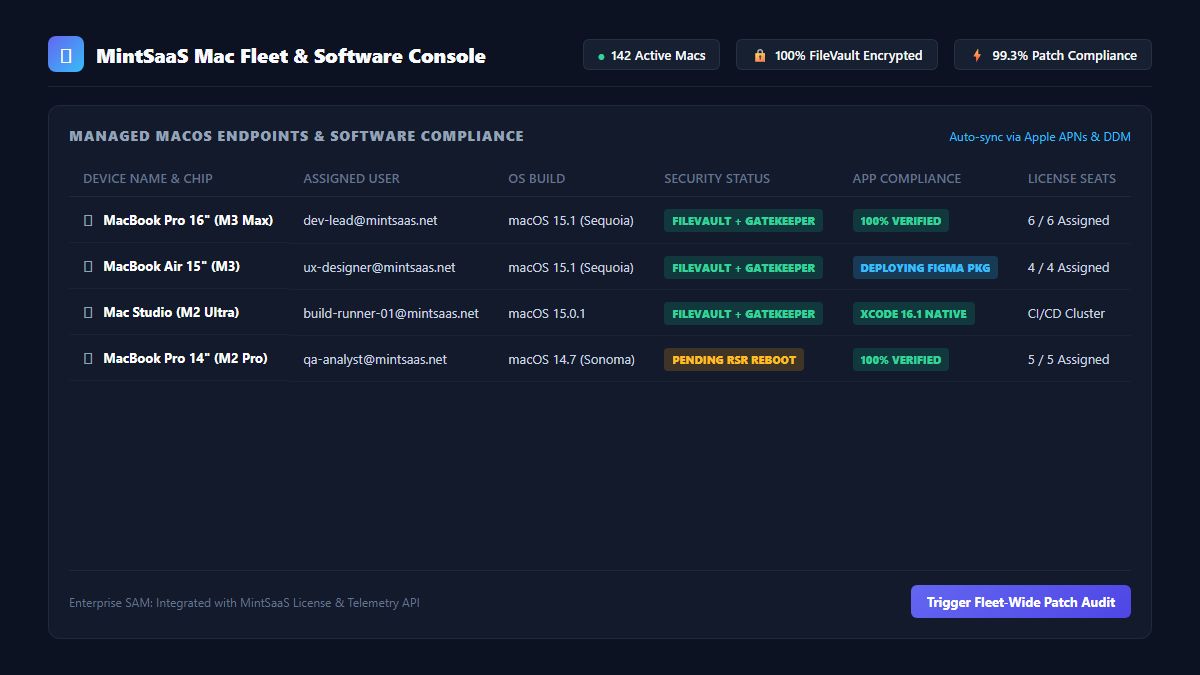
1. Volume Purchase Program (VPP) via the Mac App Store
For commercial applications distributed through the Apple Mac App Store (such as Slack, Microsoft 365, or specialized utilities), administrators acquire licenses in bulk through Apple Business Manager.
- Advantage: Applications install silently in the background without requiring employee Apple IDs.
- Update Handling: The App Store daemon (
appstoreagent) updates the binaries automatically behind the scenes.
2. Custom Enterprise Packaging (.pkg and .dmg)
Engineering tools like VS Code, Postman, custom developer CLIs, and internal enterprise software are rarely distributed through the Mac App Store.
- Administrators build signed, notarized flat packages (
.pkg) containing installation scripts, pre-install validation checks, and post-install configuration scripts. - Packages are hosted on secure HTTPS content delivery networks or S3 buckets and distributed via software management daemons like Munki or enterprise MDM agents.
3. Developer Toolchain Automation via Homebrew Cask
In engineering-heavy environments, maintaining developer productivity requires letting developers install CLI tools without granting full administrative workstation access.
- Leading IT teams utilize managed Homebrew configurations (
Brewfile) pre-approved by security. - Scripts evaluate dependencies in sandboxed directories, allowing developers to install libraries while mac software management monitors binary checksums and integrity.
Managing Privacy Permissions: The macOS TCC Architecture
A frequent pain point in enterprise mac software management is Apple's Transparency, Consent, and Control (TCC) framework. TCC governs access to sensitive hardware components and user folders:
- Camera and Microphone access
- Screen Recording permissions (essential for tools like Zoom, Teams, and Slack)
- Accessibility and Input Monitoring
- Full Disk Access (FDA) required by enterprise security agents and backup software
Solving the "Permission Prompt Nightmare"
When employees receive a new Mac without proper management, they are inundated with dozens of modal permission prompts upon launching software, leading to frustration and dropped meetings.
Using modern mac software management, administrators pre-approve trusted applications using Privacy Preferences Policy Control (PPPC) configuration profiles:
- The MDM pushes signed mobileconfig payloads matching the application’s unique cryptographic code signing requirement (
designated requirement). - Full Disk Access and Screen Recording permissions are granted automatically at installation, providing employees with a flawless out-of-the-box user experience.
Best Practices for Enterprise Mac Software Management
To achieve optimal security without stifling employee velocity, adopt these four core principles:
1. Maintain a Zero-Touch Onboarding Workflow
Never ship a Mac to an IT warehouse before sending it to an employee. Order hardware directly from Apple with your Apple Business Manager Customer ID. When the employee powers on the machine at home, Automated Device Enrollment securely configures the machine, connects to Okta SSO, installs required productivity tools, and encrypts the drive before they ever reach the desktop.
2. Establish a Self-Service Software Portal
Do not force employees to file IT tickets every time they need an approved design or developer application. Provide a curated Self-Service Application Catalog where verified, licensed software (such as specialized CAD viewers, design software, and MintSaaS Productivity Tools) can be installed with a single click.
3. Implement Cryptographic Recovery Key Escrow
Never rely on personal FileVault passwords. A single employee departure or forgotten password can permanently brick an encrypted laptop containing sensitive company records. Configure your mac software management suite to automatically escrow institutional FileVault recovery keys to a secure, audited vault upon device boot.
4. Separate Developer Flexibility from Corporate Compliance
Developers need the freedom to compile local code, spin up Docker containers, and test staging branches. Instead of locking down the filesystem entirely, enforce guardrails at the identity and network layer: mandate zero-trust VPN access, require multi-factor authentication, and monitor software checksums rather than banning command-line execution.
Complementary MintSaaS Infrastructure Solutions
Managing corporate IT infrastructure extends beyond operating system binaries. MintSaaS provides a comprehensive suite of cloud and enterprise tools designed to streamline digital operations:
- Mac & Windows Software Hub: Discover optimized, native desktop utilities built specifically for macOS Apple Silicon and Windows 11 architectures.
- AI Agents & Automation Suite: Automate routine IT ticket triage, employee onboarding checklists, and device compliance verification using autonomous agents.
- Business CRM & Operations: Unify customer accounts, software subscription tiers, and corporate operations in one centralized platform.
- PDF Security & Document Processing: Process, redact, rotate, and sign sensitive enterprise legal contracts and compliance reports with 100% client-side privacy.
Frequently Asked Questions (FAQ)
What is the difference between macOS MDM and Mac software management?
Mobile Device Management (MDM) is the underlying protocol created by Apple to send commands and configuration profiles to devices. Mac software management is the broader operational practice that utilizes MDM alongside custom packaging pipelines, software asset licensing, zero-touch provisioning, and patch schedules to manage the entire application lifecycle.
Can IT administrators see personal files through Mac software management?
No. Apple’s privacy architecture strictly sandboxes management controls. Administrators can see device hardware details, battery health, installed applications, and security status (like FileVault status), but they cannot read personal iMessages, personal photos, browsing histories, or private email contents.
How does zero-touch deployment work on macOS?
Zero-touch deployment pairs Apple Business Manager with an MDM server. When a company purchases a Mac, its serial number is automatically linked to the organization. When the employee unboxes the Mac and connects to Wi-Fi, the setup assistant contacts Apple’s activation servers, verifies ownership, downloads company profiles, installs default software, and sets up user accounts without IT staff ever physically touching the machine.
What is the best way to handle software updates on Mac fleets?
The industry standard is to utilize Apple’s Declarative Device Management (DDM) software update declarations. Administrators set an enforcement deadline (e.g., 7 days after an OS release, or 24 hours for Rapid Security Responses). Users receive subtle reminders, and if the update is not applied prior to the deadline, the Mac updates and reboots automatically overnight.
Can Mac software management enforce software license compliance?
Yes. Modern fleet management platforms inventory installed executable versions across your organization and interface with licensing APIs (such as MintSaaS License Verification) to audit active seat allocations and eliminate software piracy and over-licensing costs.
Conclusion & Next Steps
As macOS solidifies its position as the premier platform for enterprise innovation, unmanaged laptops are an unacceptable operational vulnerability. Implementing structured mac software management delivers the security and audit compliance that leadership demands, while preserving the fluid, delightful user experience that Mac users love.
Ready to elevate your IT operations? Explore the MintSaaS Mac & Windows Tools Hub, supercharge team workflows with our AI Agent Solutions, and streamline business processes with MintSaaS Business CRM today.
More from MintSaaS Dispatch
Handcrafted technical insights and developer tools.
Centralized Business Management Software: The Unified Operating System for Growing Companies
AI Agent Management Software: Enterprise Multi-Agent Governance & Orchestration