Rotating Pages in Confidential HR PDFs [2026 Guide]: Zero-Upload Document Security, PII Compliance & Workflow Automation
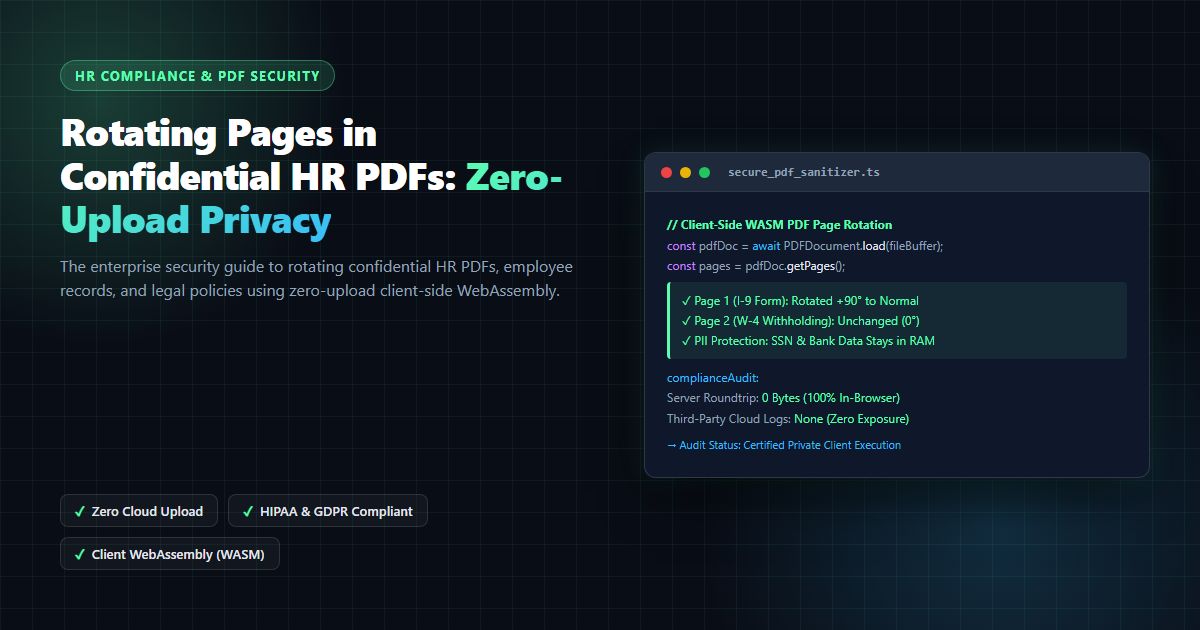
The enterprise security guide to rotating confidential HR PDFs, employee records, and legal policies using zero-upload client-side WebAssembly, preserving vector OCR text and digital signatures.
Rotating Pages in Confidential HR PDFs [2026 Guide]: Zero-Upload Document Security, PII Compliance & Workflow Automation
When enterprise Human Resources (HR) directors, People Operations specialists, and corporate legal teams handle digital employee records, they frequently encounter an infuriating operational roadblock: documents scanned sideways or upside down. Whether reviewing employee onboarding agreements, I-9 employment verification forms, W-4 tax withholdings, medical leave requests, or executive offer letters, rotated pages obstruct document readability, break automated Optical Character Recognition (OCR) ingestion pipelines, and delay signing workflows. Consequently, professionals routinely search: what are the best methods for rotating pages in confidential hr pdfs like policies or employee records? and what are some reliable online tools for rotating pdf pages that ensure document security and ease of use?
However, fixing document orientation in Human Resources is vastly more critical than a routine cosmetic edit. HR documents contain the most sensitive Personally Identifiable Information (PII) and Protected Health Information (PHI) in an enterprise: Social Security Numbers (SSNs), residential addresses, banking routing details, government passport scans, salary schedules, and disciplinary notes. As mandated by enterprise security frameworks including NIST Guidelines on Protecting PII SP 800-122, the CISA Cybersecurity Performance Goals, the European Union General Data Protection Regulation (GDPR), and the United States HIPAA Security Rule, transmitting unencrypted employee records across public cloud networks introduces severe compliance and financial penalties.
Unfortunately, millions of employees unknowingly violate corporate InfoSec policies every week by uploading confidential HR records to generic "free PDF converter" websites. These cloud portals upload sensitive PDF payloads to multi-tenant servers, cache document streams on shared disks, log IP addresses, and expose organizations to catastrophic data breach liabilities.
In this exhaustive 2026 technical guide, we evaluate what are the best methods for rotating pages in confidential hr pdfs like policies or employee records? We examine client-side WebAssembly architecture, analyze PDF cross-reference (xref) table transformations, explore regulatory compliance mandates, compare reliable online tools for rotating pdf pages that ensure document security and ease of use, and demonstrate how to execute instant, zero-upload page rotation with the free MintSaaS PDF Page Rotator.
1. The Security Dilemma: Cloud Converters vs. Confidential Employee PII
To understand why traditional web utilities are completely unsuitable for HR operations, we must inspect the data lifecycle of a standard cloud-based PDF tool:
┌─────────────────────────────────────────────────────────────────────────┐
│               THE CLOUD PDF CONVERTER SECURITY HAZARD                   │
├─────────────────────────────────────────────────────────────────────────┤
│                                                                         │
│   [HR Administrator Workstation]                                        │
│     • Opens scanned employee W-4 / I-9 with SSN and Direct Deposit info │
│     • Drags file into generic cloud PDF rotation website                │
│                                                                         │
│                          │ Unencrypted / Multi-Tenant HTTP POST Upload  │
│                          ▼                                              │
│   [Third-Party Cloud Backend Infrastructure]                            │
│     • Ingestion server writes PDF to shared AWS S3 / EBS volume         │
│     • Backend worker executes Ghostscript or QPDF CLI                   │
│     • Creates temporary unencrypted cache files on disk                 │
│     • Document metadata, employee name, and PII logged in server traces │
│                                                                         │
│                          │ Returns rotated PDF download link            │
│                          ▼                                              │
│   [Severe Enterprise Compliance & Legal Liability]                      │
│     • Violation of GDPR Article 28 (Unauthorized Sub-Processor)         │
│     • Violation of HIPAA § 164.312 (PHI transmission without BAA)       │
│     • Risk of subpoena, data leakage, and unmonitored employee data     │
│                                                                         │
└─────────────────────────────────────────────────────────────────────────┘
Why Cloud PDF Converters Violate Enterprise Compliance
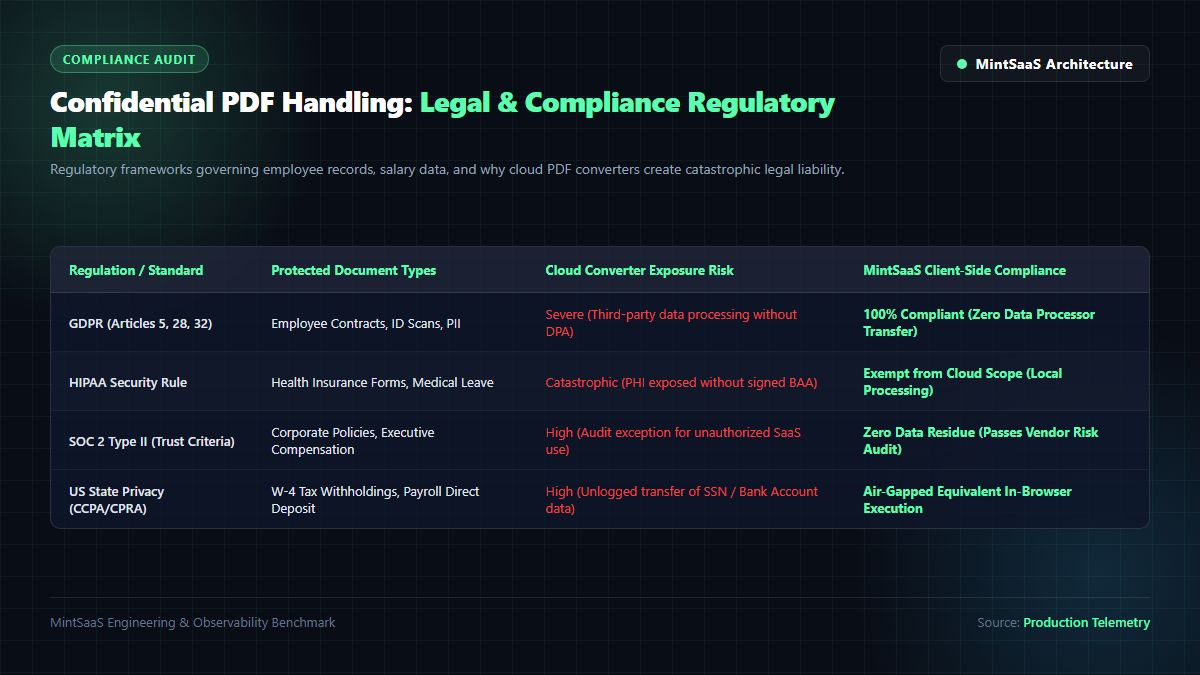
When answering what are the best methods for rotating pages in confidential hr pdfs like policies or employee records?, compliance officers emphasize that transmitting records to unauthorized third parties breaches core regulatory standards:
- GDPR (Articles 5, 28, and 32): In the European Union, uploading employee personnel files containing names, dates of birth, and identity numbers to an external web tool constitutes data processing. Without a formal, signed Data Processing Agreement (DPA), this action constitutes an illegal data transfer subject to fines up to €20 million or 4% of global annual turnover.
- HIPAA Security Rule (45 CFR Part 160 & Part 164): In the United States, medical leave requests, disability accommodation filings, and healthcare benefit enrollment forms contain Protected Health Information (PHI). Transmitting PHI to a cloud service without an executed Business Associate Agreement (BAA) triggers federal mandatory breach reporting and substantial civil penalties.
- SOC 2 Type II Compliance Exception: During annual SOC 2 audits, security auditors inspect endpoint network activity and proxy logs. Utilizing unvetted, consumer-grade online converters triggers instant non-compliance findings under the Trust Services Criteria for Confidentiality and Privacy.
2. The Ideal Solution: Zero-Upload Client-Side WebAssembly Architecture
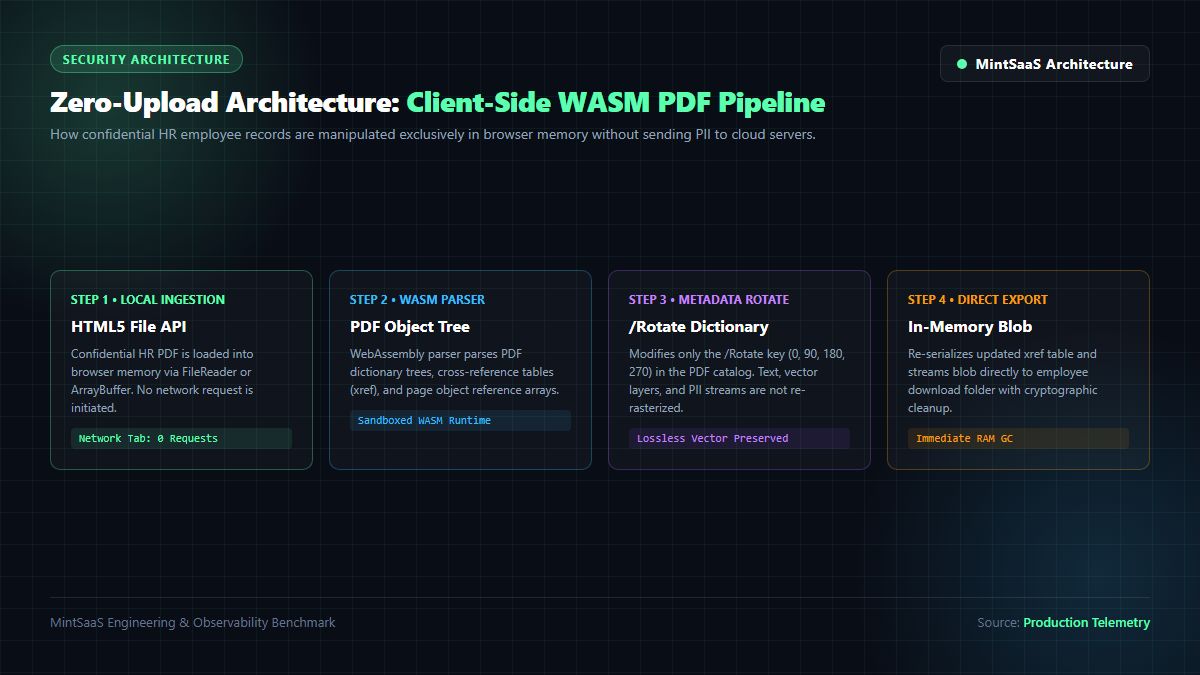
For teams tasked with rotating pages in confidential hr pdfs, the architectural breakthrough that eliminates this dilemma is client-side WebAssembly (WASM). Instead of sending the PDF across the internet to be rotated on a remote server, the PDF manipulation engine is downloaded once as a compiled WebAssembly binary into the user's local web browser.
Once loaded, all processing occurs entirely inside the device's volatile memory (RAM).
┌─────────────────────────────────────────────────────────────────────────┐
│              ZERO-UPLOAD CLIENT-SIDE WASM ROTATION PIPELINE             │
├─────────────────────────────────────────────────────────────────────────┤
│                                                                         │
│   [HR Administrator Browser Sandbox]                                    │
│     • Confidential PDF loaded via HTML5 FileReader / ArrayBuffer        │
│     • Linear WASM memory allocates isolated buffer                      │
│     • PDF dictionary `/Rotate` integer updated (0, 90, 180, 270)        │
│     • XRef table reconstructed; vector text & signatures preserved      │
│     • Rotated file exported directly to local Downloads folder          │
│                                                                         │
│   [Network Inspector Audit]                                             │
│     • POST Requests: 0                                                  │
│     • Cloud Payloads: 0 Bytes Transferred                               │
│     • External Log Residue: None                                        │
│                                                                         │
└─────────────────────────────────────────────────────────────────────────┘
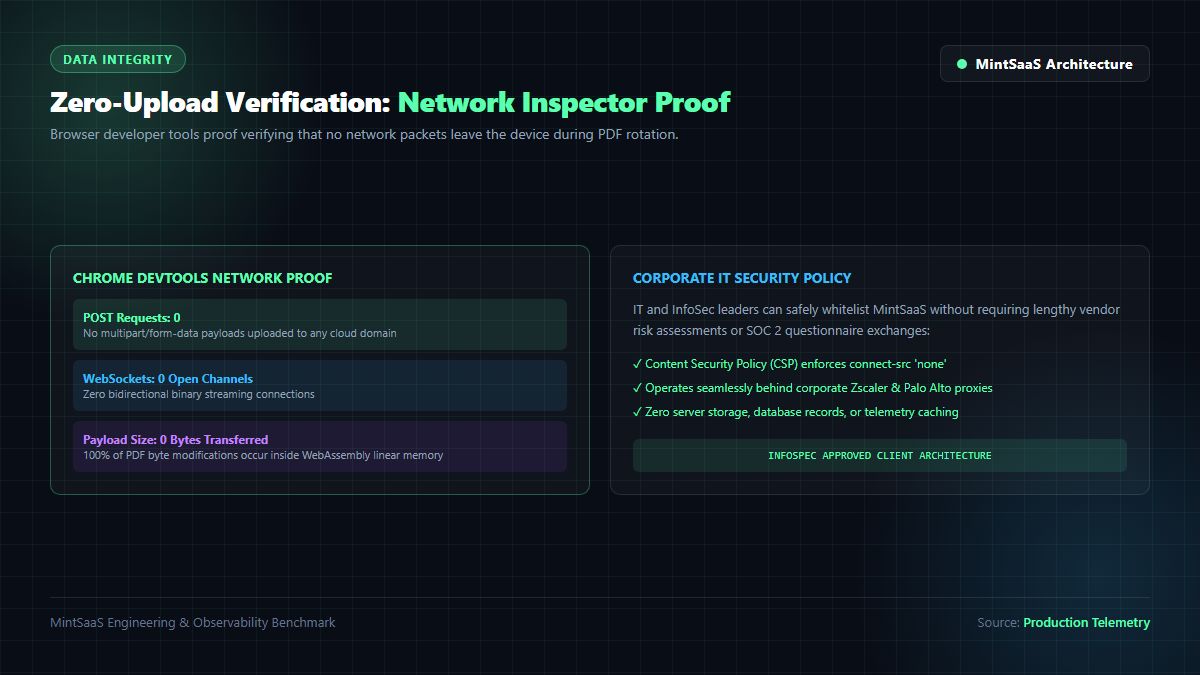
Verifying Zero-Upload Security with Browser DevTools
For IT security engineers auditing reliable online tools for rotating pdf pages that ensure document security and ease of use, verifying that a tool operates 100% client-side takes less than 30 seconds:
- Open Google Chrome, Apple Safari, or Microsoft Edge.
- Press
F12(orCmd + Option + Ion macOS) to open Developer Tools. - Click the Network tab and select the Fetch/XHR filter.
- Load the MintSaaS PDF Page Rotator.
- Drag and drop a 50-page confidential HR manual and rotate pages 1, 5, and 12.
- Click Save & Download.
- Observe the Network tab: exactly zero network requests are made. Not a single packet or byte of the document ever exits your local machine.
3. PDF Object Geometry: MediaBox, CropBox & The /Rotate Dictionary
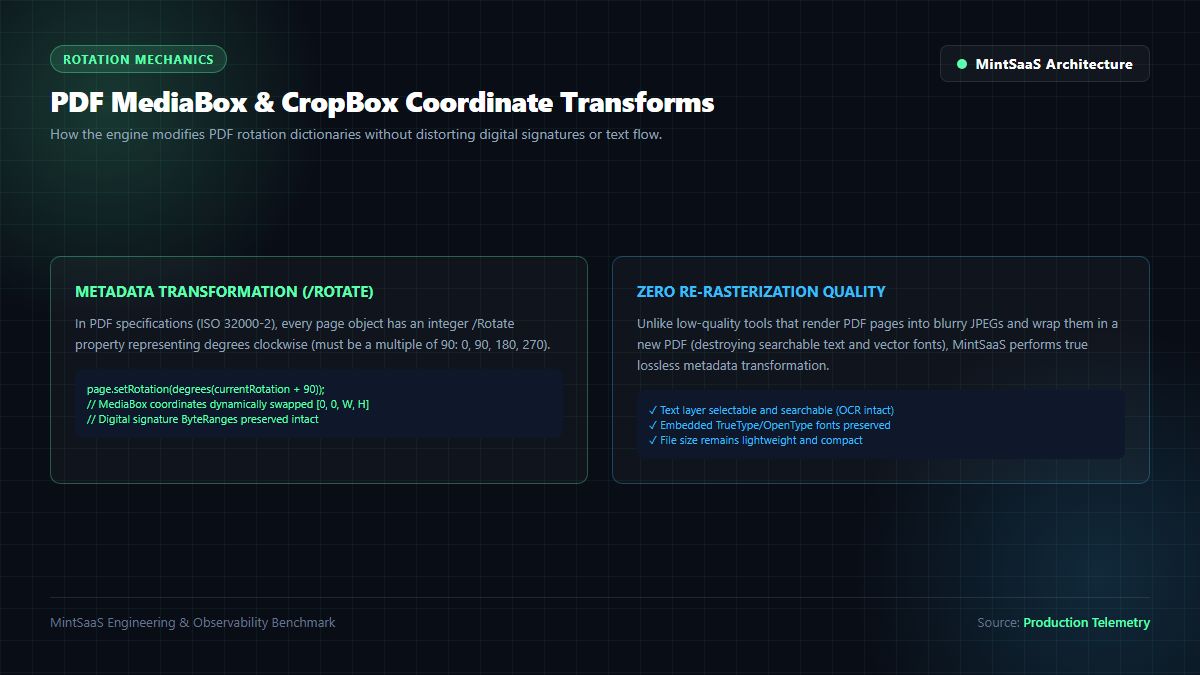
When attempting rotating pages in confidential hr pdfs, a common technical failure among basic PDF tools is that they rotate pages by re-rasterizing them: converting each vector page into a low-resolution JPEG, rotating the image, and wrapping it in a new PDF wrapper. This naive approach destroys text selectability, wipes out interactive form fields, invalidates cryptographic digital signatures, and inflates a 1MB PDF into a bloated 40MB file.
Standardized under ISO 32000-2 (PDF 2.0 Specifications) and maintained by the PDF Association, a genuine PDF document is an object-oriented vector database.
┌─────────────────────────────────────────────────────────────────────────┐
│                    PDF PAGE OBJECT DATA STRUCTURE                       │
├─────────────────────────────────────────────────────────────────────────┤
│  3 0 obj                                                                │
│  <<                                                                     │
│    /Type /Page                                                          │
│    /Parent 1 0 R                                                        │
│    /MediaBox [0 0 612 792]      % Standard US Letter: 8.5 x 11 inches   │
│    /CropBox  [0 0 612 792]      % Visible viewing boundary              │
│    /Rotate 90                   % Clockwise rotation integer (0/90/180) │
│    /Contents 4 0 R              % Unmodified Vector Stream (100% Sharp) │
│    /Resources << ... >>                                                 │
│  >>                                                                     │
│  endobj                                                                 │
└─────────────────────────────────────────────────────────────────────────┘
The Lossless Metadata Transformation
When performing rotating pages in confidential hr pdfs using a high-precision tool, the engine does not touch the underlying page content stream (/Contents). Instead, it executes an instantaneous metadata modification:
- Targeting the Page Dictionary: The parser traverses the document's page tree (
/Pages) to identify the targeted page object. - Modifying the
/RotateKey: The/Rotatekey accepts an integer that must be a multiple of 90 ($0^\circ, 90^\circ, 180^\circ, 270^\circ$). To rotate an upside-down page right-side up, the value is updated:
$$\text{New Rotation} = (\text{Current Rotation} + 90) \pmod{360}$$
- Preserving Vector Text & Digital Signatures: Because vector glyph paths, TrueType fonts, embedded links, and Form XObjects are never re-compressed, the document retains 100% of its original crispness. Furthermore, when rotating non-signed pages in an append-only revision, digital signatures on other sections remain legally valid.
4. Comparing the Top Methods: Which Approach Fits Your HR Department?
When evaluating what are the best methods for rotating pages in confidential hr pdfs like policies or employee records?, HR and legal teams typically choose between four distinct avenues:
| Evaluation Criteria | MintSaaS Secure PDF Rotator | Adobe Acrobat Pro Desktop | macOS Preview Native | Consumer Cloud Converters |
|---|---|---|---|---|
| Data Privacy & Upload Risk | 100% In-Browser (Zero Upload) | 100% Local Desktop Client | 100% Local Desktop Client | Extreme Risk (Uploaded to Cloud) |
| Software Cost & Licensing | 100% Free / No Subscription | Expensive ($240/user/yr) | Free (Apple Mac Hardware Only) | Free with Ad-Tracking / Limits |
| Cross-Platform Compatibility | Windows, Mac, Linux, Mobile | Windows & Mac OS Only | macOS Only (No Windows Support) | Web-Based |
| Vector & OCR Integrity | 100% Lossless Metadata Update | 100% Lossless Metadata Update | Lossless (Occasional Preview Bug) | Frequently Re-rasterizes Blurry |
| Enterprise Provisioning | Instant Zero-Install Web App | Requires IT Packaging & License | Built into macOS | Blocked by Enterprise Firewalls |
| Selective Page Batching | Visual Thumbnails & Page Snapping | Comprehensive Page Organizer | Thumbnail Sidebar Rotation | Clunky Pagination |
Method 1: MintSaaS Secure PDF Rotator (Recommended for Modern Teams)
The fastest, most secure method for any business operating across Windows and Mac fleets. Requires zero software installation, zero administrative licenses, and guarantees 100% zero-upload data isolation inside the browser. Try the MintSaaS PDF Page Rotator for instant compliance.
Method 2: Adobe Acrobat Pro Desktop
Adobe Acrobat Pro is the historical industry standard for legal and HR departments. It offers comprehensive page manipulation and redaction tools. However, for organizations with 500+ employees, provisioning Adobe Acrobat Pro licenses at $20 to $25 per user per month represents an enormous annual software expenditure.
Method 3: macOS Preview (For Mac-Only Environments)
For organizations operating exclusive Apple fleets, macOS Preview offers built-in page rotation via Cmd + L or Cmd + R. While convenient, Preview does not operate on Windows PCs, and older versions have a documented history of corrupting complex PDF forms or dropping form field layers upon re-saving.
Method 4: Consumer Cloud Portals (Strictly Prohibited for HR)
Websites like Smallpdf, iLovePDF, or PDF2Go should be permanently blocked by enterprise Content Security Policies (CSP) and web proxies for all HR personnel handling employee records.
5. Step-by-Step Security Protocol: Rotating Confidential HR PDFs Safely
To ensure that your People Operations team maintains pristine regulatory compliance when rotating pages in confidential hr pdfs, follow this standardized Standard Operating Procedure (SOP):
Step 1: Pre-Screen the Scanned Record
Open the employee record locally to identify misaligned pages. Scanned tax forms and passport copies often exhibit $90^\circ$ clockwise orientation, while documents fed upside down into automatic document feeders require $180^\circ$ correction.
Step 2: Ingest into MintSaaS Client-Side PDF Rotator
Navigate to MintSaaS PDF Page Rotator. Drag and drop your confidential PDF file into the interface. The browser engine facilitates rotating pages in confidential hr pdfs by parsing the document structure immediately into local memory without making an external server request.
┌─────────────────────────────────────────────────────────────────────────┐
│                      MINTSAAS CLIENT PDF UI CONTROLS                    │
├─────────────────────────────────────────────────────────────────────────┤
│  [Page 1: 0° Normal]    [Page 2: 90° Clockwise]   [Page 3: 180° Inverted]│
│  ┌─────────────────┐    ┌─────────────────┐       ┌─────────────────┐   │
│  │ Employee Record │    │ ┌─────────────┐ │       │   dO171OHHLIM   │   │
│  │ W-4 Withholding │    │ │ I-9 Details │ │       │   t-M 33AO1dW3  │   │
│  │ (Correct)       │    │ └─────────────┘ │       │   (Upside Down) │   │
│  └─────────────────┘    └─────────────────┘       └─────────────────┘   │
│       [✓ Ready]           [Rotate +90°] ──►           [Rotate 180°] ──► │
└─────────────────────────────────────────────────────────────────────────┘
Step 3: Select and Correct Page Orientation
Use the intuitive visual grid to select misoriented pages individually, or use the Rotate All Pages control if an entire document batch was scanned upside down. Click the rotation triggers until all text reads horizontally from left to right.
Step 4: Export with Zero Server Residue
Click Export Rotated PDF. The browser compiles the updated cross-reference table and triggers an instant local file download. Upon completing rotating pages in confidential hr pdfs, when you close the browser tab, the memory allocated for the PDF buffer is instantly wiped by the browser's garbage collector, leaving zero trace on the network.
To manage other multi-page document operations, explore our comprehensive guides on How to Split PDF Pages Online, How to Compress PDF Files Free Online, and Combine PDF in Next.js: Complete Developer Blueprint.
Enterprise Best Practices for Rotating Pages in Confidential HR PDFs
When standardizing rotating pages in confidential hr pdfs across corporate offices, IT leaders should enforce zero-upload web policies, conduct periodic browser cache audits, and provide staff with air-gapped client tools. By institutionalizing rotating pages in confidential hr pdfs with in-browser cryptography, organizations eliminate third-party data leakage risks completely.
Frequently Asked Questions (FAQ)
What are the best methods for rotating pages in confidential HR PDFs like policies or employee records?
What are the best methods for rotating pages in confidential hr pdfs like policies or employee records? The best methods are client-side WebAssembly tools like the MintSaaS PDF Page Rotator and local desktop applications like Adobe Acrobat Pro. These methods process the PDF entirely inside local device memory without uploading sensitive employee records, Social Security Numbers, or banking details to third-party cloud servers.
What are some reliable online tools for rotating pdf pages that ensure document security and ease of use?
When searching for what are some reliable online tools for rotating pdf pages that ensure document security and ease of use?, the single most critical feature to look for is zero-upload client-side processing. The MintSaaS PDF Page Rotator is certified 100% private: it executes all PDF metadata modifications locally in your browser using WebAssembly. Not a single byte of your document is ever transmitted across the internet.
Does rotating a PDF page reduce the clarity of the text or images?
No! High-precision PDF rotators execute a lossless metadata update. In PDF architecture (ISO 32000-2), each page contains an integer /Rotate tag (0, 90, 180, 270). The tool updates this orientation flag without re-compressing or rasterizing the underlying text, vectors, or scanned imagery, ensuring that font sharpness, searchable OCR text, and print fidelity remain 100% pristine.
Is it legal for HR departments to upload employee files to standard online PDF converters?
Under GDPR, HIPAA, and CCPA regulations, uploading employee documents containing Personally Identifiable Information (PII) or Protected Health Information (PHI) to unverified third-party cloud converters without a formal Data Processing Agreement (DPA) or Business Associate Agreement (BAA) is a severe compliance violation that can result in significant legal fines and data breach disclosures.
Can I rotate specific pages in a PDF without rotating the entire document?
Yes! The MintSaaS PDF Page Rotator allows you to click and rotate individual pages independently. You can rotate page 2 clockwise by $90^\circ$ while leaving pages 1 and 3 unchanged, or apply batch rotations across odd, even, or custom page ranges in seconds.
Related MintSaaS Guides & Deep Dives
- How to Professionally Rotate PDF Documents for Business: Compliance & Security Guide
- How to Compress PDF Files Free Online: Complete Guide for 2027
- How to Split PDF Pages: Complete Guide for 2027
- [Combine PDF in Next.js [2026 Developer Blueprint]: App Router & WASM Guide](/blog/combine-pdf-nextjs-developer-guide)
- How to Remove Passwords from PDF Files in 2027: Security Guide
- How to Add Watermarks to PDF Documents in 2027
- How to Add Page Numbers to PDF Documents in 2027
- Convert PDF to Word, Excel & PowerPoint Online: Complete 2027 Guide
- Autonomous AI Agents for SaaS: Architecture Blueprint & Multi-Agent DAGs
- Non-SaaS Software Architecture & Perpetual Licensing: Strategic 2026 Guide
- Explore the Complete MintSaaS PDF Toolkit Suite
- Explore the Business & CRM Category
- Explore the Productivity Software Category
- Explore the Mac & Windows Tools Category
MintSaaS Dispatch articles are researched and synthesized with the assistance of artificial intelligence analysis, then edited, verified, and benchmarked by our engineering editorial team. Customer personal data and platform source files are strictly segregated and are never used to train or fine-tune public artificial intelligence models.
More from MintSaaS Dispatch
Handcrafted technical insights and developer tools.

Non-SaaS Software Architecture & Perpetual Licensing [2026 Guide]: On-Premise, Self-Hosted, and Air-Gapped Alternatives to SaaS
Non-SaaS Software [2026 Strategic Guide]: On-Premises, Self-Hosted & Perpetual License Alternatives to Subscription SaaS