Non-SaaS Software [2026 Strategic Guide]: On-Premises, Self-Hosted & Perpetual License Alternatives to Subscription SaaS
The ultimate 2026 strategic guide to non-SaaS software: on-premises deployment, perpetual licenses, local-first architectures, 5-year TCO calculations, and why enterprises are reclaiming software ownership.
For more than a decade, the technology industry operated under a singular assumption: every software utility would inevitably transform into a recurring cloud subscription. Yet in 2026, enterprise IT departments, developers, and privacy-conscious small businesses are driving a massive counter-movement toward non saas software solutions.
Driven by relentless subscription price inflation, compounding per-seat SaaS fatigue, high-profile cloud outages, and strict data sovereignty mandates (CISA Secure Software Guidelines), the appeal of non saas software has transitioned from a niche preference to an executive imperative.
Whether your organization is evaluating on-premises installations, self-hosted Docker containers, air-gapped security environments, or native perpetual-license desktop executables, this comprehensive guide delivers the definitive economic, security, and architectural framework for selecting, deploying, and governing non saas software in 2026.
1. What is Non-SaaS Software? Defining the Taxonomy
To understand the non saas landscape, organizations must clearly differentiate the models that contrast with multi-tenant, cloud-hosted Software-as-a-Service (SaaS):
┌────────────────────────────────────────────────────────────────────────┐
│                      THE NON-SAAS SOFTWARE TAXONOMY                    │
├───────────────────┬───────────────────┬────────────────────────────────┤
│ 1. PERPETUAL      │ 2. SELF-HOSTED    │ 3. LOCAL-FIRST                 │
│    DESKTOP NATIVE │    ON-PREMISES    │    HYBRID                      │
├───────────────────┼───────────────────┼────────────────────────────────┤
│ • Native C++/Rust/│ • Docker / K8s on │ • Embedded SQLite/CRDTs        │
│   Swift binaries  │   private VPC     │ • Zero network dependency      │
│ • One-time pay    │ • Full database   │ • Instant local reads/writes   │
│   license key     │   ownership       │ • Optional end-to-end sync     │
│ • Air-gapped safe │ • HIPAA/ITAR/GDPR │ • Perpetual fallback license   │
│ • Zero cloud ping │   data sovereign  │ • Offline-first resilience     │
└───────────────────┴───────────────────┴────────────────────────────────┘- Perpetual-License Native Desktop Software: Applications installed directly on a workstation (macOS, Windows, or Linux) that run entirely using local CPU, RAM, and GPU resources. The purchaser pays once, receives a cryptographically signed license key, and owns the right to execute that software version indefinitely without monthly recurring subscription fees.
- On-Premises / Private Cloud Self-Hosted Platforms: Enterprise solutions deployed onto bare-metal hardware, local virtualization clusters (Proxmox, VMware), or private cloud VPCs (AWS GovCloud, isolated Azure subnets). Telemetry is completely disabled or strictly routed through corporate proxy firewalls.
- Local-First & Offline-First Hybrid Tools: The bleeding edge of non saas architecture. These tools store all data locally in embedded storage engines (such as SQLite, DuckDB, or IndexedDB) and use Conflict-free Replicated Data Types (CRDTs) to sync peer-to-peer or via private relays only when desired.
As we analyzed in our foundational study on SaaS vs Traditional Software, selecting a non saas architecture is not a regression to legacy IT—it is an intentional strategic defense against subscription bloat and data vulnerability.
2. The Economic Case: 5-Year Total Cost of Ownership (TCO) Analysis
The primary catalyst accelerating the adoption of non saas tools is simple economics. In a standard SaaS pricing model, software costs compound continuously as headcount expands, regardless of whether employees utilize the complete feature set.
Consider the 5-year Total Cost of Ownership (TCO) comparison between a typical SaaS collaboration/tooling suite ($45/user/month with standard 7% annual vendor price escalators) and a non saas perpetual license model ($299 one-time license per workstation with an optional 20% annual maintenance/upgrade package):
5-Year TCO Comparison Table: SaaS vs Non-SaaS
| Team Size | Deployment Model | Year 1 Initial Outlay | Year 3 Cumulative Spend | Year 5 Cumulative Spend | Total Savings with Non-SaaS |
|---|---|---|---|---|---|
| 25 Seats | Cloud SaaS ($45/mo + 7% escalators) | $13,500 | $43,767 | $80,442 | — |
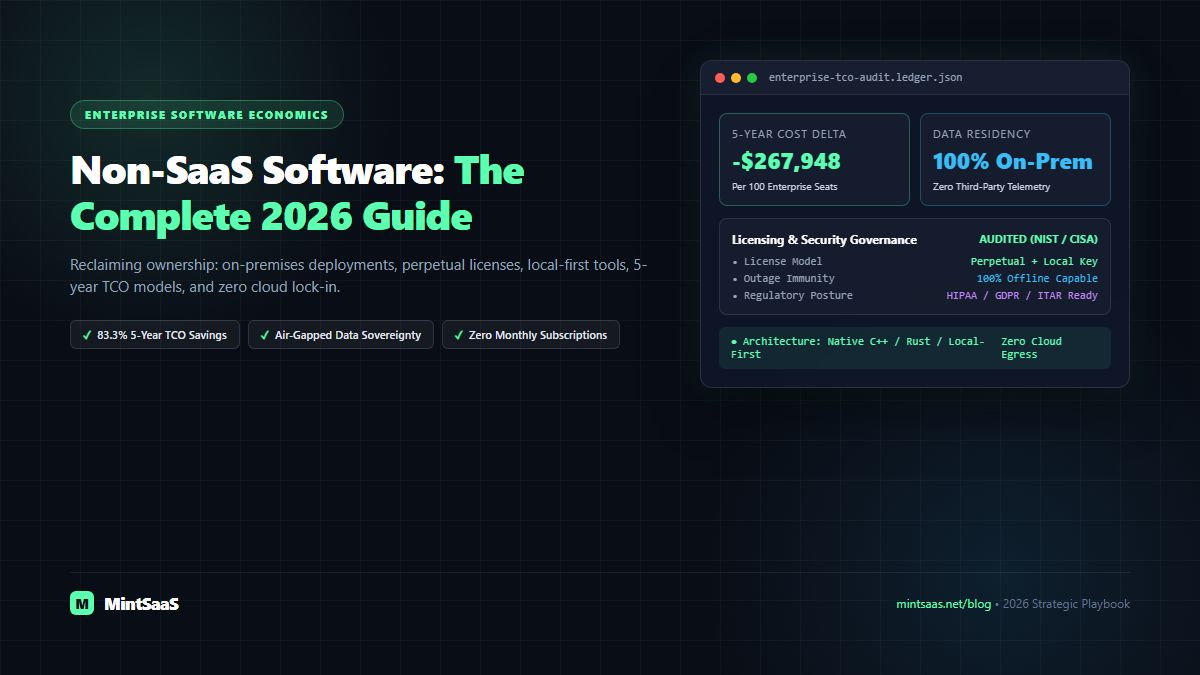
| 25 Seats | Non-SaaS Perpetual ($299 + 20% maint.) | $7,475 | $10,465 | $13,455 | $66,987 (83.3% Saved) |
| 100 Seats | Cloud SaaS ($45/mo + 7% escalators) | $54,000 | $175,068 | $321,768 | — |
| 100 Seats | Non-SaaS Perpetual ($299 + 20% maint.) | $29,900 | $41,860 | $53,820 | $267,948 (83.3% Saved) |
| 500 Seats | Cloud SaaS ($45/mo + 7% escalators) | $270,000 | $875,340 | $1,608,840 | — |
| 500 Seats | Non-SaaS Perpetual ($299 + 20% maint.) | $149,500 | $209,300 | $269,100 | $1,339,740 (83.3% Saved) |
5-Year Cumulative Spend Trajectory: 100-Seat Organization
───────────────────────────────────────────────────────────────────────────────
SaaS (Compounding):    [$54K]───────► [$175K]───────────────► [$321.8K]
Non-SaaS (Perpetual):  [$29.9K]───► [$41.9K]───────► [$53.8K]
───────────────────────────────────────────────────────────────────────────────
Cumulative Capital Preserved: $267,948 over 60 Months
For venture-backed startups and bootstrapped companies alike, redirecting hundreds of thousands of dollars from recurring SaaS OPEX into engineering payroll or customer acquisition represents a massive competitive advantage. You can explore how modern founders structure software budgets in our analysis of Fast-Growing B2B SaaS Automation Tools and SaaS Monetization Strategies.
3. Data Sovereignty, Air-Gapped Security, and Regulatory Compliance
Beyond financial savings, the most compelling driver for non saas software is regulatory risk mitigation and intellectual property protection (NIST SP 800-53 Security Controls).
When an organization routes sensitive legal documents, source code, medical records, or customer financial records through a multi-tenant cloud SaaS provider, it inherits that provider's entire attack surface, including sub-processor vulnerabilities, multi-tenant credential stuffing, and foreign surveillance exposure.
Why Compliance Teams Mandate Non-SaaS Architecture:
- GDPR & EU AI Act Compliance: European data protection authorities strictly regulate cross-border data transfers to US-hosted cloud providers. Deploying non saas on-premises software ensures that all personally identifiable information (PII) never leaves the physical jurisdiction of the organization's regional data center (Cloudflare Data Sovereignty Overview).
- HIPAA & HITECH in Healthcare: Under HIPAA Security Rules, transmitting Protected Health Information (PHI) to cloud SaaS vendors requires complex Business Associate Agreements (BAAs) and continuous audit logging. Utilizing local, non saas medical imaging or document processing software completely eliminates third-party transmission vectors.
- ITAR & Defense Contracting: Defense industrial base suppliers handling International Traffic in Arms Regulations (ITAR) technical data are legally prohibited from uploading unencrypted technical drawings to commercial SaaS platforms. Non saas air-gapped software installed on isolated, hardware-encrypted workstations is the gold standard for compliance.
- Zero Supply-Chain Telemetry: Modern non saas utilities do not silently beacon telemetry, user keystrokes, or code snippets back to third-party analytics servers, protecting trade secrets from industrial espionage.
Organizations managing mixed operating system fleets can inspect zero-touch enterprise governance patterns in our deep dive on Autonomous Endpoint Management for Mixed Windows and Mac Fleets and our specialized Managed Mac FleetGuard Suite.
4. Performance, Latency, and Offline Resilience
The operational reality of cloud-based web applications is that every button click, document search, or state change must cross public internet routing tables. Even with fiber backbones and worldwide Content Delivery Networks, network latency remains bounded by physics:
Latency Comparison: Native Non-SaaS vs Cloud Web SaaS
───────────────────────────────────────────────────────────────────────────────
Local C++/Rust Binary Disk I/O:      | 0.05ms |
Native RAM Cache Lookup:             | 0.001ms |
Cloud SaaS REST API Roundtrip:       |========== 85ms ==========|
Cloud SaaS Database Query Execution: |==================== 180ms ====================|
Cloud SaaS Global DNS / TLS Handshake:|======================================== 320ms |
Architectural Advantages of Non-SaaS Execution:
- Sub-Millisecond Processing: A native desktop application compiled in Swift, Rust, C++, or Go leverages SIMD hardware instructions, Apple Silicon Neural Engine cores, and direct NVMe storage bandwidth (Apple Developer Security & Performance, Microsoft Desktop Architecture). Operations like batch image conversion or multi-gigabyte log parsing execute in fractions of a second, whereas cloud SaaS solutions require tedious file uploading, server-side processing queues, and download waits.
- 100% Offline Immunity: When AWS, Cloudflare, or major undersea fiber cables experience outages, companies dependent entirely on cloud SaaS grind to an immediate halt. Non saas software operates flawlessly on airplanes, remote field sites, secure underground research bunkers, or during widespread ISP disruptions (W3C Offline Web Applications Standard).
- Zero API Deprecation or Forced UI Redesigns: With cloud SaaS, vendors routinely redesign navigation workflows, deprecate critical features, or double subscription tiers overnight. With non saas perpetual software, your team controls the exact upgrade lifecycle, deploying software updates on your schedule after rigorous internal testing.
Developers looking to maximize local machine speed can review our curated guide to the Best Windows Tools for Power Users and explore high-speed utilities in the Mac & Windows Software Tools Category.
5. The Decision Framework: When to Choose SaaS vs Non-SaaS
Not every business function should be migrated to non saas models. A mature enterprise technology strategy selects the optimal delivery model for each specific workload. Use the following decision scorecard:
| Evaluation Dimension | Choose Cloud SaaS | Choose Non-SaaS / On-Prem / Perpetual |
|---|---|---|
| Data Sensitivity | Low-risk public marketing copy, generic tasks | Proprietary IP, confidential HR records, PHI, financial ledgers |
| Collaboration Scope | Real-time multi-continent concurrent co-authoring | High-throughput individual production, local processing, batch automation |
| Network Environment | Always connected, high-bandwidth office internet | Air-gapped, field operations, frequent travel, regulated networks |
| Financial Horizon | Short-term experiment, pilot team, OPEX preference | Established core business operations, 3+ year horizon, CAPEX efficiency |
| Customization Need | Standard out-of-the-box workflows | Custom binary extensions, local shell scripts, internal enterprise plugins |
| Software Longevity | Tool will be discarded within 12 months | Tool will be embedded in operational pipelines for 3 to 10 years |
For document compliance, organizations frequently pair on-prem systems with privacy-first generators such as the MintSaaS Privacy Policy Generator and streamline file preparation using the local-first PDF Toolkit Suite.
6. How to Successfully Transition to a Non-SaaS Architecture
If your organization is planning to reduce subscription overhead and adopt non saas alternatives, follow this structured 4-phase rollout methodology:
Phase 1: Subscription Audit & Vendor Dependency Mapping
- Export the previous 12 months of corporate credit card and accounts payable records.
- Identify "zombie SaaS seats"—licenses assigned to departed contractors or employees who log in less than once per month.
- Categorize SaaS applications by data risk: Public / Internal / Confidential / Restricted.
Phase 2: Pilot Local-First & Perpetual Replacements
- Select non-critical internal teams (e.g., internal documentation, media editing, local data transformation) to pilot non saas perpetual tools.
- Evaluate software stability, local backup integrity (Time Machine, Windows Backup, ZFS snapshots), and licensing key management.
Phase 3: Infrastructure Hardening & Container Orchestration
- For team-wide self-hosted applications, deploy immutable Docker containers backed by automated PostgreSQL or SQLite database replication.
- Isolate self-hosted servers behind Zero-Trust Network Access (ZTNA) gateways (Tailscale, WireGuard, or Cloudflare Tunnels), ensuring zero open public ingress ports.
Phase 4: Long-Term Governance & Escrow
- Establish internal software version baselines. Retain signed installation installers and cryptographic license keys in offline encrypted vaults.
- Review our operational guide on Centralized Business Management Software to maintain seamless visibility across your company's software footprint.
7. Related MintSaaS Guides & Deep Dives
Deepen your knowledge of software procurement, system architecture, and operational efficiency:
- SaaS vs Traditional Software: Which Is Better for Your Business in 2026?
- Best SaaS Monetization Software Guide 2026: Pricing Models & Licensing
- Fast-Growing B2B SaaS Automation Tools for Small Business 2026
- Micro-SaaS Ideas for 2026: Small Business Automation Playbook
- Centralized Business Management Software: The Complete 2026 Blueprint
- Best Windows Tools for Developer & Power User Productivity
- Which Tools Provide Managed macOS Updates for Enterprises?
- What Does Autonomous Endpoint Management Look Like for a Mixed Windows & Mac Fleet?
- Explore Business & CRM Software Solutions on MintSaaS
- Explore Mac & Windows Native Tools on MintSaaS
- Explore Digital Products and Production Templates
- Mint Mac FleetGuard: Enterprise Security & Endpoint Protection
- Mint MenuBar Master: Mac Desktop Optimization Utility
Frequently Asked Questions (FAQ)
What does non-SaaS mean in modern software engineering?
Non-SaaS refers to software applications that are not delivered as continuous, multi-tenant cloud subscriptions. Non-SaaS solutions include perpetual-license native desktop software (Windows, macOS, Linux), self-hosted on-premises server applications (Docker, Kubernetes on private hardware), air-gapped systems, and local-first applications where user data resides on local storage rather than vendor-controlled cloud servers.
Why are businesses switching from subscription SaaS to non-SaaS software?
The primary drivers of the non-SaaS transition are compounding subscription cost inflation (SaaS fatigue), data privacy and regulatory compliance (GDPR, HIPAA, ITAR), zero vendor lock-in, protection against third-party cloud outages, and instantaneous raw performance delivered by native desktop hardware without internet latency.
How does the 5-year Total Cost of Ownership (TCO) compare between SaaS and non-SaaS?
Over a 5-year timeframe, non-SaaS perpetual license models frequently save 70% to 85% compared to per-seat monthly SaaS subscriptions. While SaaS costs compound indefinitely as team headcount expands and vendors enforce annual price increases, perpetual software requires a single upfront capital expenditure (CAPEX) with optional, predictable annual maintenance updates.
Can non-SaaS software support collaboration across distributed teams?
Yes. Modern non-SaaS and local-first architectures utilize Conflict-free Replicated Data Types (CRDTs), Git-backed repositories, or private self-hosted synchronization relays (such as Syncthing, self-hosted PostgreSQL, or private S3-compatible object stores). This enables teams to collaborate smoothly while maintaining full data ownership and offline resilience.
Is non-SaaS software more secure than cloud SaaS?
Non-SaaS software drastically reduces external attack surfaces by keeping sensitive corporate data, source code, and customer records on internal, air-gapped, or firewall-protected storage. It eliminates exposure to multi-tenant cloud credential breaches, rogue third-party browser extensions, and unauthorized vendor data scraping for artificial intelligence model training.
9. Tier-1 Authority References & Industry Standards
- CISA: Secure Software Development Framework (SSDF) Guidelines
- NIST: Special Publication 800-53 Rev. 5 Security Controls
- Microsoft Learn: Native Windows Desktop App Architecture & Sandboxing
- Apple Developer Documentation: macOS Security & FileVault Encryption
- GitHub Enterprise Server Documentation: On-Premises Architecture
- W3C Recommendation: Offline Web Applications & Local Storage
- Cloudflare Learning: What is Data Sovereignty and How Does It Work?
MintSaaS Dispatch articles are researched and synthesized with the assistance of artificial intelligence analysis, then edited, verified, and benchmarked by our engineering editorial team. Customer personal data and platform source files are strictly segregated and are never used to train or fine-tune public artificial intelligence models.
More from MintSaaS Dispatch
Handcrafted technical insights and developer tools.
Rotating Pages in Confidential HR PDFs [2026 Guide]: Zero-Upload Document Security, PII Compliance & Workflow Automation
Non-SaaS Software Architecture & Perpetual Licensing [2026 Guide]: On-Premise, Self-Hosted, and Air-Gapped Alternatives to SaaS