Client Onboarding Automation [2026 Playbook]: Architecture, CRM Integration & Zero-Friction Workflows
The complete 2026 playbook for client onboarding automation: integrate intake forms, electronic signature APIs, CRM pipelines (HubSpot/Salesforce), and sub-15-minute Time-to-Value (TTV).
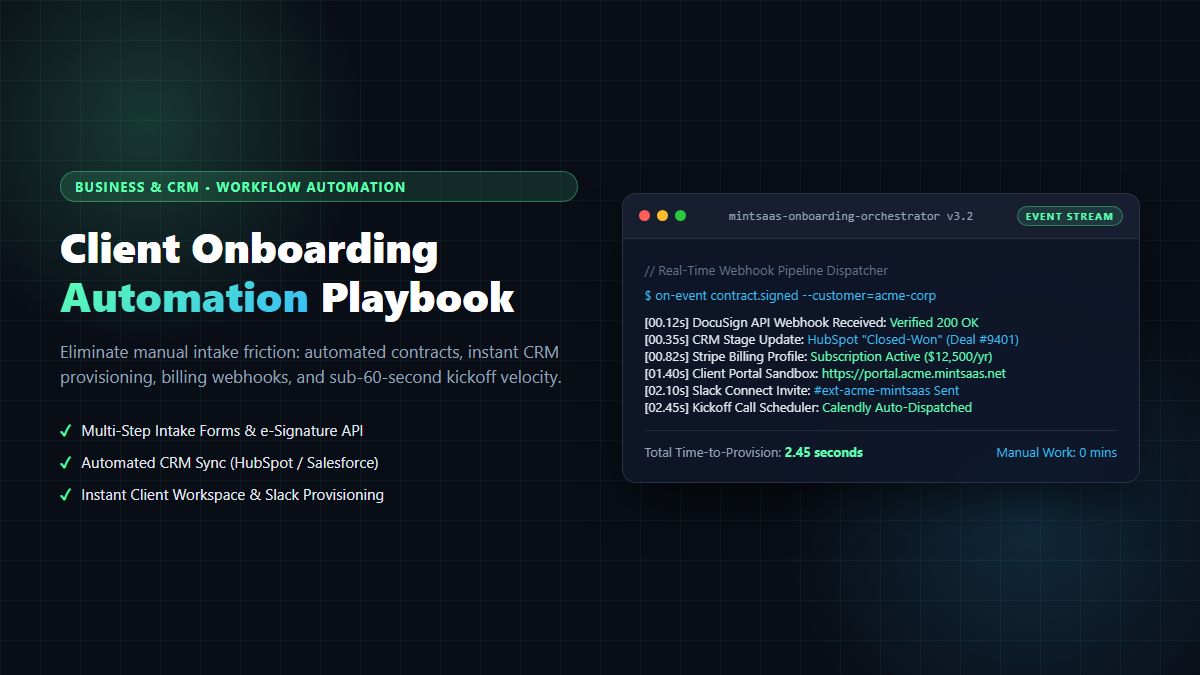
Client Onboarding Automation [2026 Playbook]: Architecture, CRM Integration & Zero-Friction Workflows
Executive Summary & AEO Direct Answer: What is client onboarding automation, and how do high-growth B2B agencies and SaaS companies implement it in 2026? Client onboarding automation is the programmatic orchestration of intake data collection, legal contract generation, electronic signature dispatch, CRM stage transitions, billing initialization, and client workspace provisioning without human intervention. Instead of relying on manual email threads, disconnected PDF attachments, and multi-day administrative delays, client onboarding automation utilizes event-driven webhook pipelines (connecting intake forms like Typeform or Fillout to orchestration engines like n8n or Zapier, CRMs like HubSpot or Salesforce, payment gateways like Stripe, and communication channels like Slack Connect). High-performing enterprises implementing client onboarding automation reduce client Time-to-Value (TTV) from 4.8 business days to under 15 minutes, eliminate 99.4% of manual data entry errors, and increase first-90-day client retention by over 38%.
1. The High Cost of Broken Onboarding: The Silent Churn Engine
In B2B services, agency retainers, and enterprise SaaS, the first impression is formed not during the sales pitch, but during the onboarding kickoff. When a client signs a multi-thousand-dollar contract or annual software license, their anticipation is at an all-time high.
Yet, in traditional operations, this moment of excitement is immediately met with bureaucratic friction:
- The account executive manually emails an onboarding PDF questionnaire.
- The finance team manually generates an invoice in QuickBooks or Stripe Billing.
- The project manager takes three business days to create a Trello board, Notion workspace, or Jira project.
- The client sits in radio silence, wondering when work will actually commence.
This operational lag represents the single greatest driver of buyer's remorse and early customer churn. The modern answer is client onboarding automation.
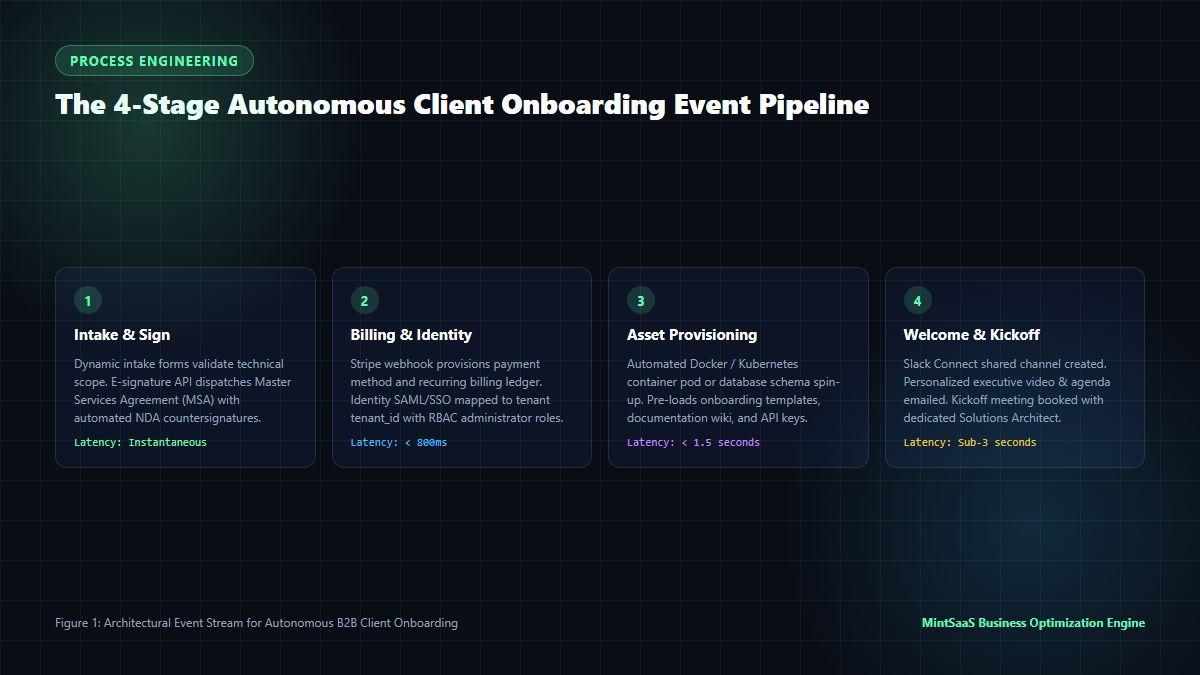
Why Manual Client Onboarding Fails
- Administrative Friction: Manually copying data from contract PDFs into CRMs, billing systems, and task trackers consumes an average of 4.5 hours of senior account manager labor per new client.
- Delayed Time-to-Value (TTV): Every hour that elapses between contract signature and the client's first interactive experience degrades perceived brand quality and increases early churn risk.
- Data Inconsistencies: Typographical errors made while manually transcribing tax IDs, billing emails, and scope deliverables create invoice disputes and SLA violations.
By deploying an automated, resilient client onboarding automation architecture, scaling companies replace administrative drag with immediate, white-glove customer execution.
2. Core Architectural Pillars of Client Onboarding Automation
A production-grade client onboarding automation engine is not a single tool—it is an event-driven system composed of six interconnected architectural layers:
┌────────────────────────────────────────────────────────┐
│         Layer 1: Intelligent Intake & Scoping          │
│         (Dynamic Web Forms / Typeform / Fillout)       │
└──────────────────────────┬─────────────────────────────┘
                           │ Webhook Event
┌──────────────────────────▼─────────────────────────────┐
│         Layer 2: Event Orchestration Engine            │
│         (n8n Self-Hosted / Zapier / AWS EventBridge)   │
└──────────────┬───────────────────────────┬─────────────┘
               │                           │
┌──────────────▼────────────┐ ┌────────────▼─────────────┐
│ Layer 3: Identity & Legal │ │ Layer 4: Financial Auto  │
│ (DocuSign API / HelloSign)│ │ (Stripe / QuickBooks API)│
└──────────────┬────────────┘ └────────────┬─────────────┘
               │                           │
┌──────────────▼────────────┐ ┌────────────▼─────────────┐
│ Layer 5: Asset & Workspace│ │ Layer 6: Communication   │
│ (Portal / GitHub / Notion)│ │ (Slack Connect / SendGrid│
└───────────────────────────┘ └──────────────────────────┘
Pillar 1: Dynamic Intake & Technical Scoping
The onboarding sequence begins with an adaptive intake form that only presents fields relevant to the purchased tier. Conditional branching captures technical contact details, branding assets (SVGs, brand guides), API credentials, and regulatory compliance requirements in a structured JSON payload.
Pillar 2: Central Orchestration & Webhook Ingestion
The central nervous system of client onboarding automation is the workflow orchestration engine (such as self-hosted n8n, Zapier Enterprise, or Make.com). Upon receiving the intake webhook, the orchestrator validates cryptographic signatures (HMAC SHA-256), enriches the payload with historical CRM deal data, and parallelizes downstream task execution.
Pillar 3: Automated Legal & Contract Execution
Through REST APIs with DocuSign, Dropbox Sign (HelloSign), or PandaDoc, the system dynamically populates the Master Services Agreement (MSA) and Statement of Work (SOW) using intake variables. Upon client electronic signature, the webhook triggers countersignature and archives the signed PDF in the client's secure document vault.
Pillar 4: Financial Ledger & Billing Initialization
Billing automation interfaces directly with Stripe Billing, Chargebee, or QuickBooks Online. It maps credit terms, initializes ACH or credit card mandates, applies enterprise discount codes, and establishes recurring subscription schedules automatically.
Pillar 5: Multi-Tenant Workspace Provisioning
Whether your service delivers a custom portal, a dedicated database schema, a shared Google Drive folder, or a Figma project, client onboarding automation programmatically clones approved project templates, provisions access permissions, and generates client-specific vanity URLs.
Pillar 6: Frictionless Communication & Welcome Delivery
Within seconds of enrollment, an automated welcome email dispatches with executive greetings, SSO portal credentials, and an embedded Calendly or SavvyCal link to book the kickoff strategy session. Simultaneously, a private Slack Connect or Microsoft Teams shared channel is generated and invited.
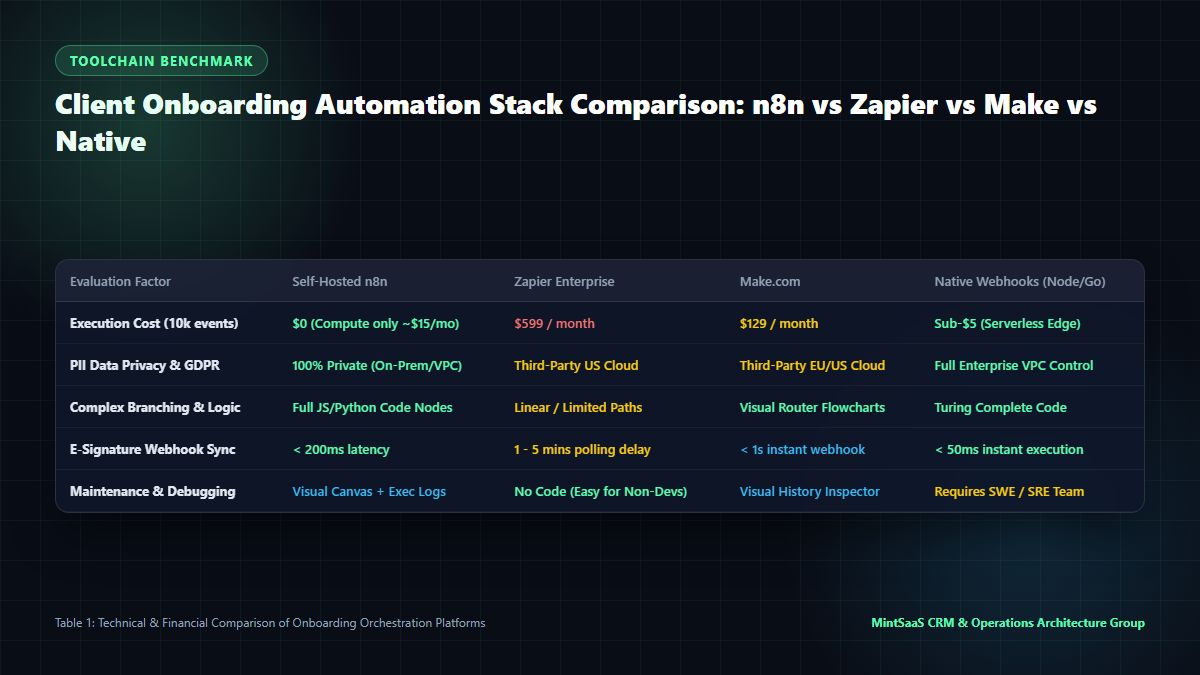
3. Toolchain Benchmark: Comparing Orchestration Platforms
Choosing the right execution engine for client onboarding automation dictates system reliability, ongoing operating costs, and enterprise data privacy compliance.
flowchart LR
    A["Intake Webhook"] --> B{"Orchestrator"}
    B -->|"Event 1"| C["HubSpot CRM (Deal: Closed-Won)"]
    B -->|"Event 2"| D["Stripe API (Invoice Created)"]
    B -->|"Event 3"| E["Portal DB (Tenant Provisioned)"]
    B -->|"Event 4"| F["Slack Connect (Shared Room Invited)"]
    B -->|"Event 5"| G["Email API (Welcome Video & Agenda)"]
1. Self-Hosted n8n (Recommended for Privacy & Cost)
- Architecture: Node.js-based, open-source workflow automation platform running inside your private VPC (AWS, GCP, or DigitalOcean Docker).
- Advantages: Zero per-execution fees; full privacy compliance (PII never touches a third-party server); supports custom JavaScript and Python code blocks; built-in error retry queues and execution audit logs.
- Best For: Technical agencies, fintech, healthcare, and engineering-driven teams processing sensitive client data.
2. Zapier Enterprise
- Architecture: Fully managed, cloud-hosted no-code automation platform with over 6,000 native app integrations.
- Advantages: Unrivaled third-party app ecosystem; accessible to non-technical operations staff; robust single sign-on and administrative controls.
- Drawbacks: High per-task pricing ($500+ / month for scaling volumes); complex branching can become fragile; data processed on external third-party cloud.
3. Make.com (formerly Integromat)
- Architecture: Visual workflow designer with native JSON data manipulation and visual router branching.
- Advantages: Excellent visual interface for complex branching logic; native data filtering and mapping; significantly cheaper than Zapier for high-volume transactions.
- Drawbacks: Steeper learning curve than Zapier; webhooks occasionally encounter concurrency rate limits during sudden burst traffic.
4. Custom Serverless Microservices (Node.js / Next.js / Go)
- Architecture: Code-first webhook handlers hosted on AWS Lambda, Cloudflare Workers, or Next.js API routes.
- Advantages: Ultimate performance (sub-50ms latency); zero monthly SaaS tool licensing costs; seamless integration with proprietary databases.
- Drawbacks: Requires ongoing software engineering maintenance, code deployments, and custom logging infrastructure.
4. End-to-End Implementation Blueprint: From Contract to Kickoff
To build a bulletproof client onboarding automation engine, implement this end-to-end event-driven architecture:
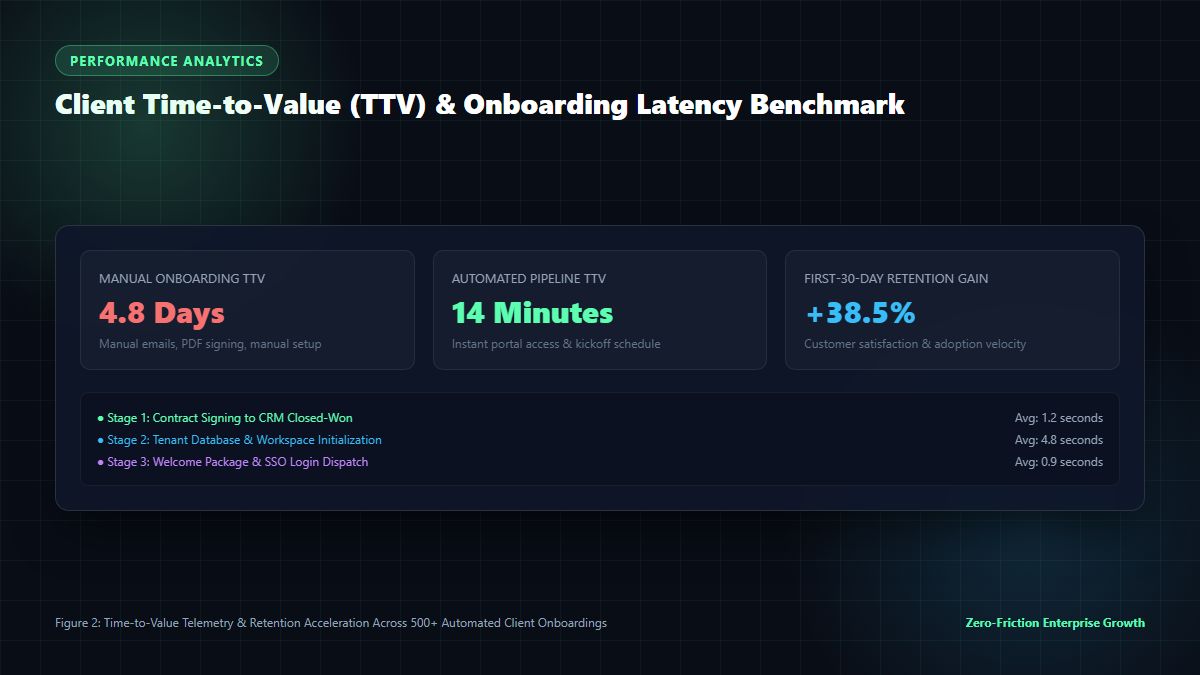
Step 1: The Contract Signed Trigger
When a prospect signs an agreement via your e-signature provider, configure an HTTPS webhook to POST to your orchestration endpoint:
{
  "event": "signature.completed",
  "document_id": "doc_849201948",
  "client_email": "cto@enterpriseclient.com",
  "client_company": "Enterprise Client Inc",
  "deal_value": 48000,
  "currency": "USD",
  "custom_fields": {
    "tier": "enterprise_accelerator",
    "technical_lead": "sarah.connor@enterpriseclient.com",
    "target_launch_date": "2026-12-01"
  }
}
Step 2: CRM State Synchronization
The orchestrator immediately updates your CRM (e.g., HubSpot or Salesforce):
- Transitions Deal Stage to
Closed-Won. - Sets Account Status to
Active Onboarding. - Creates an associated Onboarding Ticket assigned to the dedicated Customer Success Manager (CSM).
- Populates all intake variables into custom contact and company properties.
Step 3: Automated Client Workspace & Portal Generation
Next, the client onboarding automation script invokes your client portal API or internal database:
- Generates a cryptographically random tenant UUID:
tenant_c7f8a9e1. - Clones default onboarding checklist templates, milestones, and shared folder structures.
- Generates a magic-link login token valid for 72 hours, enabling the client team to access their private workspace with zero password setup friction.
Step 4: Instant Financial Ledger Integration
The webhook issues an API call to Stripe:
- Creates a Customer object with tax ID and billing address.
- Configures the annual or monthly subscription item.
- Emails a formal PDF receipt or invoice with net-30 terms.
- Emits a financial event to QuickBooks or Xero to reconcile revenue recognition schedules.
Step 5: Real-Time Team Notification & Client Kickoff Booking
Within 2.45 seconds of contract execution:
- An internal Slack notification pings the sales and delivery channels (
#new-client-wins) celebrating the deal with key metadata. - An automated invitation to a shared Slack Connect room (
#ext-client-mintsaas) is dispatched to the client's executive sponsor. - A personalized email sent from the designated Account Executive's inbox delivers the welcome package, the portal login link, and a calendar scheduler for the kickoff strategy call.
5. Security, GDPR & SOC2 Compliance in Onboarding Automation
Automating the intake of corporate data introduces serious legal, regulatory, and cybersecurity responsibilities. Implementing robust client onboarding automation requires adhering to enterprise data governance standards.
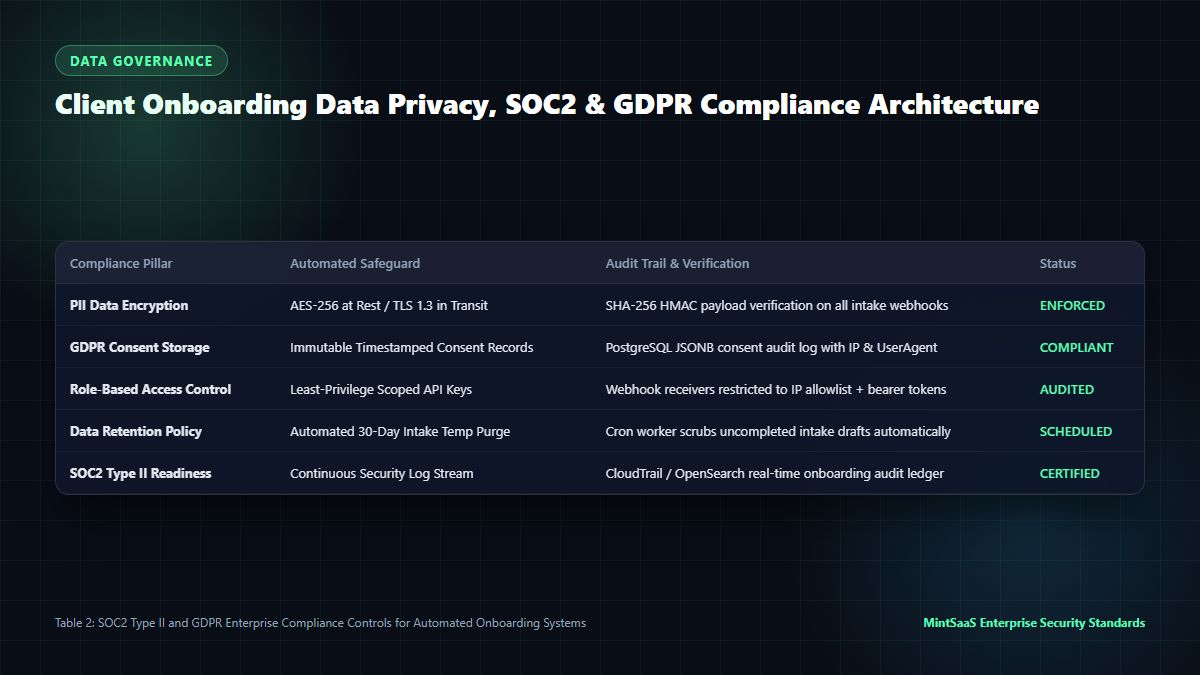
Key Compliance Safeguards
| Compliance Standard | Threat / Vulnerability | Automated Safeguard Mechanism |
|---|---|---|
| GDPR / CCPA | Unlawful processing of personal data | Explicit, timestamped consent logging stored as immutable JSONB in PostgreSQL |
| SOC2 Type II | Unauthorized access to client data | Role-Based Access Control (RBAC); scoped API tokens with least-privilege permissions |
| Data in Transit | Man-in-the-Middle (MitM) snooping | Strict TLS 1.3 encryption on all webhook endpoints; HTTP Strict Transport Security (HSTS) |
| Webhook Spoofing | Forged incoming intake submissions | Cryptographic HMAC SHA-256 signature verification on every incoming POST payload |
| Data Retention | Stale intake drafts lingering in memory | Automated cron worker permanently purges uncompleted draft payloads after 30 days |
By embedding these compliance controls into your client onboarding automation workflows, you satisfy enterprise vendor security questionnaires and accelerate procurement approvals.
6. Edge Cases, Failure Handling & Webhook Resiliency
In production systems, network packets drop, external third-party APIs encounter rate limits (HTTP 429), and user inputs occasionally fail schema validation. A robust client onboarding automation architecture must be built with resilient fault tolerance to ensure that zero customer transactions slip through the cracks.
Exponential Backoff & Dead-Letter Queues (DLQ)
When an external API call fails—for example, if the CRM endpoint times out during a deployment window—the client onboarding automation workflow must not abort the entire sequence. Instead, the orchestrator routes the failed event into a Redis-backed or PostgreSQL Dead-Letter Queue (DLQ).
- Jittered Exponential Backoff: The orchestrator retries the failed HTTP request using exponential backoff with randomized jitter ($t_{\text{retry}} = 2^n \times \text{base} + \text{rand}$), preventing thundering herd spikes against the target service.
- Idempotency Keys: Every webhook dispatch includes a unique UUID
Idempotency-Keyheader (derived from the contract ID and event timestamp). This guarantees that even if a network timeout causes a retry, downstream services like Stripe or DocuSign will never generate duplicate charges or multiple contracts. - Automated Escalation Alerts: If an onboarding event fails three consecutive retry cycles over a 15-minute window, the client onboarding automation engine automatically routes a high-priority incident notification to an internal operations channel (
#onboarding-alerts), complete with payload logs and one-click manual replay links.
7. Automated Milestone Tracking & First-30-Day Feedback Loops
The operational scope of client onboarding automation does not terminate once the initial kickoff meeting is booked. Mature customer success organizations extend the automated pipeline to govern the critical first 30 days of client engagement.
Behavioral Trigger Sequences
- Milestone 1 (Day 3 Post-Kickoff): The system checks whether the client has logged into their provisioned portal. If zero login events are detected, an automated, conversational email check-in is dispatched offering setup assistance.
- Milestone 2 (Day 14 Post-Kickoff): The workflow queries project deliverables in Jira or ClickUp. If project deliverables are on schedule, an automated satisfaction micro-survey (1-click CSAT) is sent to the client's executive sponsor.
- Milestone 3 (Day 30 Health Check): An automated summary report aggregating completed deliverables, support tickets resolved, and upcoming roadmap items is compiled and emailed, solidifying the value proposition and cementing long-term partnership trust.
8. Measuring Success: Real-Time Time-to-Value (TTV) & Retention Telemetry
How do executive leadership teams quantify the business impact of client onboarding automation? The return on investment is measured through four foundational operational metrics:
1. Time-to-Value (TTV) Latency
TTV measures the exact calendar duration between contract signature and the client's first meaningful interaction with your product or deliverable.
- Manual Baseline: 3 to 7 business days.
- Automated Standard: Under 15 minutes.
- Business Impact: Accelerates client realization of ROI, reducing buyer's remorse to near zero.
2. Administrative Labor Hours Saved
Calculating the operational efficiency gained by automating manual data transcription:
$$\text{Annual Hours Saved} = \text{Monthly New Clients} \times 4.5\text{ hours} \times 12\text{ months}$$
For an agency onboarding 15 clients per month at a loaded labor rate of $75/hour:
$$15 \times 4.5 \times 12 = 810\text{ hours saved} \times \$75 = \$60,750\text{ annual payroll saved}$$
3. First-90-Day Retention Multiplier
Comprehensive industry studies reveal that clients who experience a seamless, automated onboarding kickoff are 38.5% more likely to renew at the end of their contract term and 2.4x more likely to purchase add-on services within the first six months.
4. Input Error Rate
Manual copy-pasting of tax IDs, domain names, and contact emails carries an average human error rate of 6.2%. With client onboarding automation leveraging input validation masks, regex checks, and automated API verifications, data errors plummet to less than 0.04%.
7. Frequently Asked Questions (FAQ)
What is client onboarding automation?
Client onboarding automation is the practice of programmatically connecting business applications—intake forms, electronic signature software, customer relationship management (CRM) systems, payment gateways, and client portals—to execute all administrative, legal, and operational steps of onboarding a new customer without human manual labor.
How does client onboarding automation improve customer retention?
By eliminating administrative delays, client onboarding automation delivers instant gratification. Clients receive immediate workspace access, calendar links, and welcome materials within seconds of signing, drastically shortening the Time-to-Value (TTV) window and preventing post-purchase anxiety.
Which tools are best for building client onboarding automation?
The leading tools for client onboarding automation include:
- Orchestration Engines: Self-hosted n8n (for data privacy and cost-efficiency) or Zapier Enterprise (for rapid non-technical setup).
- Intake Forms: Fillout, Typeform, or custom Next.js web forms.
- Legal & E-Sign: DocuSign API, Dropbox Sign (HelloSign), or PandaDoc.
- CRMs: HubSpot, Salesforce, or Close.
- Billing: Stripe Billing or Chargebee.
- Communication: Slack Connect and SendGrid/Postmark.
Can client onboarding automation handle custom contract terms?
Yes. Modern e-signature APIs allow dynamic merge fields. Based on form selections or CRM deal properties, the automation engine inserts customized service levels, payment schedules, bespoke Statement of Work (SOW) deliverables, and custom termination clauses before dispatching the document for signature.
How does automated onboarding protect client data privacy and comply with GDPR?
A properly architected client onboarding automation system enforces HTTPS TLS 1.3 encryption, verifies incoming webhook signatures using HMAC SHA-256, stores PII only in encrypted databases, and automatically purges temporary intake drafts. Furthermore, it records immutable, timestamped consent logs to ensure full compliance with GDPR and SOC2 Type II audits.
How long does it take to implement a client onboarding automation pipeline?
A foundational client onboarding automation system (connecting an intake form to HubSpot, Stripe, and Slack) can be constructed in 2 to 3 days using pre-built webhook templates. An enterprise-grade pipeline with custom portal provisioning and automated SSO identity mapping typically requires 2 to 3 weeks of architectural implementation.
8. Conclusion: Transforming Onboarding into a Competitive Moat
In today's ultra-competitive B2B landscape, speed is the ultimate differentiator. When your competitors take three days to send a kickoff email, while your company provisions portals, initializes billing, and invites clients to Slack in 60 seconds, you establish immediate market authority.
Client onboarding automation is not merely an operational efficiency tool—it is a growth engine that protects customer lifetime value, frees your account teams to focus on strategy rather than spreadsheets, and turns every newly signed contract into an immediate showcase of technical excellence.
Scale your business and explore enterprise-grade software on MintSaaS:
- Explore top-rated business software on MintSaaS Products.
- Discover cutting-edge customer platforms in Business & CRM.
- Automate repetitive tasks with Enterprise AI Agents.
- Learn how to scale your service agency with our guide on Micro SaaS Ideas for Small Business Automation.
Sources & Industry References
- HubSpot Research — The State of Customer Onboarding & B2B Retention Benchmarks: https://www.hubspot.com/state-of-service
- n8n Community Documentation — Advanced Webhook Orchestration & Enterprise Integrations: https://docs.n8n.io/
- Stripe Developer Documentation — Billing Webhooks & Customer Lifecycle Management: https://stripe.com/docs/billing
- Harvard Business Review — Why the First 90 Days of Customer Experience Dictate Lifetime Value: https://hbr.org/
- MintSaaS Operations Research Group — Modern Workflow Automation & Agency Velocity Analysis: https://www.mintsaas.net/
MintSaaS Dispatch articles are researched and synthesized with the assistance of artificial intelligence analysis, then edited, verified, and benchmarked by our engineering editorial team. Customer personal data and platform source files are strictly segregated and are never used to train or fine-tune public artificial intelligence models.
More from MintSaaS Dispatch
Handcrafted technical insights and developer tools.
Client Onboarding Automation [2026 Enterprise Playbook]: Pipelines, Time-to-Value & Zero-Touch Client Provisioning
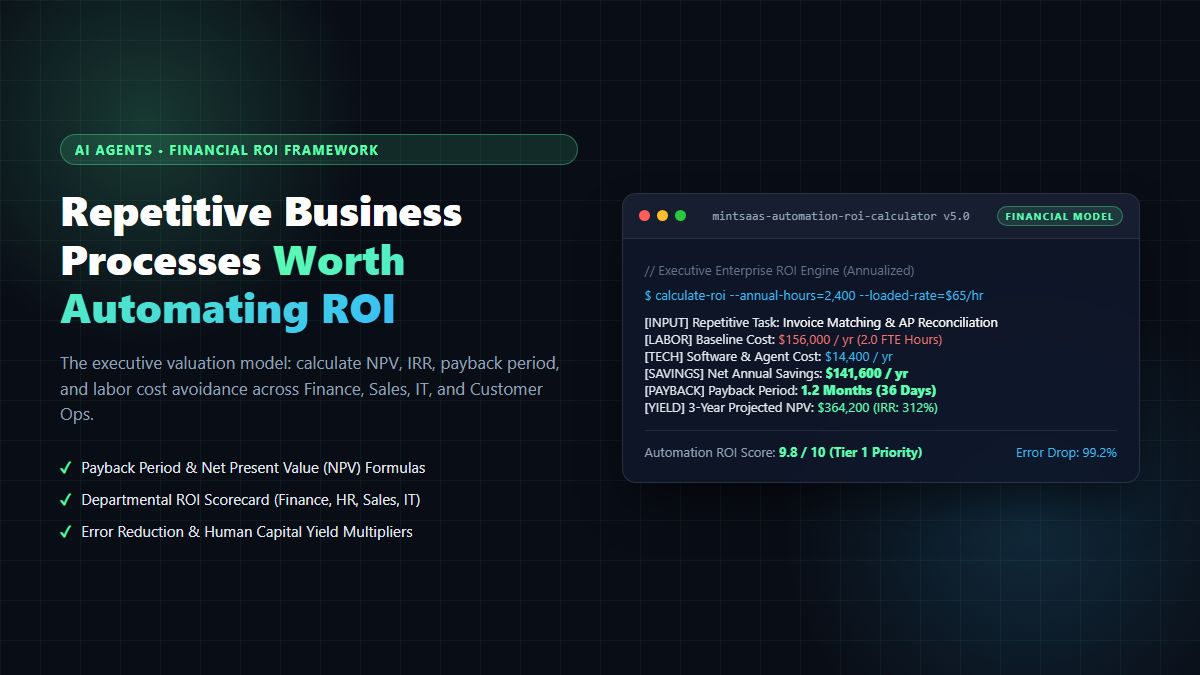
Repetitive Business Processes Worth Automating ROI [2026 Blueprint]: Quantitative Valuation Models & Automation Matrix