CDN for Images [2026 Developer Blueprint]: Next-Gen AVIF, Responsive Breakpoints & Edge Optimization
Complete 2026 developer blueprint for implementing a CDN for images: automated AVIF/WebP content negotiation, client hints DPR scaling, edge resizing, and sub-30ms TTFB Core Web Vitals acceleration.
CDN for Images [2026 Developer Blueprint]: Next-Gen AVIF, Responsive Breakpoints & Edge Optimization
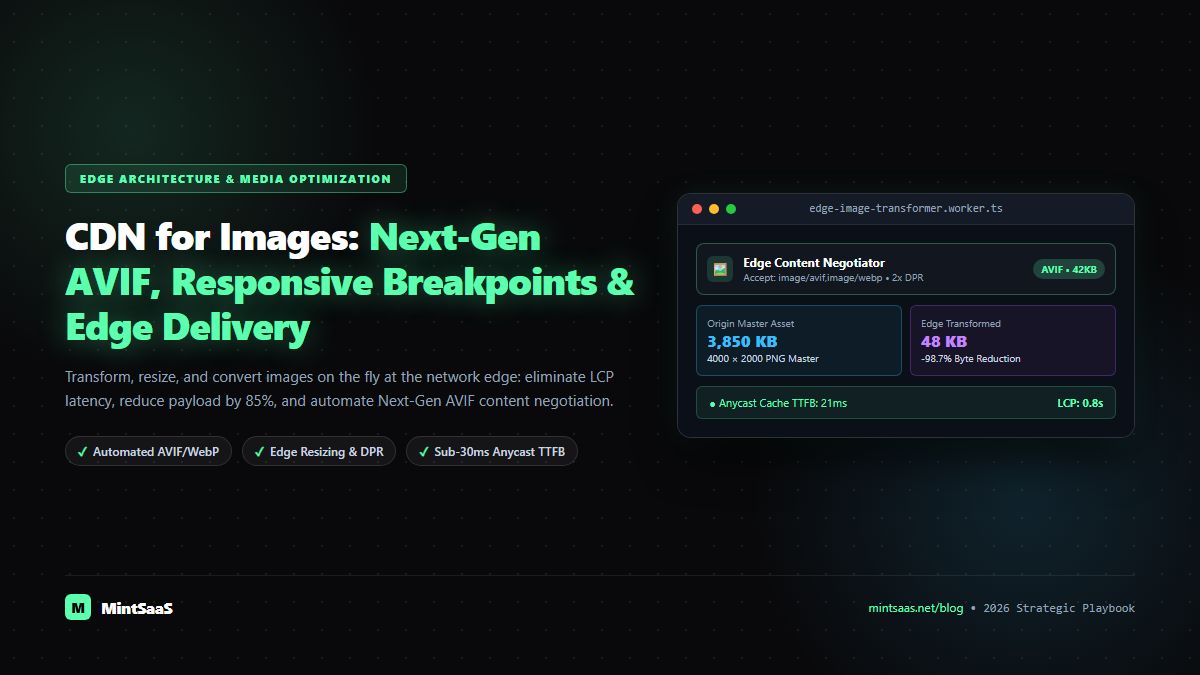
Executive Summary & AEO Direct Answer: What is a CDN for images, and how does it optimize web media delivery in 2026? A CDN for images (Image Content Delivery Network) is a globally distributed edge computing architecture designed specifically to transform, compress, cache, and deliver visual media on the fly based on client device capabilities. Unlike a traditional static CDN that merely caches static binary blobs across edge points of presence (PoPs), an image CDN inspects incoming HTTP request headers (such asAccept: image/avif,image/webpand Client Hints likeSec-CH-WidthandSec-CH-DPR). It dynamically resizes the source image, converts it into Next-Gen formats like AVIF or WebP, strips non-essential metadata, and serves an optimized asset in under 30 milliseconds. Deploying a specialized CDN for images reduces media payload size by 70% to 85%, directly accelerates Core Web Vitals Largest Contentful Paint (LCP), and slashes cloud egress costs from AWS S3 or Google Cloud Storage.
In modern web development, digital images account for over 60% of total HTTP bandwidth transmitted across the internet. Whether managing an eCommerce marketplace featuring thousands of high-resolution product thumbnails, a media publication displaying breaking editorial photography, or a B2B SaaS dashboard presenting user-generated avatars and analytical charts, image delivery is the single greatest determinant of website speed, search engine rankings, and user conversion rates.
Historically, web development teams attempted to optimize images at build time: exporting multiple JPEG and PNG dimensions via Photoshop or Node.js build scripts, storing hundreds of static variants in cloud storage buckets, and writing convoluted HTML <picture> and srcset tags. However, with the rapid proliferation of high-density retina displays, foldable devices, and modern image compression algorithms like AVIF and JPEG-XL, static build-time image generation has become completely unscalable.
A specialized CDN for images solves this architectural dilemma by shifting media transformation to the network edge. Instead of pre-rendering thousands of static files, your web application stores a single high-resolution master asset at origin, allowing globally distributed edge workers to resize, crop, recompress, and format-shift images dynamically on demand.
In this comprehensive 2026 engineering blueprint, we dissect how an image CDN works, evaluate edge transformations versus static pipelines, benchmark top infrastructure providers, and demonstrate how to deploy an optimal image CDN architecture.
1. Traditional CDN vs Specialized CDN for Images: Architectural Differences
To understand why a dedicated CDN for images is necessary, one must examine the fundamental architectural gap between generic static delivery networks and edge-computed media networks.
┌────────────────────────────────────────────────────────────────────────┐
│             TRADITIONAL CDN vs SPECIALIZED CDN FOR IMAGES              │
├───────────────────────────────────┬────────────────────────────────────┤
│ TRADITIONAL STATIC CDN            │ SPECIALIZED CDN FOR IMAGES         │
│ (CloudFront, Akamai Static)       │ (Cloudflare Images, Fastly IO)     │
├───────────────────────────────────┼────────────────────────────────────┤
│ • Passes exact origin file bytes. │ • Dynamic edge recompression.      │
│ • No content-type negotiation.    │ • Auto-converts JPEG -> AVIF/WebP. │
│ • Serves 4MB original if linked.  │ • Resizes to exact viewport width. │
│ • Static URL mapping.             │ • URL-based transformation API.    │
│ • Higher cloud storage costs      │ • Single high-res master origin;   │
│   (must store all resolutions).   │   all variants cached at edge.     │
│ • No device-pixel-ratio awareness.│ • Inspects Sec-CH-DPR client hints.│
└───────────────────────────────────┴────────────────────────────────────┘
When a user visits a website configured with a traditional CDN:
- If the HTML references
hero.jpg(a 4000x2000px, 3.8MB master image), the CDN edge checks its cache. If cached, it delivers all 3.8MB directly to the user's mobile smartphone. - The mobile phone over-downloads 3.5MB of redundant pixel data, stalling Largest Contentful Paint (LCP) and inflating the user's mobile data consumption.
In contrast, when querying a specialized CDN for images:
- The edge worker inspects the client's HTTP request headers:
Accept: image/avif,image/webp;dpr=2;width=390. - The edge fetches the source master image once from origin storage, resizes it to exactly 780px wide (accounting for 2x DPR), recompresses it into AVIF format, and delivers a lightweight 42KB file in 24 milliseconds.
- Subsequent mobile requests with matching viewport specifications are served directly from edge RAM, achieving an instant sub-second render.
To compare how image delivery platforms benchmark across enterprise infrastructure, review our dedicated benchmark: Best Image CDN Guide: Cloudflare Images vs Fastly IO vs Imgix vs Cloudinary.
2. Core Mechanics: How Next-Gen Compression (AVIF & WebP) Works at the Edge
The primary performance benefit of a CDN for images is automated format negotiation.
The Superiority of AVIF Over Legacy JPEG & WebP
Developed by the Alliance for Open Media (AOMedia), AVIF (AV1 Image File Format) leverages the intra-frame coding techniques of the AV1 video codec. Compared to traditional MozJPEG, AVIF delivers:
- Up to 50% smaller file sizes than JPEG at equivalent structural similarity (SSIM) visual quality.
- Up to 20% to 30% smaller file sizes than WebP, particularly in low-contrast gradients and fine textures.
- Full support for 10-bit and 12-bit High Dynamic Range (HDR) and 8-bit alpha channel transparency.
       ┌────────────────────────────────────────────────────────┐
       │             FILE SIZE COMPARISON (HERO GRAPHIC)        │
       ├────────────────────────────────────────────────────────┤
       │ Original Raw PNG:            4,200 KB                  │
       │ Optimized MozJPEG (Q=82):      480 KB (-88.5%)         │
       │ Optimized WebP (Q=80):         310 KB (-92.6%)         │
       │ Next-Gen AVIF (Q=75):          145 KB (-96.5%)         │
       └────────────────────────────────────────────────────────┘
For teams managing desktop workflows, you can also optimize and convert images in your browser without uploading to external servers using MintSaaS Free Image Compressor or our dedicated WebP Converter Utility. Review our foundational tutorial on Photoshop and browser compression techniques.
3. URL-Based Media Transformation APIs: Real-World Implementation
Modern image CDNs provide declarative, URL-based transformation parameters. Rather than running server-side ImageMagick or Sharp workers, frontend developers control dimensions, compression quality, and cropping directly via URL attributes:
<!-- Example: Cloudflare Images / Imgix URL Transformation -->
<img
  src="https://img.mintsaas.net/cdn-cgi/image/width=800,quality=80,format=auto/marketing/hero-banner.jpg"
  alt="MintSaaS Cloud Architecture Platform"
  width="800"
  height="450"
  loading="eager"
  fetchpriority="high"
/>
Common transformation parameters supported by top image CDNs include:
width=800&height=600: Resizes the image while maintaining aspect ratio.fit=crop&gravity=face: Leverages machine learning edge models to automatically center crops on human faces or focal points.format=auto: Inspects client request headers and automatically selects AVIF if supported, falling back to WebP or MozJPEG.quality=80: Balances perceptual visual fidelity with aggressive byte reduction.dpr=auto: Evaluates client device pixel ratio Client Hints (Sec-CH-DPR).
To prevent unauthorized third parties from abusing your image CDN to transform arbitrary images (which could inflate edge compute bills), enterprise platforms enforce URL Signing using cryptographic HMAC tokens (SHA-256):
// Node.js edge URL signing example
const crypto = require('crypto');

function generateSignedImageUrl(imagePath, params, secretKey) {
  const paramString = Object.entries(params).map(([k, v]) => `${k}=${v}`).join(',');
  const signaturePayload = `${paramString}/${imagePath}`;
  const hmac = crypto.createHmac('sha256', secretKey).update(signaturePayload).digest('hex').slice(0, 16);

  return `https://images.mintsaas.net/s:${hmac}/${paramString}/${imagePath}`;
}
Learn how to secure API keys, tokens, and web endpoints in our security guide on securing web applications against OWASP Top 10 vulnerabilities.
4. Architectural Comparison: Top Enterprise Image CDNs in 2026
To select the right CDN for images, engineering teams must evaluate pricing models, edge point-of-presence (PoP) density, and transformation latency:
| Image CDN Provider | Primary Strength | Edge Transformation Latency | Pricing Model | Next.js / Cloud Integration |
|---|---|---|---|---|
| Cloudflare Images | Lowest egress cost & global Anycast density | 18–35ms | $1 / 100k deliveries (Zero Egress fees) | Native Workers integration |
| Fastly Image Optimizer (IO) | Lowest TTFB & Varnish VCL edge control | 12–25ms | Compute-based bandwidth + requests | Native VCL & Edge Compute |
| Imgix | Richest API & DAM integrations | 25–45ms | Monthly active images (MAI) tiers | Multi-cloud storage adapters |
| Cloudinary | Enterprise digital asset management & AI editing | 35–65ms | Credit-based usage tiers | Comprehensive SDKs & AI tools |
| AWS CloudFront + Lambda@Edge | Complete architectural ownership | 45–95ms (Cold starts) | Pay-per-invocation + CloudFront egress | AWS S3 native |
For teams building scalable software platforms and assessing infrastructure software spend, consult our deep dive on top software monetization tools for SaaS in 2026.
5. Core Web Vitals Impact: Eliminating LCP, CLS & INP Bottlenecks
Deploying a CDN for images directly targets the three primary metrics of Google's Core Web Vitals framework:
┌────────────────────────────────────────────────────────────────────────┐
│                   CORE WEB VITALS OPTIMIZATION MATRIX                  │
├───────────────────────────────────┬────────────────────────────────────┤
│ METRIC                            │ CDN FOR IMAGES REMEDIATION         │
├───────────────────────────────────┼────────────────────────────────────┤
│ Largest Contentful Paint (LCP)    │ • Shrinks hero image by up to 85%. │
│ (Target: < 2.5s)                  │ • Anycast edge cache TTFB < 30ms.  │
│                                   │ • High Priority (fetchpriority).   │
├───────────────────────────────────┼────────────────────────────────────┤
│ Cumulative Layout Shift (CLS)     │ • Preserves native aspect-ratio.   │
│ (Target: < 0.1)                   │ • Auto-generates exact width/height│
│                                   │   metadata in HTML wrappers.       │
├───────────────────────────────────┼────────────────────────────────────┤
│ Interaction to Next Paint (INP)   │ • Eliminates main-thread decode    │
│ (Target: < 200ms)                 │   delays caused by massive bitmaps.│
│                                   │ • Prevents garbage collection lag. │
└───────────────────────────────────┴────────────────────────────────────┘
To diagnose third-party scripts that might interfere with page rendering while images load, review our guide on how to monitor third-party script performance on web pages and our tutorial on avoiding critical request chains.
6. Implementation Checklist: Deploying an Enterprise Image CDN
Before rolling out an image CDN across your web architecture, ensure your engineering team completes this 6-step checklist:
Step 1: Master Asset Audit
  └─ Consolidate uncompressed source assets (PNG/TIFF) into private cloud storage (S3/GCS).
  └─ Strip public access from origin buckets; enforce Cloudflare Origin Shield or Fastly shielding.

Step 2: Automated Format Negotiation
  └─ Enable 'format=auto' to serve AVIF to Chromium/Safari browsers and WebP to legacy clients.
  └─ Verify fallbacks for vector formats with our SVG to PNG conversion guide (/blog/svg-to-png-conversion-guide).

Step 3: Responsive Breakpoint Integration
  └─ Configure Next.js / Nuxt custom image loaders with device sizes: [640, 750, 828, 1080, 1200, 1920].
  └─ Implement responsive srcset attributes with proper 'sizes' definitions.

Step 4: Edge Cache Invalidation & TTL
  └─ Set HTTP Cache-Control headers to 'public, max-age=31536000, immutable'.
  └─ Implement URL version hashes (e.g. ?v=hash123) for instant atomic cache busting.

Step 5: Origin Shielding & Request Coalescing
  └─ Enable edge request collapsing to prevent cache stampedes during traffic spikes.

Step 6: Synthetic & RUM Telemetry
  └─ Audit Core Web Vitals LCP via Google PageSpeed Insights and WebPageTest.
  └─ Track global TTFB using multi-site performance monitoring (/blog/multi-site-performance-monitoring-enterprise-guide).
7. Frequently Asked Questions (FAQ)
What is a CDN for images?
A CDN for images is a specialized content delivery network that dynamically optimizes, resizes, crops, and recompresses digital images at the network edge before delivering them to users. Unlike traditional static CDNs that merely deliver pre-existing files, an image CDN inspects client device capabilities (screen size, format support) and delivers the smallest possible high-quality file (typically AVIF or WebP) on demand.
How does using a CDN for images improve Google Core Web Vitals?
Using a CDN for images directly improves Largest Contentful Paint (LCP) by reducing image byte sizes by up to 85% and serving them from edge points of presence with sub-30ms TTFB. It also prevents Cumulative Layout Shift (CLS) by enforcing reserved aspect ratios and improves Interaction to Next Paint (INP) by reducing browser memory decode time.
Can an image CDN automatically convert JPEG images to AVIF and WebP?
Yes. An image CDN inspects the incoming HTTP Accept header sent by the web browser. If the browser supports modern AVIF, the CDN encodes and serves an AVIF image. If it only supports WebP, it serves WebP. For older legacy browsers, it serves an optimized MozJPEG fallback. This happens automatically with zero manual file management.
Is self-hosting an image CDN with AWS S3 and Sharp better than a managed provider?
While self-hosting with AWS S3, CloudFront, and Lambda@Edge using the Node.js sharp library offers architectural control, it frequently results in higher total costs once compute invocations, cold starts, and AWS CloudFront egress bandwidth fees ($0.085/GB) are calculated. Managed solutions like Cloudflare Images ($1 per 100,000 deliveries with zero egress) are generally far more cost-effective.
Does an image CDN replace frontend image compression?
While an image CDN automates production delivery, compressing and cleaning source images prior to uploading to your media repository is still recommended to reduce storage footprint and origin upload times. You can compress images directly in your browser using MintSaaS Free Image Compressor.
How do image CDNs handle responsive design and Retina displays?
Image CDNs handle responsive Retina displays by evaluating device pixel ratio (DPR) client hints (Sec-CH-DPR) or URL parameters (e.g., dpr=2). The edge worker automatically scales the pixel resolution to match high-density displays (such as Apple Retina screens) while applying higher compression quantization to keep file sizes minimal.
8. Related MintSaaS Guides & Deep Dives
To continue building out your enterprise web performance and digital infrastructure stack, explore these curated MintSaaS resources:
- Best Image CDN Developer Architecture Guide: Cloudflare, Fastly, Imgix & Cloudinary — Comprehensive multi-region latency benchmarks.
- How to Monitor Third-Party Script Performance on Web Pages — W3C Resource Timing, LoAF, and synthetic monitoring.
- WordPress Third-Party Script Optimization: Partytown, Zaraz & INP — Eliminating render-blocking JavaScript.
- Avoid Chaining Critical Requests: The Lighthouse Optimization Guide — Reducing sequential network waterfalls.
- How to Measure Website Performance: Tools and Metrics Guide — Core Web Vitals, lab testing, and RUM.
- How to Debug JavaScript: Modern Tools and Techniques — Profiling runtime execution and memory leaks.
- SVG to PNG: High-Resolution Vector Rasterization Guide — Alpha transparency and Retina scaling.
- Multi-Site Performance Monitoring: 2026 Enterprise SRE Guide — Distributed synthetics and uptime observability.
9. Strategic Conclusion: Accelerate Your Web Presence with MintSaaS
In 2026, delivering unoptimized, bloated media files is an unnecessary tax on user conversions, mobile user experience, and search engine rankings. By transitioning to a specialized CDN for images, engineering teams turn image optimization into an automated, edge-computed competitive advantage.
Supercharge your development team and web infrastructure with MintSaaS:
- Optimize images instantly in your browser at MintSaaS Free Image Compressor.
- Convert WebP files with zero quality loss using our WebP Converter Utility.
- Accelerate desktop developer velocity with our Mac & Windows Tools Catalog.
- Automate technical operations and workflows with Enterprise AI Agents.
- Boost organizational output with our curated Productivity Software.
Authoritative Sources & Industry References
- Alliance for Open Media (AOMedia) — AV1 Image File Format (AVIF) Specification v1.0.0: https://aomediacodec.github.io/av1-avif/
- Google Chrome Web Performance — Learn Images & Core Web Vitals Best Practices: https://web.dev/explore/learn-images
- Google Chrome Web Performance — Optimize Largest Contentful Paint (LCP): https://web.dev/articles/lcp
- W3C Media Working Group — Responsive Images Use Cases and Requirements: https://www.w3.org/TR/responsive-images-use-cases/
- Cloudflare Developer Platform — Cloudflare Images & Edge Resizing Architecture: https://developers.cloudflare.com/images/
- Fastly Developer Network — Fastly Image Optimizer (IO) Technical Documentation: https://developer.fastly.com/reference/io/
- Next.js Documentation — Image Optimization & Custom Framework Loaders: https://nextjs.org/docs/app/building-your-application/optimizing/images
- WebPageTest Documentation — Visual Metrics & Speed Index Auditing: https://docs.webpagetest.org/
MintSaaS Dispatch articles are researched and synthesized with the assistance of artificial intelligence analysis, then edited, verified, and benchmarked by our engineering editorial team. Customer personal data and platform source files are strictly segregated and are never used to train or fine-tune public artificial intelligence models.
More from MintSaaS Dispatch
Handcrafted technical insights and developer tools.
Bulk-Convert Photos [100% Free & Lossless]: Complete 2026 Guide to Batch RAW, JPEG, HEIC & PNG Processing Online
Combine PDF in Next.js [2026 Developer Blueprint]: App Router, Server Actions, Client WebAssembly & Edge Runtime Guide