How to Automate Client Onboarding for Your Agency: The Complete 2026 Playbook
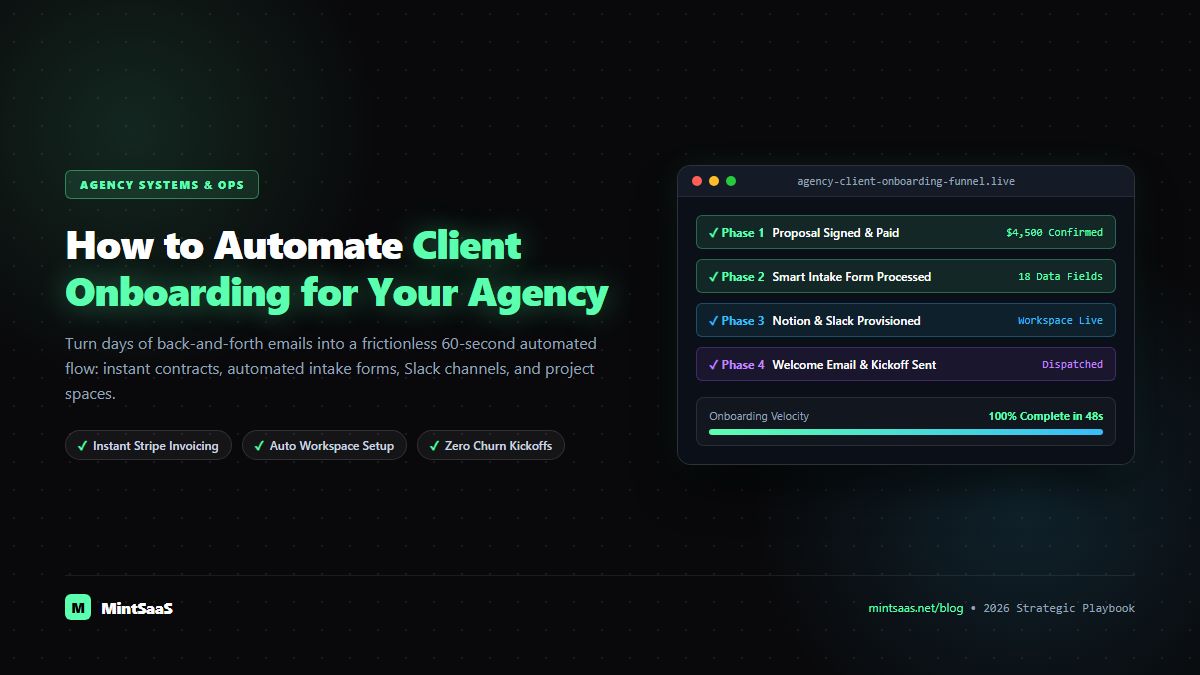
Transform your agency client onboarding from a chaotic multi-day ordeal into a frictionless 15-minute autonomous pipeline. Learn how to automate contracts, intake forms, workspace provisioning, client portals, and kickoff rituals for higher retention.
How to Automate Client Onboarding for Your Agency: The Complete 2026 Playbook
In the agency world, first impressions dictate long-term client retention. Industry data shows that over 60% of client churn occurs within the first 90 days of an engagement, and the root cause is almost never the final deliverable—it is a disorganized, sluggish, and chaotic onboarding experience.
When a client signs a high-ticket $5,000 to $25,000 monthly retainer contract, their emotional excitement and anticipation are at their absolute peak. If their post-signature experience involves waiting three days for an intake questionnaire, receiving broken Google Drive links, answering the same brand questions three times, and exchanging messy email chains about kickoff dates, buyer’s remorse sets in immediately.
Conversely, when an agency deploys an autonomous, automated onboarding pipeline, the client transitions from signed contract to fully provisioned, customized project infrastructure in under 15 minutes.
This tactical operating playbook breaks down the exact end-to-end architecture, tools, and scripts required to build an automated client onboarding machine in 2026.
Direct Answer: The 5-Phase Automated Onboarding Sequence
| Stage | Trigger Event | Automated Action Executed | Tooling Ecosystem | Average Time Elapsed |
|---|---|---|---|---|
| Phase 1: Deal Close & Contract | CRM Opportunity moves to Closed-Won | Auto-generate contract with e-signature and first deposit invoice | DocuSign / PandaDoc + Stripe | Minute 0–2 |
| Phase 2: Payment Confirmation | Webhook invoice.paid | Dispatch welcome email with private intake form and access credentials | SendGrid / Postmark + Tally Forms | Minute 2–3 |
| Phase 3: Workspace Infrastructure | Webhook form.submitted | Auto-clone project board, create shared cloud folder, invite client team | Linear / Notion + Google Drive API | Minute 3–5 |
| Phase 4: Communication Channel | Assets provisioned | Create private Slack Connect channel and pin onboarding guides | Slack API / Discord Webhooks | Minute 5–7 |
| Phase 5: Kickoff Scheduling | Channel active | Send dynamic VIP kickoff calendar link with pre-read materials | Cal.com / Calendly | Minute 7–10 |
Phase 1: Contract Execution and Initial Retainer Collection
The manual friction of drafting contracts in Word, converting them to PDF, emailing them as attachments, and waiting for manual bank wires introduces friction that kills deal momentum.
The Automated Flow
- The Deal-Won Trigger: In your CRM (HubSpot, Pipedrive, or Airtable), an Account Executive moves an opportunity to
Proposal Approved. - Template Synthesis: The workflow automation engine (e.g., n8n) intercepts the webhook payload containing:
- Client Legal Entity Name
- Signatory Name and Official Email
- Monthly Retainer Value & Payment Terms
- Statement of Work (SOW) Deliverable Scope
- Dynamic Contract Dispatch: The automation calls the DocuSign or PandaDoc REST API, injects these exact parameters into pre-approved legal templates, and dispatches the signature request to the client instantly.
- Deposit Lock: The contract is bundled with an embedded Stripe / Razorpay payment authorization. The agreement only executes when the first month’s retainer or setup fee is successfully captured.
Phase 2: Dynamic Client Intake and Brand Asset Collection
Agencies often suffer from the "Intake Interrogation"—sending clients a massive, static 40-question Google Doc that overwhelms stakeholders and sits uncompleted for weeks.
The Automated Flow
- Instant Welcome Trigger: Upon receiving the
contract.signedandpayment.successwebhooks, the system immediately fires an automated, personalized welcome email from the dedicated account director. - Dynamic Smart Intake Form: The email links to a customized interactive intake form (built with Tally, Typeform, or Fillout):
- Pre-fills known corporate information so the client never repeats data.
- Uses conditional branching logic: if the client selected "SEO & Content Agency Engagement", it asks for Google Search Console and CMS credentials; if they selected "Paid Media", it asks for Meta Business Manager and Google Ads IDs.
- Asset Vault Upload: Secure file upload blocks allow the client to submit brand guidelines, vector logos, font files, and typography packs. Files are streamed directly into an encrypted cloud bucket without file size limits.
Phase 3: Automated Workspace and Project Board Provisioning
Nothing looks more unprofessional than an agency scrambling to set up project folders and boards while the client is waiting on a kickoff call.
The Automated Flow
- Intake Processing: When the intake form is submitted, a webhook transmits the raw configuration payload to your internal automation pipeline.
- Master Project Template Cloning:
- In your project management system (Linear, ClickUp, or Notion), the automation clones a battle-tested master agency template.
- It renames the project:
[Client Name] — Growth Retainer 2026. - It sets Milestone 1: Technical Discovery & Audit (Days 1–14).
- It auto-assigns internal agency team members (Account Strategist, Creative Lead, Technical Developer) based on client industry tags.
- Cloud Storage Structure:
- An API call to Google Drive or Dropbox creates a standardized folder hierarchy:
     📁 [Client Name] Hub/
        ├── 📁 01_Contracts & Invoices
        ├── 📁 02_Brand Assets & Guidelines
        ├── 📁 03_Raw Footage & Copy
        ├── 📁 04_Drafts for Review
└── 📁 05_Final Production Deliverables- Permissions are locked down automatically: internal agency staff receive Edit rights; client team emails receive Read & Comment rights.
Phase 4: Dedicated Client Communication Channels
Email chains are where agency accountability goes to die. High-performing agencies run client communication through dedicated, real-time shared channels.
The Automated Flow
- Slack Connect Automation: The automation calls the Slack API
conversations.createand initiates a private Slack Connect channel named#ext-client-agency. - Auto-Pinning Essential Onboarding Resources: The channel’s header and bookmarks are automatically populated with:
- Direct link to the shared Client Dashboard / Project Board.
- Shared Google Drive Asset folder.
- Emergency contact numbers and agency communication SLA guidelines (e.g., "We respond within 2 hours during 9am–5pm EST").
- Automated Welcome Greeting: An automated welcome bot posts an initial briefing message tagging the client stakeholders, introducing their dedicated project squad, and explaining the next steps.
Phase 5: Frictionless Kickoff Scheduling and Strategy Brief
The final step of the onboarding machine is locking in the official strategy kickoff session without email ping-pong.
The Automated Flow
- VIP Scheduling Dispatch: The automation checks the live calendar availability of the agency Account Director and Lead Strategist, generating a unique booking link via Cal.com or Calendly.
- Kickoff Prep Pack Delivery: Alongside the calendar invitation, the client automatically receives a tailored Kickoff Prep Deck outlining:
- The agenda for the 45-minute kickoff call.
- Summary of intake answers received so far.
- What decisions need to be finalized during the meeting.
- Automated Reminder Cascade: 24 hours and 1 hour before the kickoff meeting, SMS/Email reminders confirm stakeholder attendance, reducing kickoff no-show rates to zero.
The Complete Technical Architecture Diagram
The entire automated onboarding system operates as an event-driven state machine:
  [CRM Deal: Closed-Won]
           │
           ▼
  [DocuSign API: Generate SOW] ──> [Stripe API: Process Retainer]
                                            │
                                            ▼
                               [Webhook: onboarding.start]
                                            │
                 ┌──────────────────────────┼──────────────────────────┐
                 ▼                          ▼                          ▼
      [Tally: Smart Intake]      [Linear: Clone Template]    [GDrive: Build Folders]
                 │                          │                          │
                 └──────────────────────────┼──────────────────────────┘
                                            │
                                            ▼
                              [Slack API: Create Connect]
                                            │
                                            ▼
                              [Cal.com: Schedule Kickoff]
Key Metrics to Track: Evaluating Your Agency Onboarding Machine
To verify that your automated onboarding workflow is achieving operational excellence, measure these four mission-critical KPIs:
- Time to First Value (TTFV): The duration between contract signature and the client seeing tangible progress or asset delivery. Automated agencies reduce TTFV from 7 days down to 24 hours.
- Intake Completion Velocity: The average time it takes a client to finish their onboarding questions. Clean, dynamic forms drop this from 5.2 days to under 4 hours.
- Administrative Cost per Client Onboarded: The total payroll cost required to onboard a new account. Automation slashes this from $450+ per client to under $12.
- 90-Day Retention Rate: High-touch, organized onboarding reliably increases agency retention past the critical 90-day mark by 25% to 40%.
Frequently Asked Questions (FAQ)
Won’t automated client onboarding feel cold and impersonal?
Quite the opposite. When routine mechanical logistics (creating folders, sending invoices, generating boards) happen instantly and error-free, your senior account directors have far more cognitive bandwidth to focus on genuine human relationships, strategic discovery, and creative listening.
What is the best platform to orchestrate agency onboarding?
n8n is the industry-leading platform for agencies in 2026 due to its ability to handle complex nested logic, self-hosted data privacy, and zero per-step execution pricing. Zapier and Make are also widely utilized for simpler linear pipelines.
How do I handle clients who delay filling out their intake form?
Configure automated gentle reminder cadences: if the intake webhook does not register completion within 48 hours, send a courteous email offering a 15-minute screen-share call where an agency coordinator fills it out live with them.
More from MintSaaS Dispatch
Handcrafted technical insights and developer tools.