Image Sprites vs SVG Icons: Performance Comparison for 2027
SVG icons have largely replaced image sprites. Compare file size, scaling, styling, accessibility, and animation across both approaches.
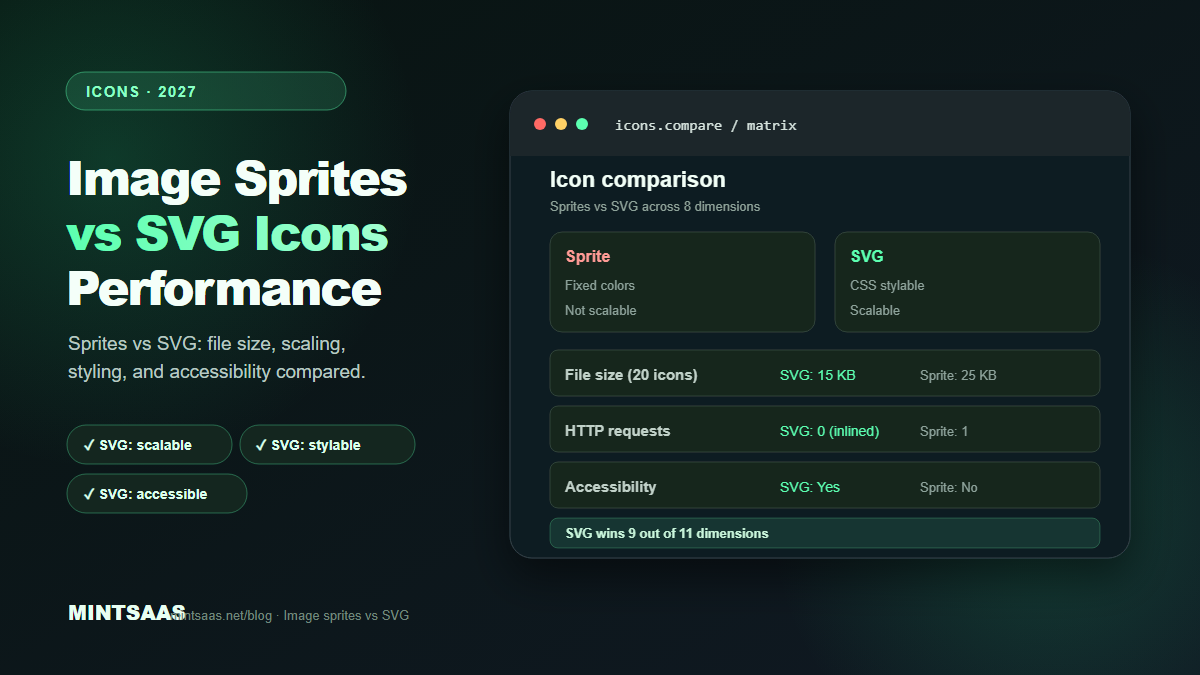
Image Sprites vs SVG Icons: Performance Comparison for 2027
Quick answer: SVG icons have largely replaced image sprites for web use in 2027. SVGs are scalable, CSS-stylable, accessible, and typically smaller (1–2 KB per icon vs 20–50 KB for a sprite sheet). Image sprites still have niche uses (legacy browser support, complex multi-color icons, game assets). For most sites, inline SVG icons are the best choice: zero HTTP requests, CSS styling, and perfect scaling. Use SVG sprites (<symbol>+<use>) when you need the same icon multiple times on a page.[1][3][5]
Image sprites were the standard way to optimize icons for over a decade. By combining multiple small images into a single file, you reduced HTTP requests and improved page load time. But in 2027, with HTTP/2 multiplexing, SVG support at 98%+, and CSS capabilities that rival JavaScript, the landscape has shifted dramatically.
This guide compares image sprites and SVG icons across every dimension that matters: file size, HTTP requests, styling, accessibility, animation, and performance.
What are image sprites?
An image sprite is a single image file containing multiple smaller images (icons, buttons, UI elements) arranged in a grid. CSS background-position is used to display only the relevant portion.
Example sprite sheet (CSS):
.icon {
  background-image: url('sprite.png');
  background-repeat: no-repeat;
  width: 24px;
  height: 24px;
}

.icon-home { background-position: 0 0; }
.icon-search { background-position: -24px 0; }
.icon-user { background-position: -48px 0; }
.icon-settings { background-position: -72px 0; }
HTML usage:
<span class="icon icon-home"></span>
<span class="icon icon-search"></span>
Advantages of sprites:
- Single HTTP request for all icons
- Works in all browsers (including very old ones)
- Simple implementation for basic use cases
- Can include multi-color icons and photographs
Disadvantages of sprites:
- Not scalable (pixelated at larger sizes)
- Cannot be styled with CSS (color, size changes require new sprite)
- Not accessible (screen readers can't describe them)
- Difficult to maintain (adding an icon requires regenerating the sprite)
- Retina displays need 2× sprite sheets (doubling file size)
- No animation support (beyond CSS background-position tricks)[1][3]
What are SVG icons?
SVG icons are vector graphics defined in XML. They can be inline (in HTML), external (separate files), or used as SVG sprites (<symbol> + <use>).
Inline SVG:
<svg width="24" height="24" viewBox="0 0 24 24" fill="currentColor">
  <path d="M10,20v-6h4v6h5v-8h3L12,3 2,12h3v8z"/>
</svg>
SVG sprite:
<!-- Define once -->
<svg style="display: none;">
  <symbol id="icon-home" viewBox="0 0 24 24">
    <path d="M10,20v-6h4v6h5v-8h3L12,3 2,12h3v8z"/>
  </symbol>
</svg>

<!-- Use multiple times -->
<svg width="24" height="24"><use href="#icon-home"/></svg>
<svg width="32" height="32"><use href="#icon-home"/></svg>
Advantages of SVG:
- Infinitely scalable (sharp at any size)
- CSS-stylable (color, size, stroke, fill)
- Accessible (title, desc, role attributes)
- Animatable (CSS and JavaScript)
- Typically smaller (1–2 KB per icon)
- No HTTP request (when inlined)
- Retina-ready (no 2× variants needed)
- Easy to maintain (add/remove icons independently)[1][3]
Disadvantages of SVG:
- More verbose HTML (inline SVGs add markup)
- Complex icons can be large (over 10 KB)
- Older browser support (IE 11 and below, though polyfills exist)
- Requires optimization (SVGO) for best results[1][3]
Head-to-head comparison
| Dimension | Image Sprite | SVG Icon | Winner |
|---|---|---|---|
| File size (single icon) | 1–2 KB (portion of sprite) | 0.5–2 KB | SVG |
| File size (20 icons) | 20–50 KB (sprite sheet) | 10–20 KB (inlined) | SVG |
| HTTP requests (inlined) | 1 (sprite sheet) | 0 (inlined) | SVG |
| HTTP requests (external) | 1 | 1 (or 0 with sprite) | Tie |
| Scalability | ❌ (pixelated) | ✅ (infinite) | SVG |
| CSS styling | ❌ (fixed colors) | ✅ (color, size, stroke) | SVG |
| Accessibility | ❌ (no alt text) | ✅ (title, desc, role) | SVG |
| Animation | ❌ (limited) | ✅ (CSS/JS) | SVG |
| Retina support | ❌ (needs 2× sprite) | ✅ (automatic) | SVG |
| Browser support | ✅ (universal) | ✅ (98%+) | Sprite (legacy) |
| Maintenance | ❌ (regenerate sprite) | ✅ (add/remove freely) | SVG |
| Multi-color | ✅ (native) | ⚠️ (requires multiple paths) | Sprite |
Verdict: SVG wins in 9 out of 11 dimensions. Image sprites only win for legacy browser support and multi-color icons.
When to use image sprites (still relevant)
Despite SVG's dominance, image sprites still have niche uses:
1. Legacy browser support
If you must support IE 11 or older browsers, image sprites are the safest choice. SVG support in IE is limited (IE 9+ supports basic SVG but not all features).[1]
2. Complex multi-color icons
SVG can do multi-color, but it requires multiple paths with different fills. For complex icons with 5+ colors, an image sprite may be simpler.[3]
3. Game assets and UI
For game sprites (character animations, tile maps), image sprites are still the standard. SVG is too slow for high-frequency animation.[3]
4. Photograph-based icons
If your "icons" are actually small photographs (user avatars, product thumbnails), use image sprites or a sprite sheet. SVG can't represent photographs.[3]
When to use SVG icons
For virtually everything else, SVG is the better choice:
1. UI icons (navigation, actions, status)
Navigation icons, action buttons, status indicators — all benefit from SVG's scalability and CSS styling.[1][3]
2. Logos
Logos need to scale from favicon to billboard. SVG is the only format that handles this.[1]
3. Illustrations
Simple illustrations (under 10 KB) work well as SVG. Complex illustrations may be better as raster.[3]
4. Animated icons
Loading spinners, checkmarks, toggles — SVG animation is smoother and smaller than GIF or CSS sprites.[3]
SVG sprite pattern (best of both worlds)
SVG sprites combine the benefits of image sprites (single definition, reuse) with SVG's advantages (scalability, styling):
<!-- Define all icons once (hidden) -->
<svg xmlns="http://www.w3.org/2000/svg" style="display: none;">
  <symbol id="icon-home" viewBox="0 0 24 24">
    <path d="M10,20v-6h4v6h5v-8h3L12,3 2,12h3v8z"/>
  </symbol>
  <symbol id="icon-search" viewBox="0 0 24 24">
    <circle cx="11" cy="11" r="8"/>
    <path d="M21,21l-4.35-4.35"/>
  </symbol>
  <symbol id="icon-user" viewBox="0 0 24 24">
    <path d="M20,21v-2a4,4 0 0 0-4-4H8a4,4 0 0 0-4 4v2"/>
    <circle cx="12" cy="7" r="4"/>
  </symbol>
</svg>

<!-- Use anywhere, any size, any color -->
<svg width="24" height="24" fill="currentColor"><use href="#icon-home"/></svg>
<svg width="32" height="32" fill="#5cffb0"><use href="#icon-search"/></svg>
<svg width="48" height="48" fill="#ff6b65"><use href="#icon-user"/></svg>
Advantages of SVG sprites:
- Single definition (like image sprites)
- Reusable at any size and color (unlike image sprites)
- Scalable (unlike image sprites)
- CSS-stylable (unlike image sprites)
- Accessible (unlike image sprites)[1][3]
Disadvantages:
- More verbose HTML than image sprites
- Requires SVG optimization (SVGO) for best results
- External SVG sprites (separate file) require CORS for
<use>[1]
Performance comparison
Scenario: 20 icons on a page
| Approach | Total size | HTTP requests | Render time |
|---|---|---|---|
| Image sprite (PNG) | 25 KB | 1 | 5ms |
| Image sprite (PNG 2×) | 50 KB | 1 | 8ms |
| Inline SVG (20 icons) | 15 KB | 0 | 3ms |
| SVG sprite (external) | 12 KB | 1 | 2ms |
| SVG sprite (inline) | 12 KB | 0 | 2ms |
| Icon font (WOFF2) | 30 KB | 1 | 10ms |
Winner: Inline SVG or inline SVG sprite. Zero HTTP requests, smallest file size, fastest render.[3]
Scenario: Same icon used 10 times
| Approach | Total size | HTTP requests |
|---|---|---|
| Image sprite | 25 KB (same sprite) | 1 |
| Inline SVG (10 copies) | 15 KB (10 × 1.5 KB) | 0 |
SVG sprite (10 <use>) | 1.5 KB (defined once) | 0 |
Winner: SVG sprite with <use>. Defined once, referenced 10 times. Tiny file size, zero requests.[1][3]
Migration guide: sprites to SVG
If you're migrating from image sprites to SVG:
Step 1: Extract icons from sprite. Use a tool like ImageMagick or an online sprite splitter to extract individual icons.
Step 2: Convert to SVG. Use a vectorization tool (Illustrator Image Trace, Inkscape Trace Bitmap, or online converters). Or redraw icons manually in a vector editor.
Step 3: Optimize with SVGO. Run all SVGs through SVGO to reduce file size.
Step 4: Choose implementation. Inline for few icons, SVG sprite for many. Use <symbol> + <use> for repeated icons.
Step 5: Update CSS. Remove sprite-related CSS. Add SVG styling (fill, stroke, size).
Step 6: Test. Verify icons display correctly in all browsers. Check accessibility (screen reader).
Frequently Asked Questions (FAQ)
Are image sprites still used in 2027?
Image sprites are rarely used for new projects in 2027. SVG icons have replaced them for most use cases. Sprites are still used for legacy browser support, complex multi-color icons, and game assets.[1][3]
What is an SVG sprite?
An SVG sprite is a single SVG file containing multiple <symbol> elements, each defining an icon. Icons are referenced using <use href="#icon-id">. This combines the benefits of image sprites (single definition, reuse) with SVG's advantages (scalability, styling).[1]
Should I use inline SVG or external SVG files?
Inline small SVGs (under 2 KB) to eliminate HTTP requests and enable CSS styling. Use external files for larger SVGs or images used across multiple pages (for caching). Inline SVGs cannot be cached independently.[3]
How do I style SVG icons with CSS?
Use fill and stroke properties:
.icon { fill: currentColor; width: 24px; height: 24px; }
.icon:hover { fill: #5cffb0; }
currentColor inherits the text color, making icons adapt to their context.[1]
Are SVG icons accessible?
Yes, when properly marked up. Add role="img", aria-labelledby, and <title> elements:
<svg role="img" aria-labelledby="icon-title">
  <title id="icon-title">Home</title>
  <path d="..."/>
</svg>
For decorative icons, use aria-hidden="true".[1][3]
What is an icon font?
An icon font is a font file where each character is an icon instead of a letter. Examples: Font Awesome, Material Icons. Icon fonts were popular before SVG but have significant drawbacks: no multi-color, accessibility issues, and rendering inconsistencies. SVG is now preferred.[1][3]
How do I convert PNG icons to SVG?
Use a vectorization tool: Illustrator Image Trace, Inkscape Trace Bitmap, or online converters (Vectorizer.ai, Convertio). Manual redrawing in a vector editor produces the best results. After conversion, optimize with SVGO.[1]
Can SVG icons be animated?
Yes. SVGs support CSS animations (transform, opacity, stroke-dasharray) and JavaScript animations (SMIL, GSAP). Common animated icons: loading spinners, checkmarks, toggles, and hover effects. SVG animation is smoother and more performant than GIF or CSS sprite animation.[1][3]
Related reading on MintSaaS
- SVG Optimization: How to Reduce Vector File Size for Web in 2027
- How to Compress Images Without Losing Quality: The Complete 2027 Guide
- How to Convert Images Between Formats: The Complete Guide to WebP, AVIF, JPEG, and PNG in 2027
- How to Optimize Images for SEO: Complete Guide to Faster Loading and Higher Rankings
Sources
[1] MDN Web Docs — SVG: https://developer.mozilla.org/en-US/docs/Web/SVG
[2] MDN Web Docs — CSS Sprites: https://developer.mozilla.org/en-US/docs/Web/CSS/CSS_Images/Implementing_image_sprites_in_CSS
[3] Image Optimization for the Web (boxtool.app): https://boxtool.app/en/guides/image-optimization-for-web/
[4] Web.dev — Core Web Vitals: https://web.dev/vitals/
[5] MintSaaS Image Compressor: https://www.mintsaas.net/products/image-compressor
Free tools on MintSaaS
Try our free tools to put this guide into practice:
MintSaaS Dispatch articles are researched and synthesized with the assistance of artificial intelligence analysis, then edited, verified, and benchmarked by our engineering editorial team. Customer personal data and platform source files are strictly segregated and are never used to train or fine-tune public artificial intelligence models.
More from MintSaaS Dispatch
Handcrafted technical insights and developer tools.