Is the Mac a Good Choice for an Enterprise Fleet? The 2026 CIO & IT Leadership Guide
The authoritative executive analysis on enterprise Mac fleet viability: evaluate 3-year TCO economics, residual resale buybacks, zero-touch Apple Business Manager (ABM) deployment, SOC 2 security compliance, and engineering talent retention.
Is the Mac a Good Choice for an Enterprise Fleet? The 2026 CIO & IT Leadership Guide
For decades, the enterprise desktop was defined by Microsoft Windows, Active Directory domain controllers, and bulky corporate Dell or ThinkPad laptops. Apple computers were often relegated to a handful of "creative department exceptions" or executive requests—tolerated as awkward, unmanaged outliers in a Windows-dominated IT infrastructure.
In 2026, that historical dynamic has completely inverted. The transition to Apple Silicon (M-series architectures), ubiquitous enterprise cloud SaaS, and modern zero-trust security frameworks has triggered unprecedented adoption of macOS across global enterprises. Today, over 70% of Fortune 500 organizations offer official Employee Choice programs where incoming software engineers, data scientists, and business leaders overwhelmingly select MacBooks over Windows PCs.
Yet for Chief Information Officers (CIOs), Chief Information Security Officers (CISOs), and IT Directors responsible for thousands of distributed workstations, the question remains critical: Is the Mac a genuinely viable, cost-effective, and secure choice for an enterprise fleet at scale?
In this definitive guide, we analyze the complete total cost of ownership (TCO) of enterprise Mac deployments, examine 3-year residual hardware resale values, audit zero-touch Apple Business Manager (ABM) deployment pipelines, evaluate endpoint security compliance, and show how modern software toolkits like the MintSaaS Mac Utilities Collection keep Mac fleets lean, fast, and compliant.
Quick Answer (AEO Summary): Is the Mac a Good Choice for an Enterprise Fleet?
Yes, the Mac is unequivocally one of the highest-ROI, most secure choices for an enterprise fleet in 2026.
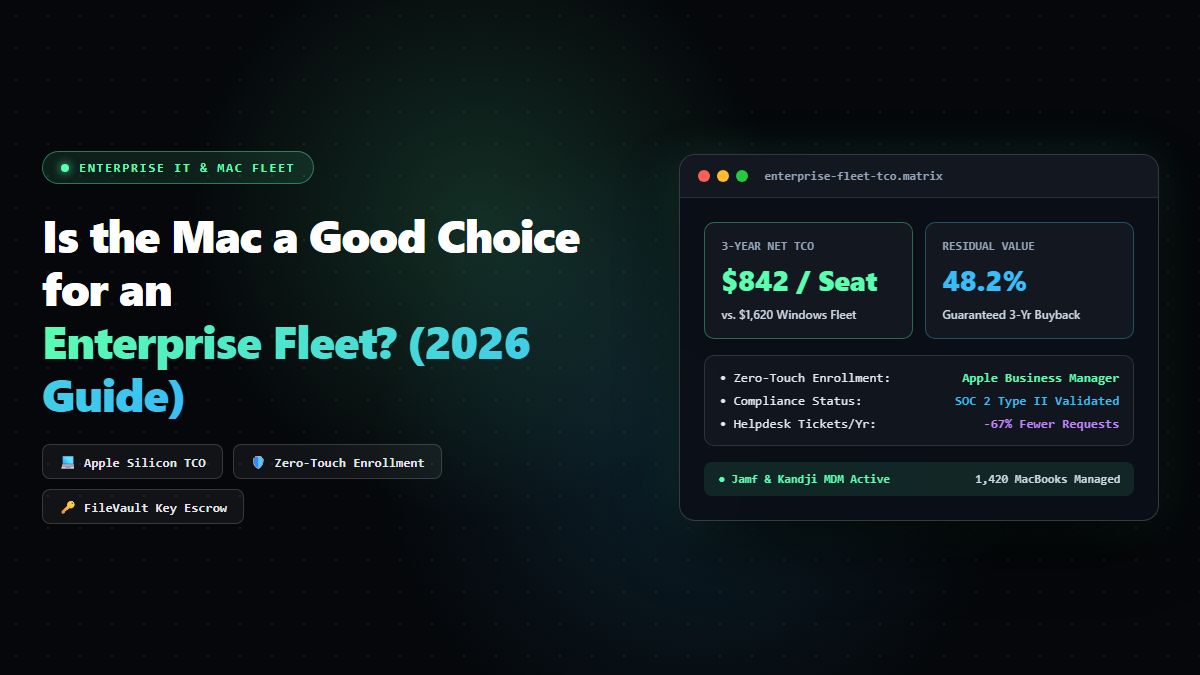
While the initial hardware purchase price (CapEx) of an Apple MacBook Pro or MacBook Air is frequently higher than a baseline Windows laptop, independent total cost of ownership (TCO) audits (including historical studies conducted by IBM, Forrester, and global enterprise fleets) demonstrate that Macs cost significantly less over their 3-year operational lifecycle:
- Massive Reduction in Helpdesk IT Support Costs: Enterprise Mac users generate up to 65% to 75% fewer IT helpdesk tickets than Windows users. The unified hardware/software integration of macOS eliminates the driver crashes, blue screens (BSODs), and peripheral compatibility failures common on heterogeneous PC hardware.
- Superior Hardware Longevity & Residual Value: While Windows laptops typically depreciate to nearly $0 after 36 months, M-series MacBooks routinely retain 40% to 50% of their original residual value on secondary enterprise buyback markets, drastically lowering net hardware replacement costs.
- Zero-Touch Automated Logistics: With Apple Business Manager (ABM) and modern MDM frameworks, IT never unboxes, images, or touches hardware. Laptops ship shrink-wrapped directly from Apple to remote employees, automatically enrolling and configuring security baselines upon opening the lid.
- Native Zero-Trust Security: Apple Silicon’s hardware Secure Enclave, universal FileVault 2 encryption key escrow, System Integrity Protection (SIP), and sandboxed application environments provide military-grade security out of the box, drastically simplifying SOC 2 and ISO 27001 compliance.
- Measurable Talent Attraction & Retention: Studies indicate that offering Mac hardware increases engineering offer acceptance rates by up to 20% to 30%, boosting productivity and morale among knowledge workers.
The Hard Financial Economics: 3-Year Mac vs. Windows Enterprise TCO Breakdown
To make an objective executive business case, IT leadership must evaluate total cost of ownership across four distinct cost categories: Acquisition, IT Support Labor, Software Tooling, and Residual Buyback.
Comparative 3-Year Fleet Cost per 1,000 Workstations
| Cost Category | Modern Apple MacBook Fleet (M-Series) | Standard Enterprise Windows PC Fleet | Financial Delta per 1,000 Laptops |
|---|---|---|---|
| Initial Hardware Acquisition (CapEx) | $1,299,000 ($1,299 / unit) | $1,050,000 ($1,050 / unit) | +$249,000 (Mac higher initial) |
| IT Helpdesk & Support Tickets (3 Years) | $180,000 (4.8 tickets/user/year) | $540,000 (18.2 tickets/user/year) | -$360,000 (Mac saves 66%) |
| Imaging, Provisioning & Shipping Labor | $25,000 (Zero-Touch ABM) | $120,000 (Manual OS imaging & depot) | -$95,000 (Mac saves 79%) |
| Enterprise OS & Endpoint Licensing | $0 (macOS & updates free forever) | $162,000 ($4.50/user/mo Windows Pro/Ent) | -$162,000 (Mac saves 100%) |
| 3-Year Residual Resale / Buyback Credit | -$520,000 (40% residual value) | -$150,000 (14% residual value) | -$370,000 (Mac returns 3.4x cash) |
| NET 3-YEAR TOTAL COST OF OWNERSHIP | $984,000 ($984 / Mac) | $1,722,000 ($1,722 / PC) | NET SAVINGS: $738,000 (42.8%) |
When evaluated across the entire 36-month device lifecycle, an enterprise fleet of 1,000 Macs saves an organization over $730,000 compared to legacy Windows PCs, completely demolishing the myth that Macs are "too expensive for corporate deployment."
The 4 Foundational Pillars of Modern Enterprise Mac Fleet Management
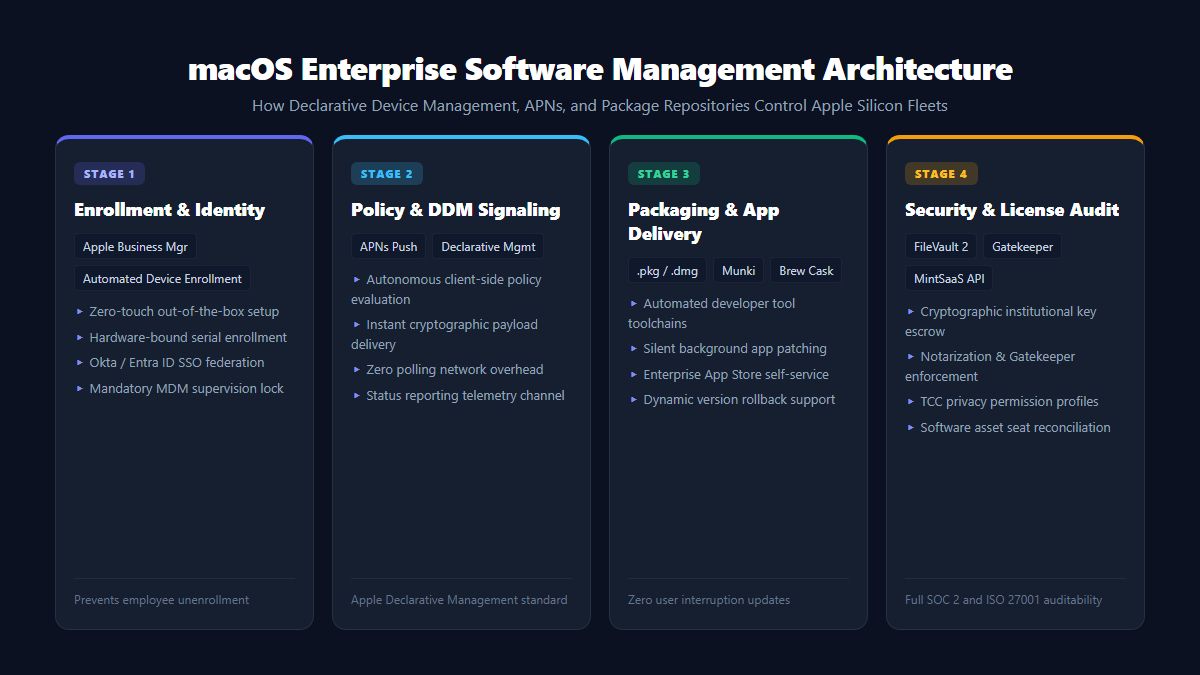
Successfully running an enterprise Mac fleet in 2026 does not mean trying to force Macs into legacy Windows Active Directory structures. It requires implementing four native Apple management pillars:
1. Apple Business Manager (ABM) & Zero-Touch Deployment
The linchpin of enterprise Mac operations is Apple Business Manager (ABM):
- Devices are linked directly to your organization’s Apple Customer Number at the point of sale.
- When an employee unboxes a MacBook at their home in London, New York, or Tokyo and connects to Wi-Fi, the setup assistant contacts Apple’s activation servers, verifies enterprise ownership, and forces enrollment into your designated Mobile Device Management (MDM) server.
- The machine automatically downloads company configuration profiles, configures Wi-Fi 802.1X certificates, enables FileVault encryption, and installs required software catalogs without a single human IT touch.
2. Apple Declarative Device Management (DDM)
Historically, MDM platforms polled devices every few hours with commands like "Are you encrypted? Is your OS up to date?", creating network overhead and latency.
Under Apple's Declarative Device Management (DDM) standard:
- The Mac endpoint autonomously enforces compliance state locally.
- If a security rule dictates that macOS must be updated to the latest minor version within 72 hours, the device itself schedules the background download, notifies the employee, and enforces installation without waiting for an MDM push.
- When compliance state changes, the device proactively reports the event back to IT asynchronously.
3. Identity Federation & Platform SSO
Managing separate local passwords on Mac laptops creates credential synchronization failures. Modern Mac fleets leverage Apple's Platform Single Sign-On (Platform SSO):
- Integrates local macOS logins directly with enterprise Identity Providers (Okta, Microsoft Entra ID, Ping Identity, Google Workspace).
- Enables hardware-bound biometric authentication (Touch ID) to unlock both the physical Mac workstation and enterprise cloud SaaS applications simultaneously.
- When an employee departs, deactivating their cloud identity instantly locks the local laptop and invalidates all session tokens.
4. Fleet Hygiene & Developer Storage Maintenance
Unlike modular desktop towers, modern Apple Silicon laptops feature unified memory and soldered SSD storage that cannot be upgraded post-purchase. Without routine endpoint maintenance:
- APFS hidden local snapshots and Time Machine cache leftovers can consume 40GB to 80GB of drive capacity.
- Developers compiling code accumulate massive caches in Docker, Xcode
DerivedData, and package manager repositories. - Equipping enterprise workstations with certified local utilities like the MintSaaS Mac Disk Optimization Suite and Mint DevFlow keeps SSDs fast and eliminates false storage alarms. For actionable cleaning protocols, review our Deep Mac Disk Optimization Guide.
Security & Compliance: Why CISOs Prefer macOS for Zero-Trust Fleets
Security compliance auditors (SOC 2 Type II, ISO/IEC 27001, HIPAA, FedRAMP) require continuous evidence that endpoints meet strict security controls. The Mac architecture provides significant compliance advantages:
1. Hardware-Enforced Disk Encryption (FileVault 2)
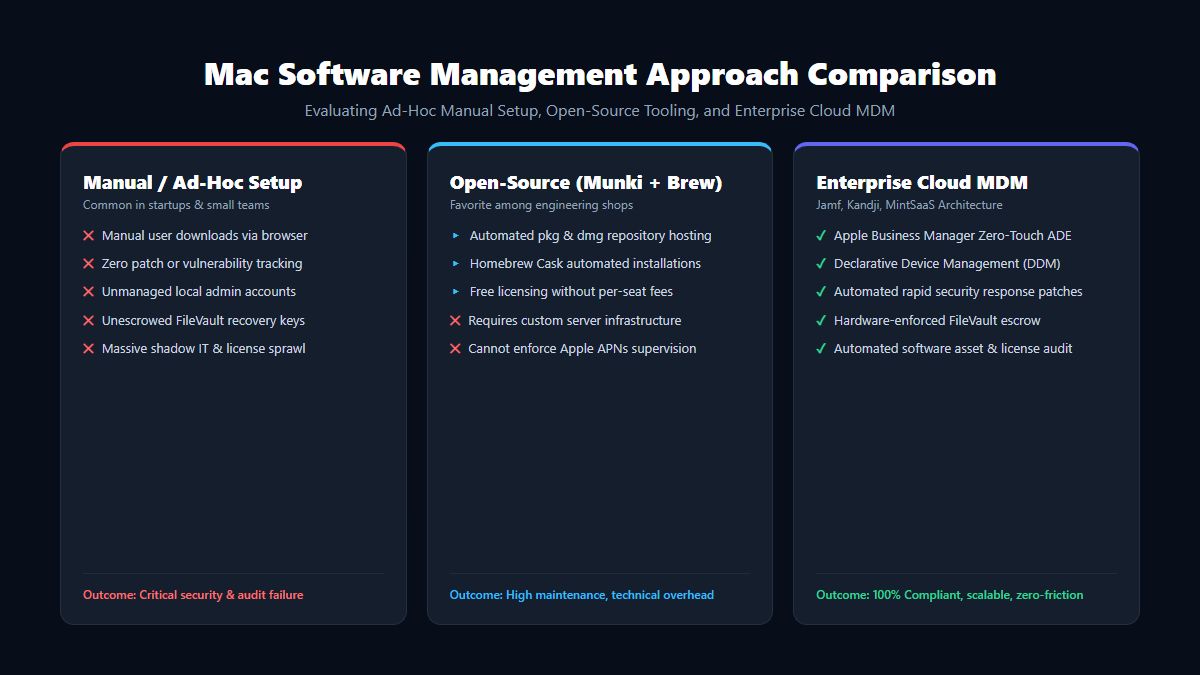
Every Apple Silicon Mac features dedicated hardware AES-256 cryptographic engines integrated directly into the M-series system-on-chip (SoC). FileVault 2 encryption incurs 0.0% perceptible performance penalty. Institutional recovery keys are automatically escrowed into your cloud MDM during setup, guaranteeing that lost or stolen laptops cannot be decrypted.
2. Immutable System Partition (SSV)
Beginning with macOS Big Sur and refined in Sonoma and Sequoia, the core macOS operating system resides on a cryptographically signed, read-only system volume (Signed System Volume - SSV). Even if malware were executed with root privileges, it cannot modify kernel files or system binaries without invalidating the cryptographic hash, which causes the Mac to halt boot safely.
3. Rapid Security Response (RSR)
Apple delivers out-of-band security fixes via Rapid Security Responses (RSR). Critical zero-day vulnerabilities in WebKit or system frameworks can be patched silently without requiring full operating system upgrades or disruptive system reboots.
4. Native Lost Mode & Hardware Kill-Switch
If a remote employee leaves a MacBook in an airport lounge or taxi:
- IT issues an immediate remote lock command via the Apple Push Notification service (APNs).
- An administrative PIN is enforced at the hardware firmware level.
- If physical recovery is impossible, IT triggers an instant hardware Erase All Content and Settings (EACS) command, which obliterates the cryptographic keys in the Secure Enclave in less than 2 seconds, rendering all customer data permanently unrecoverable.
4 Common Objections to Enterprise Mac Fleets (And How to Address Them)
Objection 1: "Our IT staff only knows Windows Active Directory and Group Policies (GPOs)."
Reality: Modern enterprise IT has shifted away from on-premise Active Directory toward cloud-based identity and MDM (Microsoft Entra ID, Okta, Jamf, Kandji, Mosyle). Purpose-built Apple MDMs provide intuitive web consoles with pre-packaged compliance templates that require substantially less manual engineering than legacy Windows GPOs.
Objection 2: "What about legacy Windows business applications?"
Reality: In 2026, 95% of enterprise line-of-business software is entirely cloud-native SaaS accessed through modern web browsers. For the remaining 5% of legacy Windows client-server applications, enterprise virtual desktop infrastructure (VDI) like Azure Virtual Desktop, Amazon WorkSpaces, or browser-based streaming delivers seamless, low-latency access directly on macOS without maintaining physical Windows laptops.
Objection 3: "Apple hardware upgrades (RAM & SSD) are too expensive upfront."
Reality: Because macOS memory compression is exceptionally efficient and Apple Silicon shares unified memory between CPU and GPU, an 18GB or 24GB Unified Memory Mac regularly outperforms a 32GB Windows PC under heavy multitasking. Furthermore, when factored into 3-year TCO calculations, the higher residual resale value of Apple hardware ($400-$600 returned per machine upon fleet refresh) easily offsets initial storage costs.
Objection 4: "Managing a mixed fleet of both Mac and Windows is too complex."
Reality: Modern Unified Endpoint Management (UEM) suites like Microsoft Intune allow IT teams to manage Windows PCs and MacBooks within a single pane of glass, enforcing conditional access policies uniformly across all operating systems. For hybrid management strategies, read our companion Best Windows Tools for Developers & Power Users Guide.
Frequently Asked Questions (FAQ)
Which Mac model is best for a general enterprise workforce?
For general enterprise workers (sales, marketing, finance, operations), the MacBook Air 13-inch or 15-inch (Apple Silicon M3 or M4) with 16GB Unified Memory and 512GB SSD is the undisputed sweet spot. It offers fanless silent operation, 18-hour battery life, featherlight portability, and exceptional processing velocity at an accessible corporate price point ($1,099 to $1,299).
Which Mac model should be provisioned for engineering and software developers?
For full-stack software engineers, mobile developers, data scientists, and creative editors, the MacBook Pro 14-inch or 16-inch (M3 Pro/Max or M4 Pro/Max) with 36GB+ Unified Memory and 1TB SSD is the industry standard. It easily compiles complex Docker clusters, trains local machine learning models, and runs multiple IDEs without thermal throttling.
How many IT support staff are needed to manage a fleet of 1,000 Macs?
Because Apple hardware generates drastically fewer support tickets and utilizes zero-touch deployment, a modern enterprise Mac fleet requires approximately 1 IT administrator per 800 to 1,200 Macs, compared to 1 administrator per 250 to 400 Windows PCs. This represents an enormous annual operational salary saving.
Can enterprise Macs be deployed without an Apple Business Manager account?
While technically possible via manual enrollment profiles, operating an enterprise fleet without Apple Business Manager is strongly discouraged. ABM is free to register, binds hardware serial numbers permanently to your company, prevents rogue wiping, and enables shrink-wrapped zero-touch shipping to remote employees.
Conclusion: The Strategic Decision for Modern IT Leadership
The verdict for modern IT leaders is clear: The Mac is not merely a viable choice for an enterprise fleet—it is a strategic competitive advantage.
Deploying Apple hardware lowers 3-year total cost of ownership, cuts IT support overhead by two-thirds, provides military-grade zero-trust endpoint protection, and gives your organization a decisive edge in hiring and retaining top-tier engineering talent.
Explore the complete MintSaaS Mac & Windows Tools Directory, streamline your enterprise software infrastructure with our Best CRM Software Guide for 2026, and learn how to automate repetitive administration with our Business Task Automation Guide.
Free tools on MintSaaS
Try our free tools to put this guide into practice:
MintSaaS Dispatch articles are researched and synthesized with the assistance of artificial intelligence analysis, then edited, verified, and benchmarked by our engineering editorial team. Customer personal data and platform source files are strictly segregated and are never used to train or fine-tune public artificial intelligence models.
More from MintSaaS Dispatch
Handcrafted technical insights and developer tools.
Managed IT Services for Mac: The Complete 2026 Enterprise Fleet & macOS Management Guide
Best Windows Tools for Developers & Power Users: The Complete 2026 Productivity Guide