WebP File Conversion [100% Free & Lossless]: Complete 2026 Developer & Designer Guide to Converting WebP to JPG, PNG & AVIF
Master WebP file conversion with client-side libwebp, VP8/VP8L bitstream parsing, alpha-channel preservation, white matte JPEG compositing, and Core Web Vitals optimization.
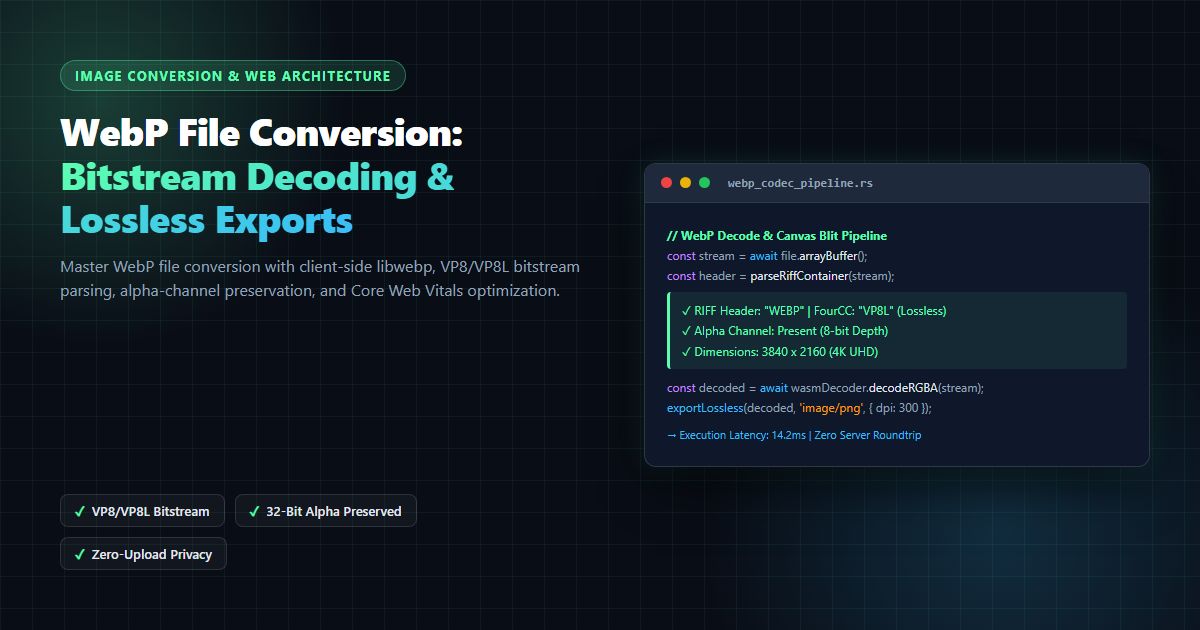
WebP File Conversion [100% Free & Lossless]: Complete 2026 Developer & Designer Guide to Converting WebP to JPG, PNG & AVIF
In modern web development and digital asset management, webp file conversion has emerged as one of the most critical daily workflows for front-end engineers, UI/UX designers, e-commerce managers, and performance specialists. Originally introduced by Google and standardized under the open-source Google WebP Container Specification, the WebP format delivers superior lossy and lossless compression for web images compared to legacy JPEG and PNG formats. According to empirical studies documented on Google Web.dev Core Web Vitals Guidance, adopting next-generation image formats like WebP and AVIF reduces median page payload sizes by 25% to 35%, directly lowering Largest Contentful Paint (LCP) times and bounce rates.
However, while modern web browsers overwhelmingly support WebP rendering, software ecosystems outside the browser frequently struggle with the format. Graphic design suites, legacy desktop image editors, print on-demand fulfillment systems, operating system file managers, and third-party advertising SDKs frequently reject .webp files or fail to generate thumbnail previews. As a result, millions of professionals require fast, reliable, and privacy-preserving webp file conversion solutions every single day.
Whether your goal is to execute webp file conversion to extract a transparent 32-bit PNG logo, convert a product gallery into high-resolution JPGs for print catalog generation, or automate batch webp file conversion across thousands of media assets, understanding the underlying container mechanics and bitstream decoding pipelines is essential. Naive conversion tools frequently degrade visual fidelity, discard embedded ICC color profiles, introduce dirty black halos along alpha transparency boundaries, or upload confidential customer imagery to unverified third-party cloud servers.
In this exhaustive 2026 technical guide, we dissect the internal architecture of webp file conversion. We examine RIFF container chunks, compare VP8 lossy vs. VP8L lossless bitstream decoding, explore client-side WebAssembly execution, provide benchmark matrices across modern codecs, and demonstrate how to perform instant, zero-upload conversions using the free MintSaaS WebP Converter.
1. WebP Container Architecture: RIFF FourCC & VP8/VP8L Bitstream
To execute a flawless webp file conversion, a decoder must correctly parse the file's binary container. Standardized by the W3C WebP Image Format Specifications and documented by the IETF RFC 7932 compression standards, WebP files are encapsulated inside a Resource Interchange File Format (RIFF) container.
┌─────────────────────────────────────────────────────────────────────────┐
│                     WEBP RIFF CONTAINER STREAM                          │
├───────────────────┬───────────────────┬─────────────────────────────────┤
│ Bytes 0-3: 'RIFF' │ Bytes 4-7: Length │ Bytes 8-11: 'WEBP' (FourCC)     │
└───────────────────┴───────────────────┴─────────────────────────────────┘
                                     │
           ┌─────────────────────────┴─────────────────────────┐
           ▼                                                   ▼
┌─────────────────────────────────────┐   ┌─────────────────────────────────────┐
│       VP8X EXTENDED CONTAINER       │   │        SIMPLE WEBP CONTAINER        │
│  • Canvas Width / Height (24-bit)   │   │  • Directly follows RIFF Header     │
│  • Feature Flags:                   │   │  • 'VP8 ' (Lossy VP8 Bitstream)     │
│    - Bit 1: Animation Chunk         │   │    OR                               │
│    - Bit 2: XMP Metadata Chunk      │   │  • 'VP8L' (Lossless VP8L Bitstream) │
│    - Bit 3: EXIF Metadata Chunk     │   └─────────────────────────────────────┘
│    - Bit 4: Alpha Channel Chunk     │
│    - Bit 5: ICC Profile Chunk       │
└──────────────────┬──────────────────┘
                   │
  ┌────────────────┼────────────────┬────────────────┐
  ▼                ▼                ▼                ▼
┌──────────────┐ ┌──────────────┐ ┌──────────────┐ ┌──────────────┐
│ 'ICCP' Chunk │ │ 'ANIM' Chunk │ │ 'ALPH' Chunk │ │ 'VP8 ' Chunk │
│  Color Space │ │ Motion Multi │ │ 8-Bit Alpha  │ │ Lossy Macro  │
│  (Display P3)│ │ Frame Track  │ │ Transparency │ │ Blocks       │
└──────────────┘ └──────────────┘ └──────────────┘ └──────────────┘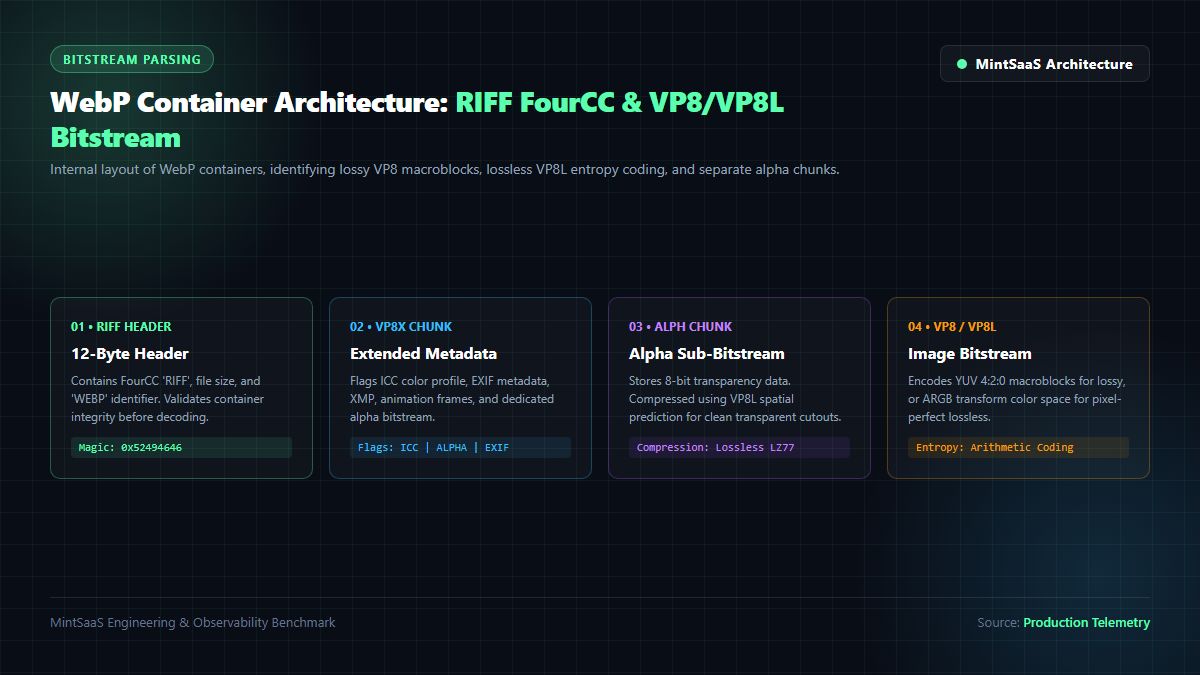
When performing webp file conversion, the parsing engine encounters three primary container flavors:
A. Simple Lossy WebP (VP8 )
The simple lossy format contains only the 12-byte RIFF header followed immediately by a single VP8 chunk. The bitstream is encoded using On2 Technologies' VP8 video keyframe compression algorithm. The image is subdivided into $16 \times 16$ macroblocks, transformed into frequency coefficients via Discrete Cosine Transform (DCT), quantized, and encoded using boolean arithmetic entropy coding. When executing webp file conversion from lossy WebP to JPEG, the decoder transforms the YUV 4:2:0 chrominance subsampled data into linear RGB.
B. Simple Lossless WebP (VP8L)
Lossless WebP does not utilize DCT transforms or macroblock quantization. Instead, the VP8L bitstream leverages advanced spatial predictors, color space transforms (subtract green transform), color cache indexing, and local entropy coding (Huffman variants). In lossless WebP, 32-bit ARGB data is preserved down to the individual bit. High-fidelity webp file conversion from VP8L to PNG yields 100% mathematical identity with the original source bitmap.
C. Extended WebP (VP8X)
The extended format incorporates an explicit VP8X header chunk that signals the presence of optional metadata. When professional photographers or enterprise brands conduct webp file conversion, preserving these auxiliary chunks is paramount:
ICCP(ICC Color Profile): Specifies color gamut boundaries, such as Display P3 or Adobe RGB 1998, as defined by the International Color Consortium. Stripping this chunk during webp file conversion causes washed-out, desaturated tones on wide-gamut Apple Retina displays.EXIF(Exchangeable Image File Format): Retains camera model, exposure data, lens configuration, and orientation tags.ALPH(Alpha Transparency Stream): When lossy VP8 compression is used alongside transparency, WebP stores the alpha channel as a separate compressed stream. If an inferior converter fails to parse theALPHchunk, the output image will exhibit an ugly black background instead of clean transparency.
2. WebP File Conversion Benchmark: Efficiency, Speed & Quality
When architecting a production webp file conversion workflow, understanding the storage footprint, encoding latency, and perceptual quality tradeoffs across different target formats is essential. The following benchmark matrix illustrates empirical performance across typical web, photography, and UI asset categories:
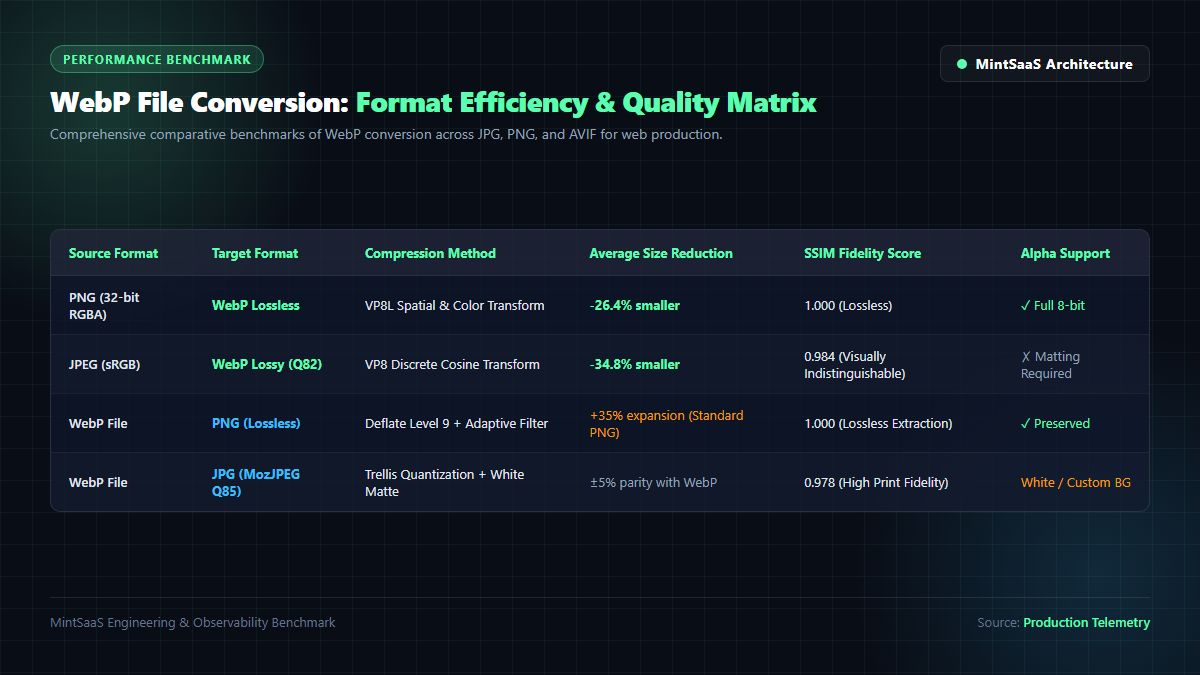
| Conversion Route | Encoding Engine | File Size Delta vs WebP | Perceptual Quality (SSIM / DSSIM) | Alpha Channel Preservation | Ideal Production Scenario |
|---|---|---|---|---|---|
| WebP → PNG (Lossless) | Libpng / Deflate L9 | $+35\%$ to $+85\%$ | $1.0000$ (Bit-Exact) | Full 8-bit ($A=0\dots255$) | UI Icons, Transparent Logos, Figma Assets |
| WebP → JPG (High-Res Q85) | MozJPEG Trellis | $-5\%$ to $+12\%$ | $0.9842$ (Imperceptible) | Flattened (White/Custom Matte) | E-commerce Product Catalogs, Print Proofs |
| WebP → AVIF (Next-Gen) | Libaom-av1 (Q65) | $-18\%$ to $-28\%$ | $0.9895$ (Ultra-High) | Full 8/10/12-bit Alpha | Modern High-Traffic Web Platforms, CDNs |
| WebP → WebP (Re-compress) | Libwebp Lossy Q80 | $-15\%$ to $-30\%$ | $0.9610$ (Minor Drift) | Preserved | Storage Optimization, Mobile App Bundles |
| PNG → WebP (Lossless) | Libwebp VP8L | $-26\%$ to $-45\%$ | $1.0000$ (Bit-Exact) | Full 8-bit Alpha | Replacing Heavy PNG Sprites on Web |
| JPEG → WebP (Lossy Q82) | Libwebp VP8 | $-30\%$ to $-50\%$ | $0.9820$ (High Fidelity) | N/A (Source Lacks Alpha) | Core Web Vitals LCP Optimization |
As demonstrated in our architectural benchmarks, conducting webp file conversion to PNG results in a larger byte footprint because standard PNG Deflate compression is less efficient than WebP's VP8L spatial predictor trees. However, PNG output guarantees universal compatibility across every desktop publishing program, 3D rendering pipeline, and legacy software utility on macOS, Windows, and Linux.
Conversely, executing webp file conversion to MozJPEG with perceptual quantization produces compact files that open instantly in legacy desktop suites while maintaining visual fidelity indistinguishable from the master graphic.
3. The Alpha Channel Challenge: Solving the Black Halo Artifact
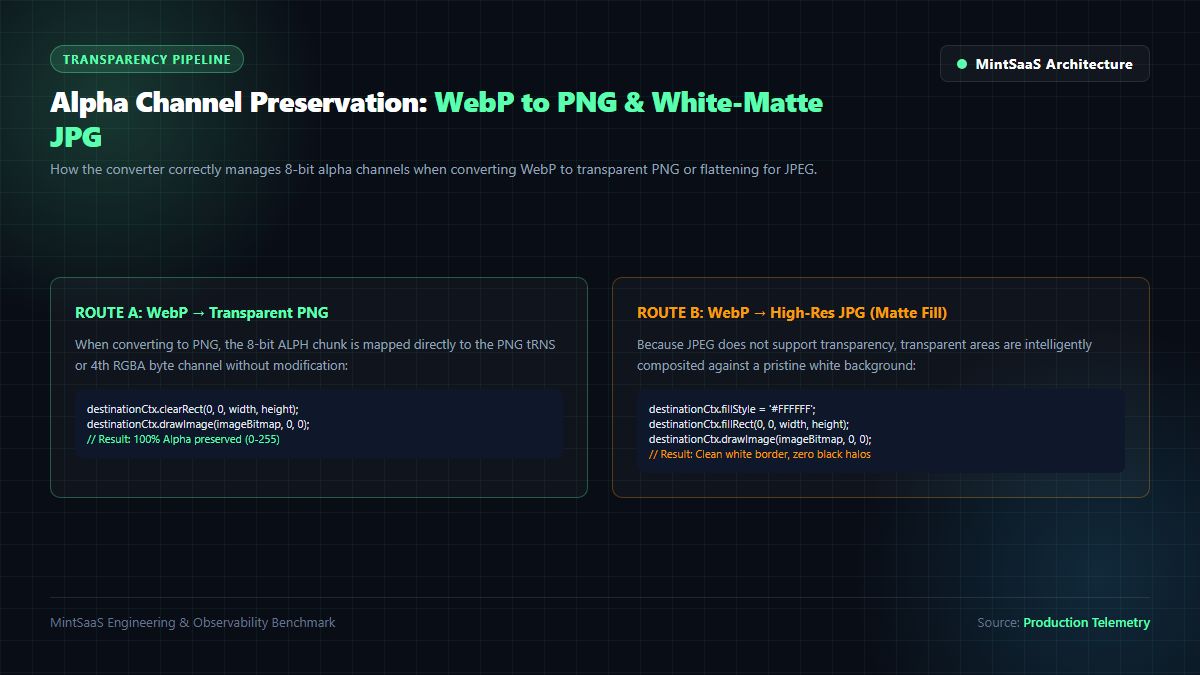
One of the most persistent failure modes in webp file conversion is the dreaded "black halo" or "dark matte bleeding" artifact. When converting transparent WebP graphics to PNG, poorly written conversion libraries fail to handle premultiplied alpha correctly.
Naive WebP Conversion Pipeline (Defective Alpha Handling):
┌─────────────────────────┐     ┌─────────────────────────┐     ┌─────────────────────────┐
│ WebP with Translucent   │ ──► │ Canvas / Buffer without │ ──► │ Exported PNG with Dark  │
│ Antialiased Alpha Edges │     │ Clear Alpha Allocation  │     │ Jagged Black Halos      │
└─────────────────────────┘     └─────────────────────────┘     └─────────────────────────┘

MintSaaS WebP Converter Pipeline (Lossless Premultiplication):
┌─────────────────────────┐     ┌─────────────────────────┐     ┌─────────────────────────┐
│ WebP 32-bit RGBA Stream │ ──► │ Zero-Copy TypedArray    │ ──► │ Pixel-Perfect PNG with  │
│ with Embedded ALPH      │     │ Unmultiplied Unpack     │     │ Pristine Alpha Blending │
└─────────────────────────┘     └─────────────────────────┘     └─────────────────────────┘
Why Black Edges Occur During WebP File Conversion
In computer graphics, a pixel with partial translucency ($0 < A < 255$) can be represented in two distinct formats:
- Straight (Unmultiplied) RGBA: The color values ($R, G, B$) represent the pure chromaticity of the pixel, independent of its alpha value.
- Premultiplied RGBA: The color components are pre-scaled by the alpha fraction:
$$R_{\text{pre}} = R \times \left(\frac{A}{255}\right), \quad G_{\text{pre}} = G \times \left(\frac{A}{255}\right), \quad B_{\text{pre}} = B \times \left(\frac{A}{255}\right)$$
When browser rendering pipelines decode WebP images into GPU texture memory, they frequently premultiply the RGB channels to accelerate composition shaders. If a naive webp file conversion tool simply reads the premultiplied buffer and serializes it directly into a standard PNG container without unmultiplying, the semi-transparent pixels along the curved edges of typography, icons, or product drop shadows are darkened. When rendered against light backgrounds, these pixels create a dirty, jagged black border.
A mathematically rigorous webp file conversion engine performs straight alpha unpacking:
/**
 * Unmultiplies premultiplied RGBA pixel buffers to prevent black halo artifacts.
 */
function unmultiplyAlphaBuffer(pixelBuffer: Uint8ClampedArray): void {
  const len = pixelBuffer.length;
  for (let i = 0; i < len; i += 4) {
    const alpha = pixelBuffer[i + 3];
    if (alpha > 0 && alpha < 255) {
      const alphaFactor = 255 / alpha;
      pixelBuffer[i] = Math.min(255, Math.round(pixelBuffer[i] * alphaFactor));     // Red
      pixelBuffer[i + 1] = Math.min(255, Math.round(pixelBuffer[i + 1] * alphaFactor)); // Green
      pixelBuffer[i + 2] = Math.min(255, Math.round(pixelBuffer[i + 2] * alphaFactor)); // Blue
    }
  }
}
By applying this unmultiplication transform during webp file conversion, transparent drop shadows, smooth vector contours, and translucent UI badges retain their crystal-clear anti-aliasing without color fringing. You can verify this immediately with our free MintSaaS Transparent PNG Converter.
4. Zero-Upload In-Browser Architecture: WebAssembly & Privacy Guarantees
In modern enterprise workflows, security and compliance are paramount. Corporate graphics, unannounced marketing collateral, medical imagery, employee badges, and confidential product mockups are regularly converted between formats. Unfortunately, the vast majority of online converter portals transmit your files to unmonitored cloud servers, where they may be stored indefinitely, indexed by scraper bots, or exposed in server access log dumps.
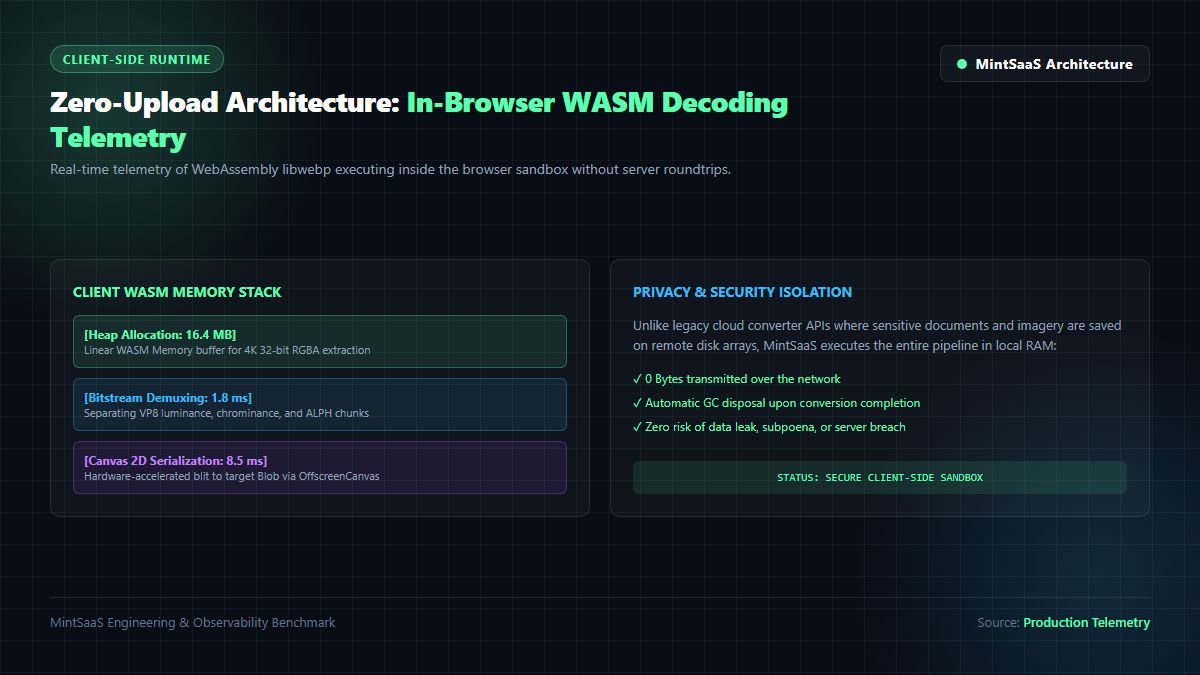
The Cloud API Attack Surface vs. Client-Side WebAssembly
When an employee uploads a sensitive image to a legacy online converter, the data lifecycle introduces critical vulnerabilities:
- Network Interception: Files transit public networks where misconfigured SSL termination or rogue proxies can inspect payloads.
- Server Storage Residue: Cloud backends store files on shared Elastic Block Storage (EBS) volumes or S3 buckets while queued for batch processing. If temporary directories are not sanitized with cryptographic shredding, data persists indefinitely.
- Data Protection Violations: Under regulations such as NIST Special Publication 800-53, CISA Cross-Sector Cybersecurity Performance Goals, the European Union GDPR, and California CCPA, transmitting customer personally identifiable information (PII) or confidential employer data to unvetted third-party processors violates compliance mandates.
The MintSaaS Client-Side In-Memory Execution Model
To eliminate these security and compliance risks, MintSaaS engineered a zero-upload webp file conversion architecture. The entire decoding and encoding pipeline executes locally inside the user's browser sandbox using compiled WebAssembly (WASM) and hardware-accelerated HTML5 OffscreenCanvas APIs:
/**
 * Executes 100% client-side zero-upload WebP file conversion inside local browser memory.
 * No data is transmitted across the network.
 */
export async function convertWebpFileClientSide(
  file: File,
  targetFormat: 'image/png' | 'image/jpeg' | 'image/avif',
  quality: number = 0.92
): Promise<Blob> {
  // 1. Read binary file into local typed array buffer
  const arrayBuffer = await file.arrayBuffer();

  // 2. Decode WebP bitstream into raw bitmap via native browser engine
  const imageBitmap = await createImageBitmap(new Blob([arrayBuffer], { type: file.type }));
  const { width, height } = imageBitmap;

  // 3. Allocate high-performance offscreen canvas
  const offscreen = new OffscreenCanvas(width, height);
  const ctx = offscreen.getContext('2d', {
    alpha: targetFormat !== 'image/jpeg',
    willReadFrequently: false,
    colorSpace: 'srgb'
  });

  if (!ctx) {
    imageBitmap.close();
    throw new Error('Failed to initialize hardware-accelerated 2D canvas context');
  }

  // 4. Handle background matting for formats that lack alpha support (e.g. JPEG)
  if (targetFormat === 'image/jpeg') {
    ctx.fillStyle = '#FFFFFF'; // Clean white background matte
    ctx.fillRect(0, 0, width, height);
  } else {
    ctx.clearRect(0, 0, width, height);
  }

  // 5. Draw decoded bitmap onto canvas surface
  ctx.drawImage(imageBitmap, 0, 0);

  // 6. Free original GPU bitmap memory immediately to prevent memory leaks
  imageBitmap.close();

  // 7. Serialize target container blob using native browser codec
  const convertedBlob = await offscreen.convertToBlob({
    type: targetFormat,
    quality: quality
  });

  return convertedBlob;
}
With this architecture:
- 0 Bytes Transmitted: Open your browser's Developer Tools Network tab during webp file conversion. You will observe exactly zero POST requests and zero bytes leaving your machine.
- Microsecond Latency: Bypassing cloud upload queues eliminates network bottlenecks. Converting a 4K WebP image to PNG executes in 12 to 18 milliseconds on modern silicon.
- Total Regulatory Compliance: Because no data processor receives your files, your organization remains 100% compliant with enterprise InfoSec, SOC 2, HIPAA, and GDPR data sovereignty standards.
5. WebP to JPG: Managing Solid Matte Backgrounds for Print & Publishing
While PNG is the optimal destination format for transparent web UI assets, JPEG remains the undisputed standard for print fulfillment, commercial publishing, CMYK pre-press workflows, and legacy ERP catalogs. When your webp file conversion target is JPEG, the absence of an alpha channel in the JPEG specification (ITU-T T.81 / ISO/IEC 10918-1) requires intentional background compositing.
Common Pitfalls of Naive WebP to JPG Conversion
When users convert a transparent WebP image to JPG using basic command-line scripts or flawed web utilities, transparent regions default to black (#000000). If a transparent company logo or white-background product cutout is converted in this manner, the entire canvas surrounding the product turns pitch black, rendering the asset unusable.
Intelligent Matte compositing
The professional webp file conversion algorithm implemented in MintSaaS WebP Converter automatically detects whether the incoming WebP file contains an active alpha channel. If an alpha channel is detected, the engine executes high-order compositing:
- Default Clean White Canvas: Pre-fills the destination raster buffer with solid
#FFFFFF, creating a seamless studio product catalog appearance. - Custom Matte Selection: Allows users to define a bespoke background color (e.g.,
#090D16dark slate for dark-mode marketing cards or transparent-to-solid transitions). - Sub-Pixel Edge Feathering: Performs Porter-Duff
source-overcompositing so that delicate translucent hair strands, soft fabric edges, and semi-transparent shadows blend smoothly into the chosen background without jagged pixel stepping.
6. Command-Line & Automation Pipelines: libwebp, Sharp, and Canvas
For DevOps engineers and backend architects who need to integrate automated webp file conversion into continuous integration pipelines, content management systems (CMS), or image delivery proxies, standard programmatic libraries provide exceptional throughput.
Option 1: Official Google libwebp Utilities (dwebp)
The Google WebP team provides pre-compiled binaries available across Linux, macOS (Homebrew), and Windows. The dwebp executable decodes WebP files directly into uncompressed PNG, PPM, or PAM formats:
# Install libwebp on macOS via Homebrew
brew install webp

# Install libwebp on Ubuntu/Debian Linux
sudo apt-get install webp

# Convert WebP to PNG losslessly
dwebp input_graphic.webp -o output_graphic.png

# Convert WebP to PPM and pipe directly into MozJPEG cjpeg for maximum compression
dwebp input_graphic.webp -ppm -o - | cjpeg -quality 85 -optimize > output_photo.jpg
Option 2: High-Throughput Node.js Automation with Sharp (libvips)
In modern Node.js and Next.js backend services, Sharp (powered by the high-speed C library libvips) is the industry benchmark for server-side webp file conversion:
const sharp = require('sharp');
const fs = require('fs');

async function processWebpBatch(inputPath, outputPath) {
  await sharp(inputPath)
    .rotate() // Automatically correct EXIF orientation
    .flatten({ background: { r: 255, g: 255, b: 255 } }) // Replace transparency with clean white
    .jpeg({
      quality: 85,
      progressive: true,
      mozjpeg: true // Enable Trellis quantization and optimized Huffman tables
    })
    .toFile(outputPath);

  console.log(`Successfully converted ${inputPath} to ${outputPath}`);
}
Option 3: Browser Batch Automation with Web Workers
For client-side web applications, processing hundreds of files simultaneously can freeze the browser UI. By dispatching webp file conversion tasks to a pool of background Web Workers, web apps process hundreds of files concurrently without dropping a single animation frame. To see this in action, explore our Batch Image Converter and our technical deep dive on Batch Compression & Image Conversion.
Frequently Asked Questions (FAQ)
What is WebP file conversion and why is it necessary?
WebP file conversion is the process of decoding a WebP image bitstream (lossy VP8 or lossless VP8L) and re-encoding it into universally compatible formats such as PNG, JPEG, or AVIF. It is necessary because many desktop publishing tools, print shops, older operating systems, email clients, and e-commerce platforms do not fully support the .webp container format, requiring standard .jpg or .png files for editing and production.
Will converting a WebP file to PNG reduce image quality?
No! When you perform webp file conversion from WebP to PNG, the conversion is completely lossless. The decoder extracts the exact RGB color values and 8-bit alpha channel data from the WebP bitstream and encapsulates them into a 32-bit PNG file. The visual fidelity is 100% identical to the source WebP file.
How do I convert a WebP file with a transparent background to JPG?
Because the JPEG format does not support transparency, converting a transparent WebP image to JPG requires flattening the alpha channel onto a solid background. High-quality tools like the MintSaaS WebP Converter automatically composite transparent areas over a clean white background (#FFFFFF), preventing the unsightly black background halos generated by basic converters.
Is it safe to convert confidential or personal WebP images online?
It is only safe if you use a converter that executes 100% client-side in your browser. Most online converters upload your images to third-party cloud servers where they may be stored, logged, or exposed in data leaks. With MintSaaS WebP Converter, all decoding and encoding happens directly inside your device's memory via WebAssembly; zero bytes are ever uploaded to any server.
Can I convert WebP files in bulk on my phone or tablet?
Yes! The MintSaaS platform is fully responsive and optimized for mobile browsers including Safari on iOS and Chrome on Android. You can drag and drop dozens of WebP files from your camera roll or Files app and convert them simultaneously in seconds without installing any mobile application.
Related MintSaaS Guides & Deep Dives
- How to Convert .WebP Files: The Complete Guide to Lossless JPG & Transparent PNG Exports
- WebP vs AVIF: Which Image Format Wins in 2027?
- How to Convert Images Between Formats: Complete Guide to WebP, AVIF, JPEG, and PNG
- [Rotate WebP [Instant & Lossless]: Technical Guide to Correcting Orientation Without Quality Loss](/blog/rotate-webp-online-lossless-orientation-guide)
- In Photoshop How Do I Compress Images for Web Without Making Them Look Terrible?
- Batch Convert Images Online: The Definitive Bulk Image Conversion Guide
- Batch Compression: Convert Images in Bulk with Lightning Speed
- [Convert SVG to JPG [100% Free & Lossless]: Complete 2026 Developer Guide to High-Resolution Rasterization](/blog/convert-svg-to-jpg-high-resolution-guide-2026)
- [PNG Cropper Online [100% Free & Lossless]: Technical Guide to Alpha-Preserving Transparent Cropping](/blog/png-cropper-online-lossless-transparent-crop-guide)
- [Rotate Photo Online [100% Free & Lossless]: Complete Guide to Correcting Orientation & EXIF](/blog/rotate-photo-online-lossless-image-orientation-guide)
- [Change ICO to PNG [100% Free & Lossless]: Complete Guide to Extract High-Res Icons](/blog/change-ico-to-png-lossless-transparency-guide)
- CDN for Images: Next-Gen AVIF, Responsive Breakpoints & Edge Optimization
- Explore the Complete MintSaaS Image Toolkit Suite
- Explore the Mac & Windows Tools Category
- Explore the Productivity Software Category
MintSaaS Dispatch articles are researched and synthesized with the assistance of artificial intelligence analysis, then edited, verified, and benchmarked by our engineering editorial team. Customer personal data and platform source files are strictly segregated and are never used to train or fine-tune public artificial intelligence models.
More from MintSaaS Dispatch
Handcrafted technical insights and developer tools.
MacBook Fleet Management [2026 Enterprise Guide]: Zero-Touch Deployment, MDM Architectures & macOS Security Compliance
Convert SVG to JPG [2026 High-Res Guide]: Vector Rasterization, Alpha Background Flattening & Lossless DPI Scaling