MacBook Fleet Management [2026 Enterprise Guide]: Zero-Touch Deployment, MDM Architectures & macOS Security Compliance
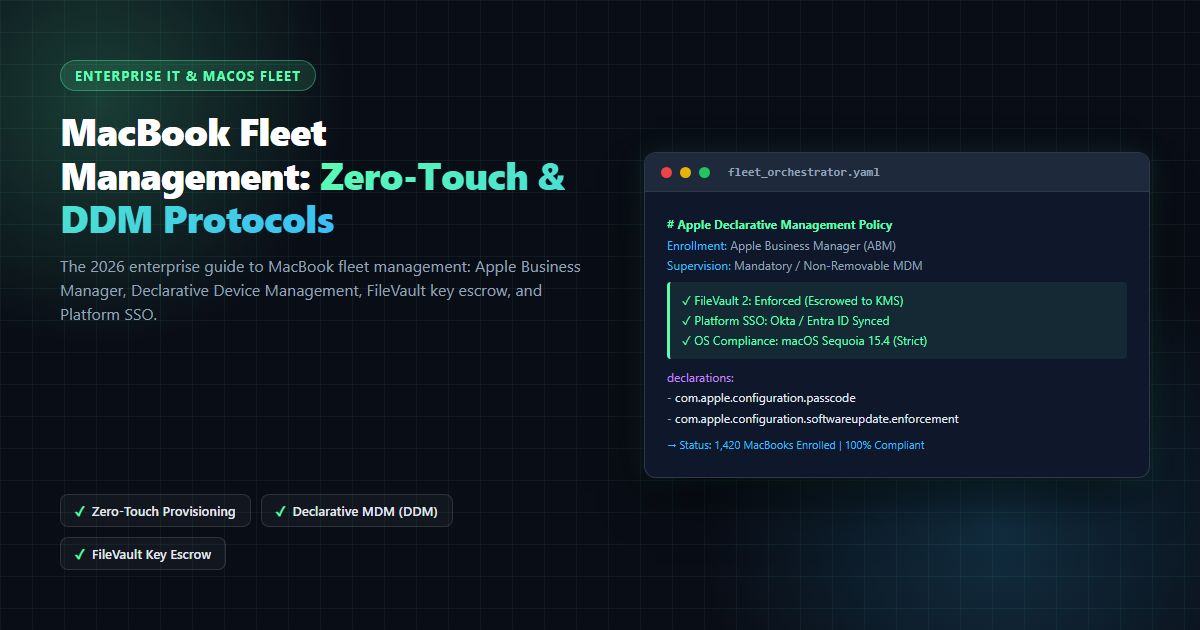
The comprehensive 2026 enterprise guide to MacBook fleet management: Apple Business Manager, Declarative Device Management (DDM), FileVault 2 key escrow, and Platform SSO.
MacBook Fleet Management [2026 Enterprise Guide]: Zero-Touch Deployment, MDM Architectures & macOS Security Compliance
In enterprise IT infrastructure, macbook fleet management has undergone a seismic paradigm shift over the past several years. Once relegated to small pockets of creative agencies or executive suites, Apple hardware now powers mission-critical engineering, product development, data science, and corporate operations across the Fortune 500. According to enterprise workplace reports cited by Apple at Work Enterprise Documentation, enterprise macOS adoption has expanded by over 60% since 2022, driven by Apple Silicon (M-series) energy efficiency, developer productivity preferences, and lower Total Cost of Ownership (TCO).
However, managing hundreds or thousands of distributed laptops requires sophisticated systems architecture. Enterprise IT directors, CISOs, and Systems Engineers cannot treat macbook fleet management as a secondary afterthought or attempt to wedge macOS endpoints into legacy Active Directory Group Policy Objects (GPO). The contemporary threat landscape, characterized by sophisticated identity attacks, credential stuffing, and supply chain compromises documented in CISA Known Exploited Vulnerabilities Catalogs and NIST Guidelines on Media Sanitization SP 800-88, demands an automated, cryptographically verifiable management lifecycle.
Whether your organization is establishing an initial mac deployment for company operations, evaluating the best macbook management software for 5,000 endpoints, or structuring outsourced managed mac support across global time zones, mastering Apple's modern device management framework is non-negotiable.
In this comprehensive 2026 engineering guide, we dissect the complete architecture of modern macbook fleet management. We analyze Apple Business Manager (ABM), Automated Device Enrollment (ADE), Declarative Device Management (DDM) state machines, FileVault 2 institutional key escrow, Platform Single Sign-On (Platform SSO), and CIS compliance benchmarks.
1. Zero-Touch Provisioning: Apple Business Manager to MDM Lifecycle
The foundational cornerstone of enterprise macbook fleet management is zero-touch deployment. Historically, IT staff spent 2 to 4 hours manually unboxing every new laptop, creating local administrator accounts, downloading disk images, running shell configuration scripts, and applying security profiles before shipping hardware to employees.
Today, Apple's Automated Device Enrollment (ADE)—orchestrated via Apple Business Manager and standardized under Apple Platform Deployment Guides—eliminates physical IT touch entirely.
┌─────────────────────────────────────────────────────────────────────────┐
│              ZERO-TOUCH AUTOMATED DEVICE ENROLLMENT (ADE)               │
├─────────────────────────────────────────────────────────────────────────┤
│ 1. Procurement: Apple/Reseller binds MacBook Serial Number to ABM Org ID│
│ 2. ABM Portal automatically assigns device to Enterprise MDM Server     │
│ 3. Factory-sealed MacBook ships directly to remote employee residence   │
│ 4. Employee unboxes, powers on, and connects to local Wi-Fi             │
│ 5. Setup Assistant contacts Apple APNs & pulls Enterprise MDM Payload   │
│ 6. Mandatory, non-removable MDM profile locked into Secure Enclave      │
│ 7. Platform SSO provisions local account matching Okta / Entra ID       │
│ 8. DDM daemon enforces FileVault 2 encryption, EDR agents, & apps       │
└─────────────────────────────────────────────────────────────────────────┘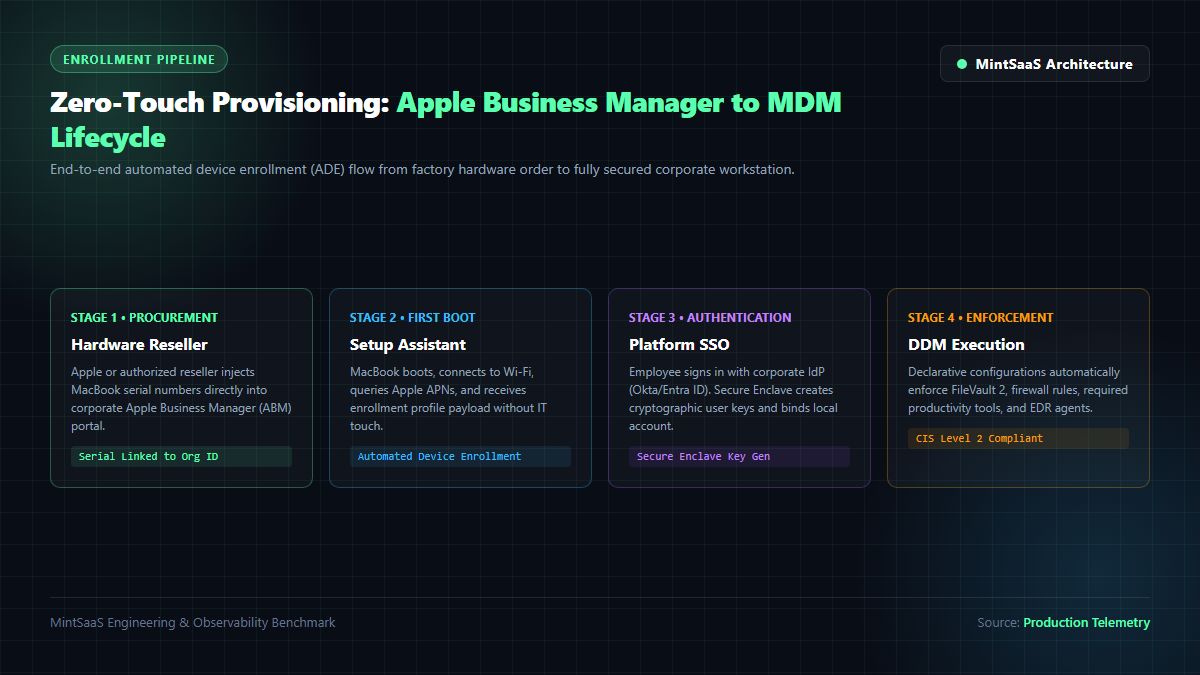
Step-by-Step Architecture of Zero-Touch MacBook Deployment
When executing a modern mac deployment for company fleets, the enrollment sequence follows a deterministic cryptographic pipeline:
- Hardware Serial Binding: During procurement, the authorized enterprise reseller (or Apple direct) registers the unique MacBook serial number into the organization's Apple Business Manager tenant. This binding establishes an immutable root of trust tied to Apple's cryptographic certificate hierarchy.
- Apple Push Notification service (APNs) Handshake: Upon initial boot, the macOS Setup Assistant reaches out to
albert.apple.comandpush.apple.comover outbound TLS port 5223. The machine submits its hardware UUID and serial number. - Enrollment Profile Delivery: Apple servers verify the device ownership and redirect the MacBook to the enterprise Mobile Device Management (MDM) server URL. The MDM server returns a digitally signed enrollment profile (
com.apple.mdm). - Mandatory Supervision: Because the serial was registered in ABM prior to boot, macOS flags the operating system as Supervised. This status prevents standard users from removing the management profile, even if they possess local administrative credentials.
- Bootstrap Token Generation: The macOS kernel generates a unique cryptographic Bootstrap Token, storing it in the Secure Enclave and escrowing it to the MDM server. This token allows MDM to authorize kernel updates, FileVault enablement, and cryptographic account actions without requiring manual password prompts.
For IT departments transitioning away from legacy manual setups, adopting automated macbook fleet management reduces device onboarding time from hours to under 8 minutes per machine while guaranteeing that no rogue laptop can connect to internal networks without compliance enforcement.
2. Declarative Device Management (DDM) vs. Legacy MDM
For over a decade, enterprise macbook fleet management relied on reactive, server-driven polling. The MDM server sent an APNs push notification; the MacBook woke up, queried the server for pending command queues (InstallProfile, DeviceInformation, SecurityInfo), processed commands sequentially, and returned status responses.
While functional, this legacy model introduced severe architectural bottlenecks. Endpoints frequently suffered from high command latency, battery drain from polling loops, and configuration drift during offline periods.
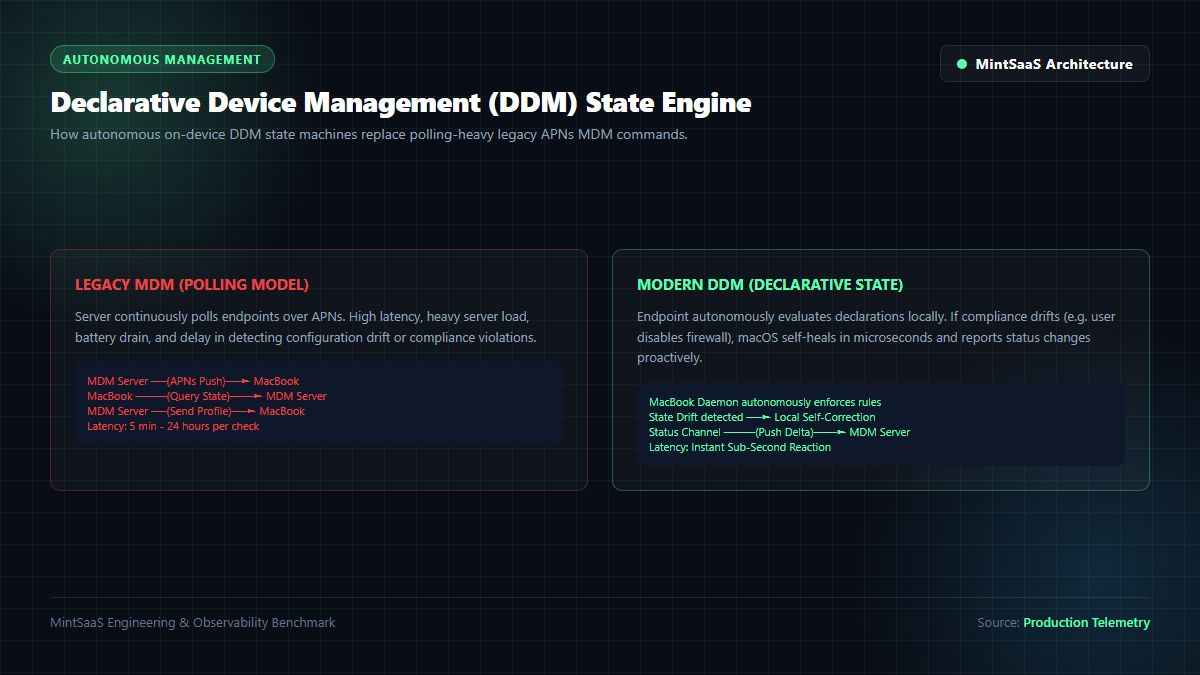
The DDM Autonomous State Machine
Introduced by Apple and expanded across macOS Sonoma and macOS Sequoia, Declarative Device Management (DDM) flips the management model from reactive polling to autonomous, on-device state evaluation. Documented in Apple Developer Declarative Management Documentation, DDM introduces four core declaration types:
┌─────────────────────────────────────────────────────────────────────────┐
│              DECLARATIVE DEVICE MANAGEMENT (DDM) DATA MODEL             │
├───────────────────┬─────────────────────────────────────────────────────┤
│ Declaration Type  │ Enterprise Fleet Function & Lifecycle Behavior     │
├───────────────────┼─────────────────────────────────────────────────────┤
│ 1. Configurations │ Declares desired system state (e.g. Passcode rules, │
│                   │ Wi-Fi 802.1X certificates, FileVault policy).       │
├───────────────────┼─────────────────────────────────────────────────────┤
│ 2. Assets         │ Reference data required by configurations (e.g.     │
│                   │ SCEP identity certificates, user credentials, URLs).│
├───────────────────┼─────────────────────────────────────────────────────┤
│ 3. Activations    │ Boolean logic and predicate engines determining     │
│                   │ when configurations apply (e.g. OS version >= 15.2).│
├───────────────────┼─────────────────────────────────────────────────────┤
│ 4. Management     │ Declares server capabilities, state polling sync,   │
│                   │ and telemetry reporting intervals.                  │
└───────────────────┴─────────────────────────────────────────────────────┘
Why DDM Revolutionizes MacBook Fleet Management
- Self-Healing Endpoints: In legacy MDM, if an employee temporarily disabled a required security profile or firewall rule while working offline on an airplane, the violation went unnoticed until the next server check-in. Under DDM, the local macOS
dmddaemon continuously evaluates declarations. If a user attempts to disable FileVault or remove security settings, macOS instantly self-heals in sub-milliseconds without server communication. - Proactive Status Channels: Instead of the MDM server repeatedly polling for compliance, the client pushes delta updates over an asynchronous status channel only when state changes occur (e.g., when a software update completes or disk encryption status shifts).
- Autonomous Software Update Enforcement: DDM introduces declarative software updates. IT administrators can define an absolute deadline timestamp (e.g.,
2026-11-15T18:00:00Z). The MacBook autonomously downloads the delta installer in the background, warns the employee with non-intrusive local notifications, and automatically reboots into the updated OS when the deadline expires.
3. Enterprise MDM Comparison: Jamf Pro vs. Kandji vs. Microsoft Intune
Selecting the optimal macbook management software represents one of the most substantial infrastructure investments an enterprise makes. While numerous vendors claim Apple compatibility, their architectural capabilities, update speeds, and administrative overhead diverge dramatically.
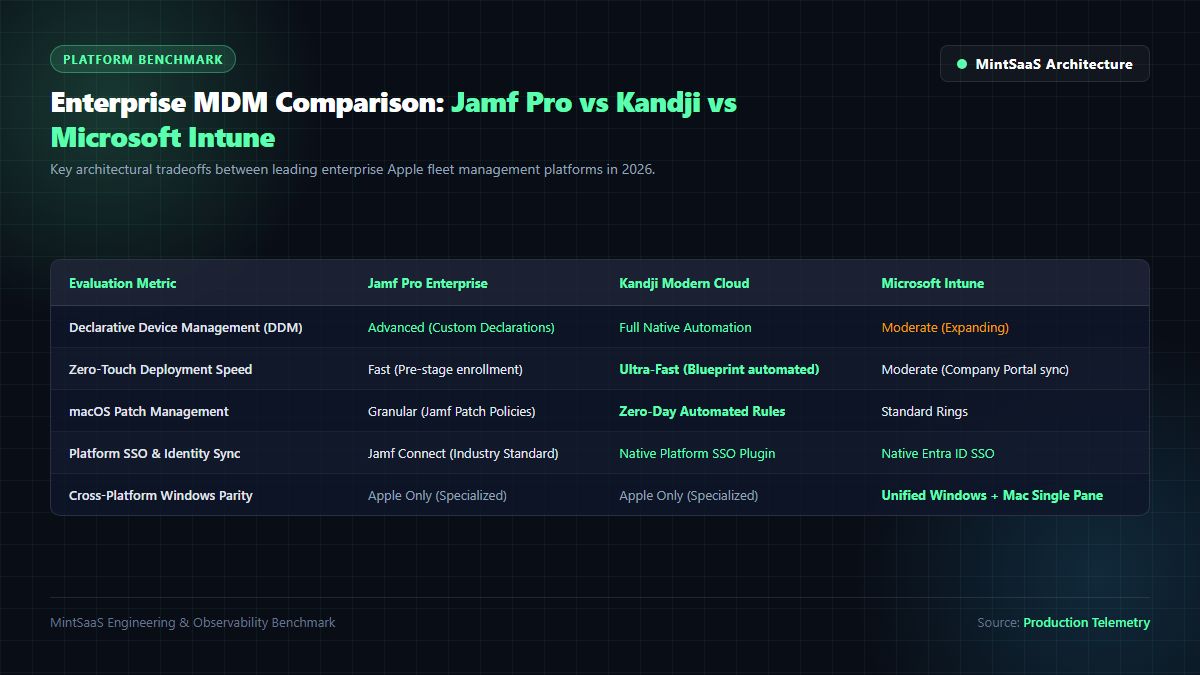
| Architecture Metric | Jamf Pro Enterprise | Kandji Modern Cloud | Microsoft Intune |
|---|---|---|---|
| Primary Platform Focus | Apple Only (macOS, iOS, iPadOS) | Apple Only (macOS, iOS, iPadOS) | Cross-Platform (Windows, Mac, Linux) |
| DDM Implementation Depth | Advanced (Custom JSON declarations) | Native Automated (Pre-built blueprints) | Expanding (Standard declarations) |
| Zero-Day macOS Support | Guaranteed Same-Day | Guaranteed Same-Day | Moderate (Typically 2-6 week delay) |
| Scripting & Extensibility | Unrestricted (Bash, Python, Swift, APIs) | Blueprint Scripts & Auto-Remediation | Shell Scripts (10-minute timeout limits) |
| Identity / Platform SSO | Jamf Connect (Pioneer) | Native Platform SSO Integration | Native Entra ID Integration |
| Fleet Visibility & Reporting | Advanced Smart Groups & Extension Attributes | Real-time Device Activity Telemetry | Standard Graph API & Log Analytics |
| Ideal Deployment Fit | Large Enterprise Apple-First Fleets (2k+ Macs) | Fast-Growing Tech SaaS & Mid-Market | Windows-Heavy Enterprises Seeking Single Pane |
Detailed Architecture Analysis of Leading Platforms
1. Jamf Pro: The Enterprise Standard
Jamf Pro remains the gold standard for dedicated Apple macbook fleet management. Its architecture supports granular extension attributes, complex API webhooks, and the Jamf Binary agent (/usr/local/jamf/bin/jamf), which executes alongside Apple's native MDM daemon. This hybrid approach allows IT teams to trigger low-level root scripts, custom inventory collection, and self-service application catalog management. For organizations managing strict compliance frameworks (e.g., FINRA, FedRAMP), Jamf Pro provides unparalleled audit depth.
2. Kandji: The Modern Automated Cloud
Kandji was engineered from the ground up to eliminate script maintenance through automated "Blueprints" and continuous compliance enforcement. Its proprietary macOS Agent (kandji-cli) automatically scans endpoints against CIS (Center for Internet Security) benchmarks, self-correcting drift across over 150 operating system parameters. For high-growth SaaS organizations seeking streamlined macbook management software without hiring full-time Jamf administrators, Kandji offers exceptional operational velocity.
3. Microsoft Intune: The Unified Enterprise Consolidator
For traditional global corporations operating tens of thousands of Windows laptops alongside a growing fleet of 1,000 to 5,000 MacBooks, running two separate MDM tools creates organizational friction. Microsoft Intune has invested heavily in closing the macOS gap, incorporating Apple Automated Device Enrollment, Declarative Device Management, and native integration with Microsoft Entra ID. While Intune lacks the immediate zero-day nuance of dedicated Apple-only tools, its ability to unify endpoint telemetry into Microsoft Defender for Endpoint and Conditional Access policies makes it an attractive consolidation option.
To evaluate broader systems software architectures and automation frameworks across operating systems, review our analysis of Best Systems Software for Small Business in the United States and What Autonomous Endpoint Management Looks Like for a Mixed Windows & Mac Fleet.
4. Hardware-Backed Encryption: FileVault 2 & Secure Enclave Key Escrow
Data protection is the foremost priority in enterprise macbook fleet management. A lost or stolen company laptop containing unencrypted proprietary intellectual property, employee records, or API credentials can result in millions of dollars in regulatory fines and brand damage.
Under the NIST Computer Security Resource Center SP 800-111 (Guide to Storage Encryption), mobile endpoint storage must enforce cryptographic protection at rest.
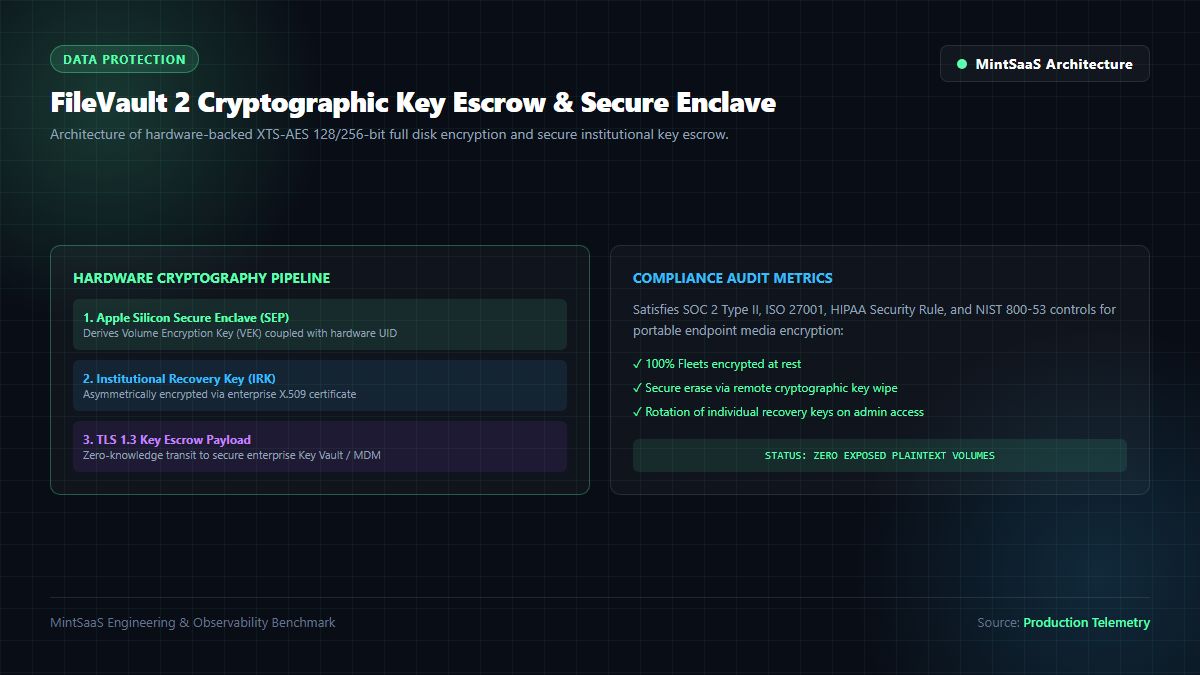
FileVault 2 Cryptographic Architecture on Apple Silicon
On modern Apple Silicon (M1, M2, M3, M4) hardware, FileVault 2 disk encryption is deeply coupled with the hardware Secure Enclave Processor (SEP):
- Dedicated AES Hardware Engine: The Apple Silicon System-on-Chip (SoC) contains a dedicated in-line cryptographic hardware engine that encrypts and decrypts flash storage blocks in real time with zero CPU performance penalty.
- Volume Encryption Key (VEK): The storage volume is encrypted using an XTS-AES 128-bit or 256-bit key. The VEK is never stored in plaintext on disk; it is wrapped (encrypted) by a key derived from the user's password combined with a hardware-unique key embedded into the Secure Enclave during chip fabrication.
- Institutional Recovery Key (IRK) vs. Personal Recovery Key (PRK): In an enterprise macbook fleet management deployment, individual users must not hold the sole recovery key. If an employee departs abruptly or forgets their passphrase, IT administrators must possess a secure recovery path.
Automating Key Escrow via MDM Configuration Profiles
Using the com.apple.MCX.FileVault2 payload, your macbook management software enforces FileVault activation upon initial login and securely escrows the Personal Recovery Key back to the MDM database over an encrypted TLS 1.3 channel:
<?xml version="1.0" encoding="UTF-8"?>
<!DOCTYPE plist PUBLIC "-//Apple//DTD PLIST 1.0//EN" "http://www.apple.com/DTDs/PropertyList-1.0.dtd">
<plist version="1.0">
<dict>
    <key>PayloadType</key>
    <string>com.apple.MCX.FileVault2</string>
    <key>PayloadVersion</key>
    <integer>1</integer>
    <key>PayloadIdentifier</key>
    <string>com.mintsaas.fleet.filevault</string>
    <key>PayloadUUID</key>
    <string>a1b2c3d4-e5f6-7a8b-9c0d-1e2f3a4b5c6d</string>
    <key>Enable</key>
    <string>On</string>
    <key>Defer</key>
    <true/>
    <key>DeferForceAtUserLoginMaxBypassAttempts</key>
    <integer>0</integer>
    <key>ShowRecoveryKey</key>
    <false/>
    <key>EscrowCertificate</key>
    <data><!-- Base64 Encoded Enterprise X.509 Certificate --></data>
</dict>
</plist>
By configuring DeferForceAtUserLoginMaxBypassAttempts = 0, the employee cannot dismiss the FileVault setup dialog. Upon their first login, macOS enables disk encryption in the background, generates a PRK, encrypts the key with the enterprise public certificate, transmits the payload to MDM, and securely wipes the plaintext recovery key from volatile system memory.
5. Identity Integration: Platform Single Sign-On (Platform SSO)
Historically, binding MacBooks to enterprise identity providers required fragile active directory domain joins (dsconfigad), which caused mobile keychain desynchronization, broken kerberos tickets, and account lockouts whenever remote employees changed passwords outside the corporate VPN.
In modern macbook fleet management, Apple resolved this architectural flaw with Platform Single Sign-On (Platform SSO), standardized under macOS 13+ and expanded in macOS Sequoia.
┌─────────────────────────────────────────────────────────────────────────┐
│                      PLATFORM SINGLE SIGN-ON (PSSO)                     │
├─────────────────────────────────────────────────────────────────────────┤
│ 1. Identity Provider: Okta, Microsoft Entra ID, or PingFederate         │
│ 2. Authentication Protocol: OpenID Connect (OIDC) / OAuth 2.0 PKCE      │
│ 3. Secure Enclave Integration: Hardware-bound cryptographic user key    │
│ 4. Single Sign-On Scope: FileVault unlock, Touch ID, Safari, Apps       │
└─────────────────────────────────────────────────────────────────────────┘
How Platform SSO Operates
- Cloud Identity as Single Source of Truth: The MacBook no longer joins an LDAP or Active Directory domain. Instead, the MDM deploys an Extensible Single Sign-On configuration payload (
com.apple.extensiblesso). - Secure Enclave Cryptographic Binding: During enrollment, the employee signs in using corporate credentials and multi-factor authentication (MFA/FIDO2). The macOS Secure Enclave generates an asymmetric key pair. The public key is registered with the Cloud IdP (Okta or Entra ID).
- Synchronized Password & Biometrics: When an employee updates their corporate password in Okta, Platform SSO intercepts the change and synchronizes the local macOS account password automatically. The user can unlock their MacBook with Touch ID, which unlocks their corporate SSO session across Safari, Slack, Google Workspace, and Microsoft 365 simultaneously.
6. CIS macOS Benchmarks & Security Compliance Automation
To satisfy SOC 2 Type II, ISO 27001, FedRAMP, and HIPAA security audits, enterprise macbook fleet management must demonstrably enforce hardened configuration standards. The industry authority on operating system hardening is the Center for Internet Security (CIS) Apple macOS Benchmark.
The CIS benchmark defines over 100 specific technical controls. A modern mac deployment for company fleets enforces these controls declaratively:
#!/bin/bash
# Enterprise macOS Compliance Verification Script
# Verifies critical CIS Benchmark controls across fleet endpoints

echo "--- MintSaaS Fleet Compliance Audit ---"

# 1. Verify FileVault 2 Status (CIS 2.5.1)
FV_STATUS=$(fdesetup status | grep -c "FileVault is On.")
if [ "$FV_STATUS" -eq 1 ]; then
  echo "✓ [PASS] FileVault 2 Full Disk Encryption is Active"
else
  echo "✗ [FAIL] FileVault 2 is Inactive! Triggering DDM Remediation..."
fi

# 2. Verify Gatekeeper Execution Security (CIS 2.5.2)
GK_STATUS=$(spctl --status | grep -c "assessments enabled")
if [ "$GK_STATUS" -eq 1 ]; then
  echo "✓ [PASS] Apple Gatekeeper Code Signing Enforcement is Enabled"
else
  echo "✗ [FAIL] Gatekeeper Disabled! Enabling spctl immediately..."
  spctl --master-enable
fi

# 3. Verify Remote Apple Events are Disabled (CIS 2.4.14)
RAE_STATUS=$(systemsetup -getremoteappleevents | grep -c "Off")
if [ "$RAE_STATUS" -eq 1 ]; then
  echo "✓ [PASS] Remote Apple Events Disabled"
else
  echo "✗ [FAIL] Remote Apple Events Enabled! Disabling..."
  systemsetup -setremoteappleevents off
fi

# 4. Verify System Integrity Protection (SIP)
SIP_STATUS=$(csrutil status | grep -c "enabled")
if [ "$SIP_STATUS" -eq 1 ]; then
  echo "✓ [PASS] System Integrity Protection (SIP) Enforced"
else
  echo "✗ [CRITICAL] System Integrity Protection is Disabled!"
fi
Essential CIS Controls Every MacBook Fleet Must Enforce
- Disable Guest Accounts (
com.apple.MCX:DisableGuestAccount = true): Prevents unauthorized physical access to transient login sessions. - Enforce Screen Saver Lockout ($5\text{ minutes}$): Enforces password lock after 300 seconds of inactivity to mitigate physical walk-away vulnerabilities.
- Automatic Security Response (RSR) Updates: Ensures Apple's zero-day Rapid Security Responses install automatically without requiring full OS reboots.
- Firewall & Stealth Mode: Enables the native packet filter firewall (
/usr/libexec/ApplicationFirewall/socketfilterfw) and blocks unsolicited ICMP ping responses.
7. Outsourced Managed Mac Support vs. In-House Fleet Administration
As organizations scale from 50 to 1,000+ laptops, leadership must evaluate whether to build an internal Apple IT operations group or partner with an enterprise provider for managed mac support.
When to Build In-House Fleet Operations
- Scale: Fleets exceeding 500 MacBooks typically justify 1 to 2 dedicated Apple systems engineers.
- Proprietary Software Integration: Organizations developing internal macOS applications or proprietary daemon services require on-site engineers with deep Xcode, Swift, and Objective-C tooling knowledge.
- Strict Clearance Requirements: Government contractors and defense suppliers requiring secret/top-secret clearances must maintain internal IT custody.
When to Partner with Managed Mac Support Providers
- Rapid International Growth: Hiring hardware dispatch and local support personnel in London, Tokyo, Singapore, and New York is prohibitively expensive. Outsourced managed mac support providers maintain global logistics hubs for zero-touch hardware provisioning and return shipping.
- Round-the-Clock Break-Fix: Distributed remote teams operating 24/7 benefit from outsourced Tier-1 and Tier-2 help desks that resolve user authentication, Wi-Fi profile, and peripheral issues instantly.
- Predictable CapEx/OpEx: Outsourcing hardware lifecycle management converts unpredictable capital expenditures into predictable, per-seat monthly operating expenses.
To explore related architectural considerations for IT operations, read our guides on Which Tools Provide Managed macOS Updates for Enterprises? and Managed IT Services for Mac: Complete 2026 Enterprise Guide.
Frequently Asked Questions (FAQ)
What is MacBook fleet management and how does it work?
MacBook fleet management is the centralized administration, deployment, configuration, and security monitoring of Apple laptop computers across an enterprise organization. It operates by pairing Apple Business Manager (ABM) with an authorized Mobile Device Management (MDM) platform, allowing IT administrators to remotely deploy software, enforce FileVault encryption, apply security policies, and maintain compliance without physically touching devices.
Can an employee remove the management profile from an enterprise MacBook?
No. When a MacBook is enrolled via Apple Business Manager using Automated Device Enrollment (ADE), the management profile is designated as mandatory and supervised. The employee cannot delete or bypass the MDM profile from System Settings, even if they possess local administrative rights. If the machine is formatted or erased, it automatically re-enrolls upon its next Internet connection.
How does zero-touch deployment work for remote employees?
In a zero-touch mac deployment for company workflow, factory-sealed MacBooks are shipped directly from Apple or an authorized reseller to the employee's home. When the employee powers on the machine and connects to Wi-Fi, macOS automatically contacts Apple servers, downloads the organization's MDM configuration, sets up corporate Single Sign-On, enforces FileVault disk encryption, and installs required company applications automatically in minutes.
What is the difference between Jamf Pro, Kandji, and Microsoft Intune for Mac management?
Jamf Pro is the industry-standard platform for dedicated Apple-first enterprises, offering deep scripting and granular policy controls. Kandji is a modern, cloud-native tool designed for rapid automation, automated patching, and built-in CIS benchmark compliance. Microsoft Intune is an enterprise unified endpoint management tool that manages MacBooks alongside Windows laptops within a single console connected to Microsoft Entra ID.
Why is FileVault key escrow essential for corporate MacBooks?
FileVault key escrow is critical because it ensures that if an employee forgets their password, leaves the company without sharing credentials, or experiences account corruption, IT administrators can unlock the encrypted drive using a securely escrowed Institutional or Personal Recovery Key stored in the MDM database. Without escrowed keys, data on an encrypted Apple Silicon drive is cryptographically unrecoverable.
Related MintSaaS Guides & Deep Dives
- Is the Mac a Good Choice for Enterprise Fleets? TCO & Security Analysis
- Mac Software Management for Enterprise Fleets: MDM Architectures & Security Compliance
- Managed IT Services for Mac: Complete 2026 Enterprise Guide to Outsourcing Apple Fleets
- Which Tools Provide Managed macOS Updates for Enterprises? DDM, Jamf, Kandji & Nudge
- What Does Autonomous Endpoint Management Look Like for a Mixed Windows & Mac Fleet?
- How Regulatory Pressure Around Software Licensing Has Affected Mac Virtualization in 2026
- Best Systems Software for Small Business in 2026 in United States
- Multi-Site Performance Monitoring: Enterprise SRE & Observability Guide
- Non-SaaS Software Architecture & Perpetual Licensing: On-Premise & Air-Gapped Guide
- Autonomous AI Agents for SaaS: Architecture Blueprint & Multi-Agent DAGs
- Explore the Mac & Windows Tools Category
- Explore the Business & CRM Category
- Explore the Productivity Category
- Explore the MintSaaS Software Catalog
MintSaaS Dispatch articles are researched and synthesized with the assistance of artificial intelligence analysis, then edited, verified, and benchmarked by our engineering editorial team. Customer personal data and platform source files are strictly segregated and are never used to train or fine-tune public artificial intelligence models.
More from MintSaaS Dispatch
Handcrafted technical insights and developer tools.
WebP File Conversion [100% Free & Lossless]: Complete 2026 Developer & Designer Guide to Converting WebP to JPG, PNG & AVIF
Convert SVG to JPG [2026 High-Res Guide]: Vector Rasterization, Alpha Background Flattening & Lossless DPI Scaling