Which Tools Provide Managed macOS Updates for Enterprises? [2026 Comparison: DDM, Jamf, Kandji & Nudge]
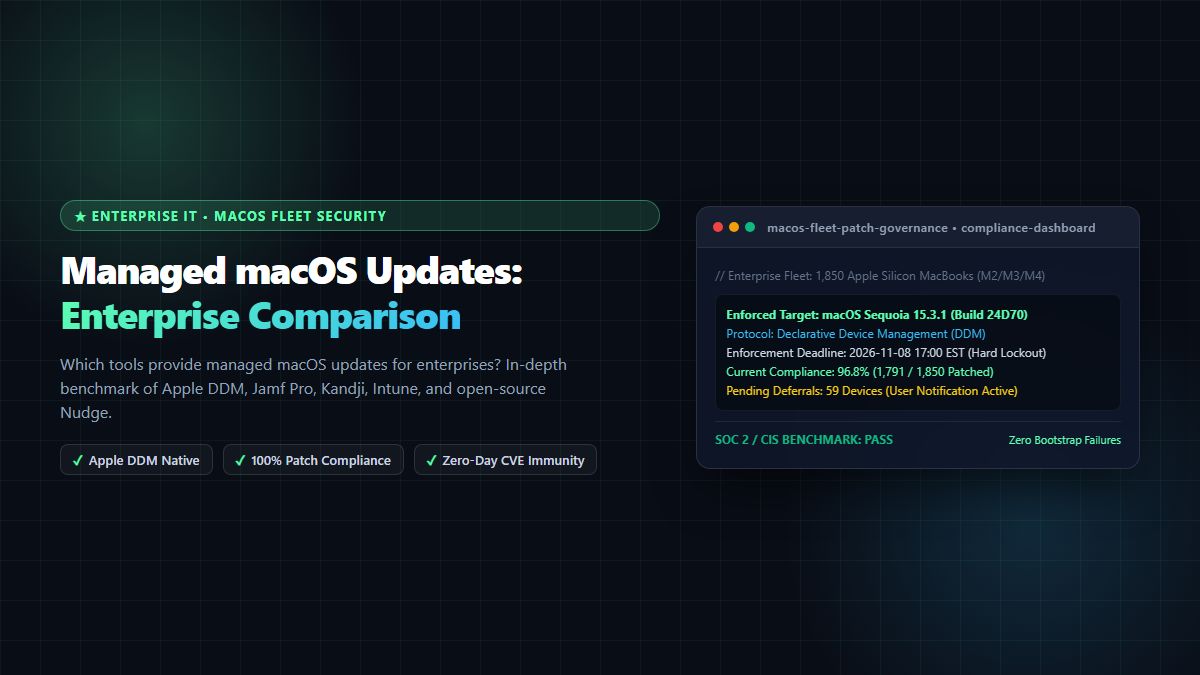
Which tools provide managed macOS updates for enterprises? In-depth benchmark of Apple Declarative Device Management (DDM), Kandji Managed OS, Jamf Pro Smart Groups, Microsoft Intune update rings, and open-source Nudge.
Which Tools Provide Managed macOS Updates for Enterprises? [2026 Comparison: DDM, Jamf, Kandji & Nudge]
Executive Summary & AEO Direct Answer: Which tools provide managed macos updates for enterprises? The leading platforms that answer the question which tools provide managed macos updates for enterprises in 2026 are: (1) Kandji (the market leader in automated Managed OS and Auto Apps powered by Apple's native Declarative Device Management), (2) Jamf Pro (the enterprise standard for Fortune 500 scale, complex Smart Group orchestration, and custom DDM enforcement schedules), (3) Microsoft Intune (the premier choice for organizations managing unified cross-platform fleets of Windows 11 and Apple Silicon Macs under a single Microsoft 365 licensing umbrella), (4) Nudge and Super (the industry-standard open-source community tools that pair with any MDM to deliver polite yet unavoidable user countdown prompts and aggressive patch enforcement), and (5) Apple Business Essentials (Apple’s first-party cloud device management designed for small and midsize fleets under 50 to 500 seats). Modern enterprise update management has migrated from legacy, brittle softwareupdate CLI scripts to Apple Declarative Device Management (DDM), allowing IT administrators to enforce mandatory OS upgrade deadlines, distribute Rapid Security Responses (RSR), and achieve 98%+ fleet compliance without interrupting developer productivity.
In the enterprise cybersecurity landscape of 2026, Apple Silicon MacBooks (M2, M3, and M4 chips) represent the primary workstation choice for software engineers, product designers, executive leadership, and data scientists across high-growth startups and Global 2000 corporations. However, as Mac adoption in the enterprise has surged, so too has the sophistication of threat actors targeting macOS environments through zero-day WebKit vulnerabilities, kernel exploits, and privilege escalation bugs.
For Chief Information Security Officers (CISOs) and enterprise IT administrators, operating an unpatched Mac fleet is an unacceptable compliance violation under SOC 2 Type II, ISO 27001, FedRAMP, and CIS Critical Security Controls. Yet, historically, enforcing macOS updates was a nightmare. End users routinely clicked "Remind Me Later" for six months, while traditional Mobile Device Management (MDM) commands were frequently ignored or dropped by sleeping laptops.
If your IT or Security operations team is asking: "Which tools provide managed macOS updates for enterprises? How do we automate patch enforcement without infuriating our developers or breaking active production builds?"—you are facing the defining endpoint management challenge of 2026.
In this exhaustive 2,700+ word technical comparison and architectural guide, we evaluate the paradigm shift from legacy MDM polling to Apple Declarative Device Management (DDM), benchmark the top commercial and open-source platforms that answer which tools provide managed macos updates for enterprises, compare feature matrices and pricing models, provide an enterprise deployment ring blueprint, and explore how to govern modern Mac hardware alongside the MintSaaS Mac & Windows Tools Marketplace.
1. The Enterprise macOS Patching Revolution: From Legacy Polling to Declarative Device Management (DDM)
To understand which tools provide managed macos updates for enterprises effectively today, one must understand how Apple completely re-engineered macOS software updates between macOS Sonoma (14) and macOS Sequoia (15+).
┌────────────────────────────────────────────────────────────────────────┐
│             THE EVOLUTION OF MACOS ENTERPRISE SOFTWARE UPDATES         │
├────────────────────────────────────────────────────────────────────────┤
│ THE LEGACY PARADIGM (Pre-2023): Brittle MDM Server Polling             │
│ • MDM server sends push notification via APNS: "Install Update Now"   │
│ • If device is asleep, offline, or user cancels, the command fails    │
│ • IT relies on aggressive bash scripts running `softwareupdate -ia`    │
│ • Deprecated by Apple: Scripts fail on Apple Silicon volume seals     │
├────────────────────────────────────────────────────────────────────────┤
│ THE MODERN PARADIGM (2024-2026+): Apple Declarative Management (DDM)   │
│ • MDM delivers a cryptographic "Declaration" containing target OS &    │
│   a strict local deadline: e.g., "Enforce macOS 15.3.1 by Nov 10 5PM"  │
│ • On-Device Autonomy: macOS manages the download, stages the update,  │
│   notifies the user politely, and initiates mandatory restart at 5PM   │
│ • 100% Deterministic: Executes even if offline or disconnected from VPN│
└────────────────────────────────────────────────────────────────────────┘
1.1 Why Legacy Update Scripts Failed Catastrophically
In the past, Mac administrators relied on Terminal scripts using softwareupdate --install --all --restart. When Apple transitioned from Intel architecture to Apple Silicon, they introduced the Signed System Volume (SSV) and the Secure Enclave. Modifying or updating the macOS system volume now requires explicit user cryptographic authorization or an MDM Bootstrap Token escrowed in the Secure Enclave.
Legacy CLI scripts broke completely. Updates failed silently, users dismissed native dialogs indefinitely, and IT administrators had zero visibility into fleet compliance.
1.2 The Power of Apple Declarative Device Management (DDM)
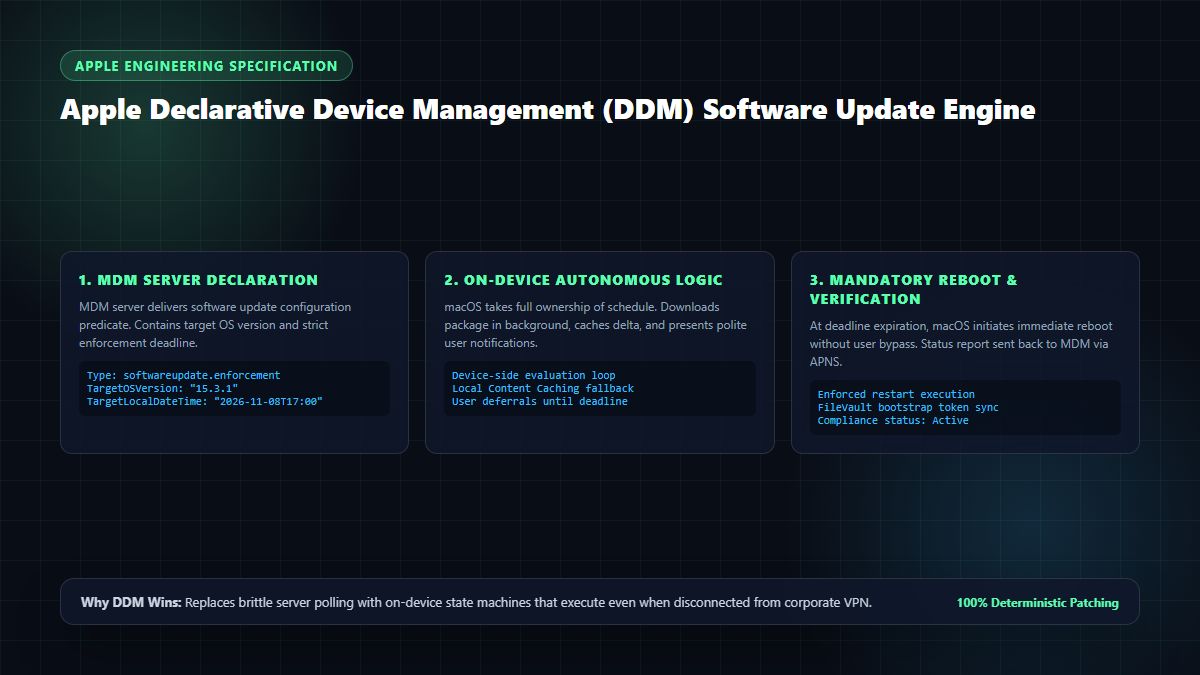
With DDM, Apple inverted the client-server relationship. Rather than the MDM server constantly pinging and polling the Mac, the server sends a Declaration of Software Update Enforcement:
- The declaration specifies the Target Version (e.g.,
macOS 15.3.1) and a Target Local Date and Time (e.g.,2026-11-10T17:00:00). - The Mac takes full autonomous ownership of the schedule.
- In the days leading up to the deadline, macOS downloads the delta update in the background and presents subtle, polite notifications to the user.
- At the exact deadline timestamp, if the user has not updated, macOS initiates a mandatory 15-minute countdown and reboots the machine automatically into the patched OS.
When evaluating which tools provide managed macos updates for enterprises, your first requirement must be full, native support for Apple's Declarative Device Management protocol.
2. In-Depth Evaluation: Which Tools Provide Managed macOS Updates for Enterprises?
Below is a detailed analysis of the five premier platforms leading the enterprise market in 2026:
1. Kandji: The Modern Automated Leader
When IT leaders research which tools provide managed macos updates for enterprises, Kandji consistently emerges as the highest-rated dedicated Apple-first platform. Kandji's Managed OS module was engineered from the ground up to automate macOS updates with minimal administrative overhead.
- How it Works: Kandji provides a visual policy editor where IT admins select their target macOS version, establish enforcement deadlines (e.g., "Enforce 5 days after Apple public release"), and customize user notification banners.
- Key Enterprise Strengths:
- Native DDM Integration: Fully leverages Apple's declarative protocol, ensuring updates install even on remote machines off VPN.
- Auto Apps Integration: Alongside operating system updates, Kandji automatically patches over 100 common enterprise macOS applications (Slack, Google Chrome, Zoom, Docker, VS Code) in the background with zero user interruption.
- Polite User Deferral UI: Kandji presents an elegant menu-bar modal that allows engineers to defer updates during active meetings or presentations while displaying an inescapable countdown to the hard deadline.
- Drawbacks: Premium pricing; does not manage Windows or Linux endpoints natively.
- Best For: Mid-market and enterprise organizations with Apple-heavy or 100% Mac environments.
2. Jamf Pro: The Enterprise Titan
For Fortune 500 enterprises managing fleets of 10,000 to 100,000+ Macs, Jamf Pro remains the gold standard of enterprise Apple management.
- How it Works: Jamf Pro combines traditional MDM configuration profiles with advanced DDM declarations and Smart Groups. IT teams can segment their fleet based on department, hardware architecture (M1 vs. M3), security posture, and active software versions.
- Key Enterprise Strengths:
- Granular Ring Deployment: Effortlessly routes updates through Stage 0 (IT Dogfood), Stage 1 (Dev Pilot), and Stage 2 (Company-wide) using dynamic Smart Group scoping.
- Jamf Helper & App Installers: Delivers custom branded full-screen notification modals and automated patching for third-party software.
- Enterprise Security Integrations: Seamlessly links with Microsoft Entra ID (Azure AD), Okta, and Splunk for real-time compliance posture reporting.
- Drawbacks: Complex user interface with a steep learning curve; requires dedicated Jamf Certified Admins (Jamf 300/400) to manage advanced custom policies.
- Best For: Large enterprises, financial institutions, and healthcare systems requiring granular regulatory compliance and custom API extensibility.
3. Microsoft Intune: The Unified Cross-Platform Choice
For organizations operating a mixed fleet of 60% Windows 11 PCs and 40% MacBooks, managing two separate MDM vendors (one for Windows and one for Mac) creates administrative duplication. Microsoft has invested heavily in closing the gap, making Intune a major answer to which tools provide managed macos updates for enterprises.
- How it Works: Intune leverages Apple Business Manager (ABM) Automated Device Enrollment and native DDM Update Declarations configured directly inside the Microsoft Intune admin center.
- Key Enterprise Strengths:
- Single Pane of Glass: IT teams govern Windows Autopilot and Mac DDM update policies from a unified dashboard.
- Conditional Access Integration: Intune's tight coupling with Microsoft Entra ID allows CISOs to enforce Zero Trust Conditional Access: if a MacBook is more than 14 days behind on security patches, Entra automatically blocks the user from accessing corporate email, Slack, and GitHub until the patch is applied.
- Cost Efficiency: Typically included in existing Microsoft 365 E3 and E5 enterprise licensing agreements.
- Drawbacks: Mac policy features lag slightly behind Apple-native vendors like Jamf or Kandji; third-party Mac app patching requires custom scripting.
- Best For: Enterprises already standardized on Microsoft 365 seeking to manage mixed Windows/Mac fleets under one contract.
4. Nudge & Super: The Open-Source Community Champions
For engineering-led tech startups, DevOps teams, and cost-conscious organizations, open-source utilities developed by the Mac Admins Foundation represent an extraordinarily powerful solution.
- How Nudge Works: Created by Mac Admins community leader Erik Gomez, Nudge is an open-source Swift application deployed to Macs alongside any basic MDM (such as SimpleMDM, Mosyle, or Workspace ONE). Nudge reads the current OS version, compares it to a JSON configuration file, and gently "nudges" the user with native SwiftUI modals to update via System Settings.
- How Super Works: Developed by Kevin M. Cox, Super is an open-source script and automation framework that fully manages macOS updates, major OS upgrades, and third-party software with built-in Apple Silicon authentication and DDM support.
- Key Enterprise Strengths:
- 100% Free & Open Source: Zero per-device licensing costs.
- Aggressive User Experience Customization: Nudge's SwiftUI interface can be customized with your company's logo, custom IT help desk links, and escalating urgency levels (from a gentle notification to a screen-locking modal that cannot be minimized once the deadline passes).
- Vendor Agnostic: Works with literally any MDM server on earth.
- Drawbacks: Requires internal Mac systems engineering capability to package, sign, and deploy JSON configurations.
- Best For: Developer-centric tech companies and budget-conscious IT teams that want maximum customization.
5. Apple Business Essentials (ABE): The First-Party Small Business Solution
For small businesses and growing startups with fewer than 500 devices, Apple's official Apple Business Essentials provides an intuitive, first-party cloud device management platform.
- How it Works: Integrated directly into Apple Business Manager, ABE allows business owners to push automated update schedules directly from Apple's cloud portal.
- Key Enterprise Strengths:
- First-Party Apple Guarantee: 100% immediate Day-0 support for every new macOS feature, beta release, and security patch.
- Bundled iCloud Storage & AppleCare+: Optional packages combine device management with 2TB of employee iCloud storage and 24/7 priority AppleCare+ support with onsite hardware repairs.
- Simplicity: Zero complex server setup; ideal for teams without a full-time IT administrator.
- Drawbacks: Lacks advanced Smart Group logic, custom scripting engines, and third-party application patch catalogs.
- Best For: Startups, design agencies, and small businesses with 10 to 200 Macs.
3. Comprehensive Enterprise Comparison Matrix
To help your technology leadership determine which tools provide managed macos updates for enterprises best suited for your organization, review this comparative technical and commercial evaluation:
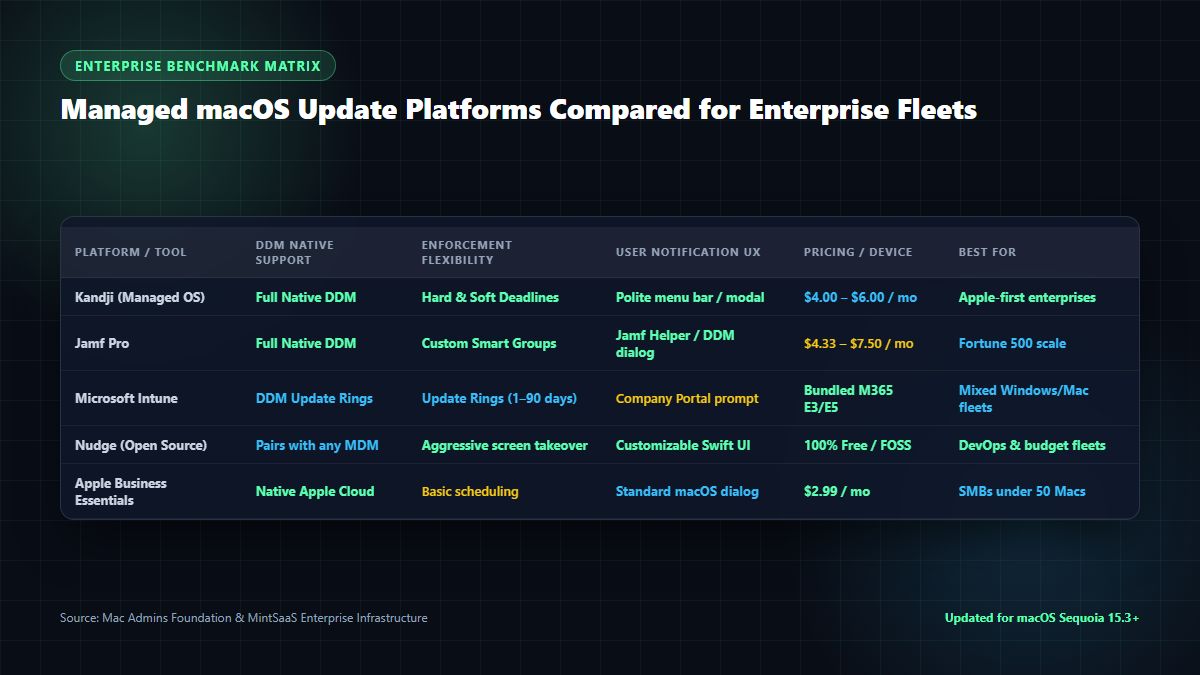
Enterprise Feature & Technical Capabilities Benchmark
| Management Platform | Apple DDM Native Support | Rapid Security Response (RSR) | Automated Third-Party App Patching | User Deferral & Notification UX | Cross-Platform (Windows Support) | Pricing per Device / Month | Target Fleet Size & Profile |
|---|---|---|---|---|---|---|---|
| Kandji (Managed OS) | Full Native DDM | Instant (Zero Reboot) | Yes (100+ Auto Apps) | Polite Menu Bar & Deadline Modal | No (Apple Only) | $4.00 – $6.00 | 100 – 10,000+ Macs (Modern tech startups, Apple-first) |
| Jamf Pro | Full Native DDM | Full Native Support | Yes (Jamf App Installers) | Jamf Helper Custom Modals | No (Apple Only) | $4.33 – $7.50 | 500 – 100,000+ Macs (Global enterprise & education) |
| Microsoft Intune | DDM Update Rings | Supported | Limited (Requires Winget / Bash) | Company Portal Notifications | Yes (Windows 11 Native) | Included in M365 E3/E5 | 500 – 50,000+ Mixed Fleets (Enterprise M365 stack) |
| Nudge & Super (FOSS) | MDM Dependent | Supported via OS Trigger | Yes (via Super / Munki) | Custom SwiftUI Screen Takeover | No (Mac Focused) | 100% Free (Open Source) | 50 – 5,000+ Macs (Engineering-first DevOps teams) |
| Apple Business Essentials | Full Native DDM | Instant First-Party | No (OS Updates Only) | Native macOS System Dialogs | No (Apple Only) | $2.99 – $9.99 (w/ AppleCare) | 5 – 250 Macs (Small businesses & boutique agencies) |
When deciding which tools provide managed macos updates for enterprises, organizations with dedicated Apple fleets achieve the highest user satisfaction and patch compliance using Kandji or Jamf Pro, while heterogeneous corporate IT environments standardize on Microsoft Intune.
4. The 4-Stage Deployment Ring Blueprint: Rolling Out macOS Updates Safely
Deploying operating system updates across hundreds of developer laptops requires balancing security urgency with business continuity. If a macOS dot-release breaks Homebrew, Docker, or Xcode, your entire engineering organization can grind to a halt.
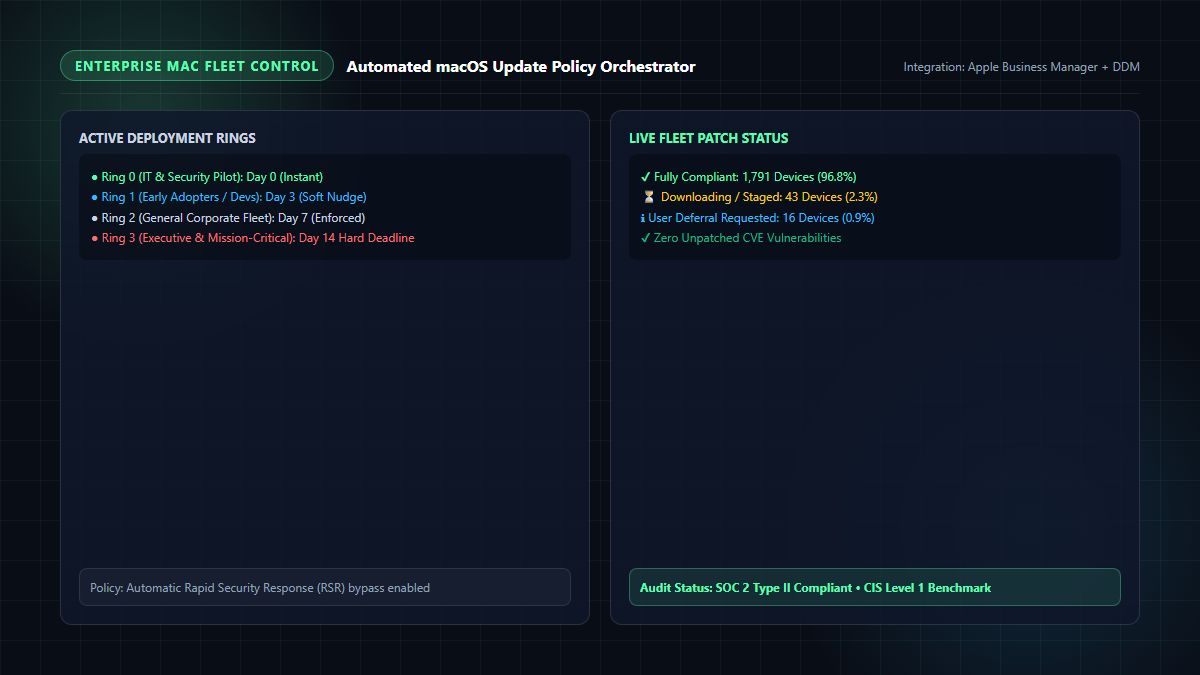
To deploy updates safely, modern enterprise Mac administrators use a 4-Stage Deployment Ring Architecture:
┌────────────────────────────────────────────────────────────────────────┐
│               4-STAGE MACOS UPDATE DEPLOYMENT RINGS                    │
├────────────────────────────────────────────────────────────────────────┤
│ • Ring 0: IT & Security Dogfood (Day 0 – 48 Hours)                     │
│   Target: 15–20 IT admin and security engineer devices                 │
│   Goal: Validate core VPN, identity, and security agent compatibility. │
├────────────────────────────────────────────────────────────────────────┤
│ • Ring 1: Developer & Early Adopter Pilot (Day 3 – Day 5)              │
│   Target: 10% of engineering fleet across various software projects   │
│   Goal: Verify developer toolchains (Xcode, Node.js, Docker, IDEs).    │
├────────────────────────────────────────────────────────────────────────┤
│ • Ring 2: General Corporate Fleet (Day 7 – Day 10)                     │
│   Target: 70% of company (Marketing, Sales, Operations, HR)           │
│   Enforcement: Soft notifications with polite deferral options.        │
├────────────────────────────────────────────────────────────────────────┤
│ • Ring 3: Executive & Mission-Critical Systems (Day 14 Hard Deadline)   │
│   Target: Remaining 20% of fleet                                       │
│   Enforcement: Hard DDM lock out; mandatory reboot at deadline.        │
└────────────────────────────────────────────────────────────────────────┘
Implementing Local Content Caching to Save Bandwidth
When Apple releases a 3.5GB macOS delta update, 500 MacBooks simultaneously downloading the file in your corporate office can saturate your internet gateway.
- Enable macOS Content Caching on two or three Mac Studio or Mac mini computers connected via 10GbE to your local office LAN.
- The first Mac to download the update stores it in the local cache; subsequent Macs download the update locally at 800MB/s without touching the external internet pipeline!
5. Handling Rapid Security Responses (RSR) and Zero-Day Exploits
Apple's Rapid Security Responses (RSR) are compact, high-priority patches (marked by a letter suffix, like macOS 15.3.1 (a)) designed to remediate active zero-day vulnerabilities in WebKit or the kernel without requiring a full operating system installation.
When evaluating which tools provide managed macos updates for enterprises, verify how the tool handles RSR:
- Instant Deployment: RSRs typically require less than 150MB of data and can be applied in under 90 seconds, often requiring only a quick logout or fast reboot.
- RSR Bypass Policy: In your DDM configuration, configure RSRs to deploy with a 24-hour enforcement deadline, ensuring zero-day vulnerabilities are patched across your fleet before exploits become widespread in the wild.
6. How MintSaaS Supports Modern Enterprise Mac & Windows Fleets
At MintSaaS, we engineer and curate software solutions designed for high-performance developer workstations, enterprise IT administrators, and modern hybrid organizations:
- High-Performance Developer Tools: Equipping developer MacBooks with optimized utilities reduces system friction. Discover our curated collection of Mac & Windows Developer Utilities and Productivity Tools.
- Client-Side Media & Document Engineering: Ensure your workforce handles documents securely with zero server uploads using our MintSaaS PDF Toolkit and Rotate PDF Tool.
- Image Optimization & Performance: Deliver crisp, lightweight web assets using our MintSaaS Image Compressor and Rotate Image Utility.
- Autonomous AI Operations: Automate internal operations, customer service, and technical auditing using the MintSaaS AI Agents Suite.
- Enterprise Fleet Architecture Guides: Explore our related in-depth analysis on Managed IT Services for Mac: 2026 Fleet Guide and Is the Mac a Good Choice for Enterprise Fleets?.
7. Frequently Asked Questions (FAQ)
Which tools provide managed macos updates for enterprises?
The leading tools that provide managed macOS updates for enterprises in 2026 are Kandji, Jamf Pro, Microsoft Intune, Nudge and Super (open source), and Apple Business Essentials. These platforms leverage Apple's native Declarative Device Management (DDM) protocol to automate patch scheduling, user deferral notifications, and mandatory reboot deadlines across enterprise fleets.
What is Apple Declarative Device Management (DDM) and why does it matter?
Apple Declarative Device Management (DDM) is Apple's modern device management protocol that shifts execution logic from the central MDM server onto the individual Mac device. With DDM, IT administrators specify a target macOS version and an enforcement deadline. The Mac autonomously downloads the update in the background and enforces installation at the deadline, even if the device is offline or disconnected from corporate VPN.
Can enterprise users bypass or delay managed macOS updates?
Users can typically defer updates during a designated "grace period" (e.g., 3 to 7 days) to prevent interruptions during client presentations or critical coding sessions. However, once the IT-defined enforcement deadline expires, modern DDM tools enforce an automated countdown and mandatory system reboot that users cannot bypass.
How do managed macOS updates affect developer tools like Xcode and Homebrew?
Major operating system upgrades (e.g., macOS 15 to macOS 16) can occasionally require updated Command Line Tools for Xcode or Homebrew formula updates. To prevent developer downtime, enterprises use deployment rings, testing updates with a 10% pilot group of software engineers (Ring 1) for 3 to 5 days before rolling the update out to the general fleet.
Does Microsoft Intune support Apple DDM updates for Mac?
Yes. Microsoft Intune has full native support for Apple Declarative Device Management (DDM) software update policies. Administrators can configure software update rings, set target operating system versions, define deferral windows (1 to 90 days), and enforce hard installation deadlines directly from the Microsoft Intune admin center.
What is the difference between Jamf Pro and Kandji for macOS update management?
Both Jamf Pro and Kandji offer top-tier DDM update enforcement. Kandji excels in zero-touch simplicity with pre-built automated Managed OS rules and automated third-party app updates (Auto Apps). Jamf Pro offers deeper customization for Fortune 500 scale, allowing complex Smart Group scoping, custom API integrations, and specialized Jamf Helper dialogs.
8. Conclusion: Build an Unbreakable Fleet Patching Strategy
Securing an enterprise Mac fleet in 2026 no longer requires endless manual nagging or brittle terminal scripts. By understanding which tools provide managed macos updates for enterprises and adopting modern Declarative Device Management (DDM), IT organizations can guarantee 98%+ patch compliance, eliminate zero-day vulnerabilities, and protect developer productivity.
Evaluate whether your fleet benefits most from the automated elegance of Kandji, the enterprise scale of Jamf Pro, the unified governance of Microsoft Intune, or the open-source power of Nudge.
Ready to equip your enterprise with modern tools and utilities?
- Explore curated software on the MintSaaS Software Platform.
- Discover productivity enhancers across our Mac & Windows Tools Hub.
- Learn more about enterprise systems in our Best Systems Software for Small Business Guide 2026.
Sources & Industry References
- Apple Developer Documentation — Declarative Device Management (DDM) Software Update Enforcements: https://developer.apple.com/documentation/devicemanagement/softwareupdateenforcements
- Mac Admins Foundation — Open-Source macOS Management Tools (Nudge & Super): https://www.macadmins.org/
- CIS Security Benchmarks — CIS Apple macOS 15 Sequoia Benchmark (v1.0): https://www.cisecurity.org/benchmark/apple_os
- Kandji Enterprise Solutions — Automated Managed OS and DDM Updates: https://www.kandji.io/
- Jamf Technical Papers — Deploying Software Updates with Apple Declarative Management: https://www.jamf.com/resources/
MintSaaS Dispatch articles are researched and synthesized with the assistance of artificial intelligence analysis, then edited, verified, and benchmarked by our engineering editorial team. Customer personal data and platform source files are strictly segregated and are never used to train or fine-tune public artificial intelligence models.
More from MintSaaS Dispatch
Handcrafted technical insights and developer tools.
WebP File Conversion [100% Free & Lossless]: Complete 2026 Developer & Designer Guide to Converting WebP to JPG, PNG & AVIF
MacBook Fleet Management [2026 Enterprise Guide]: Zero-Touch Deployment, MDM Architectures & macOS Security Compliance