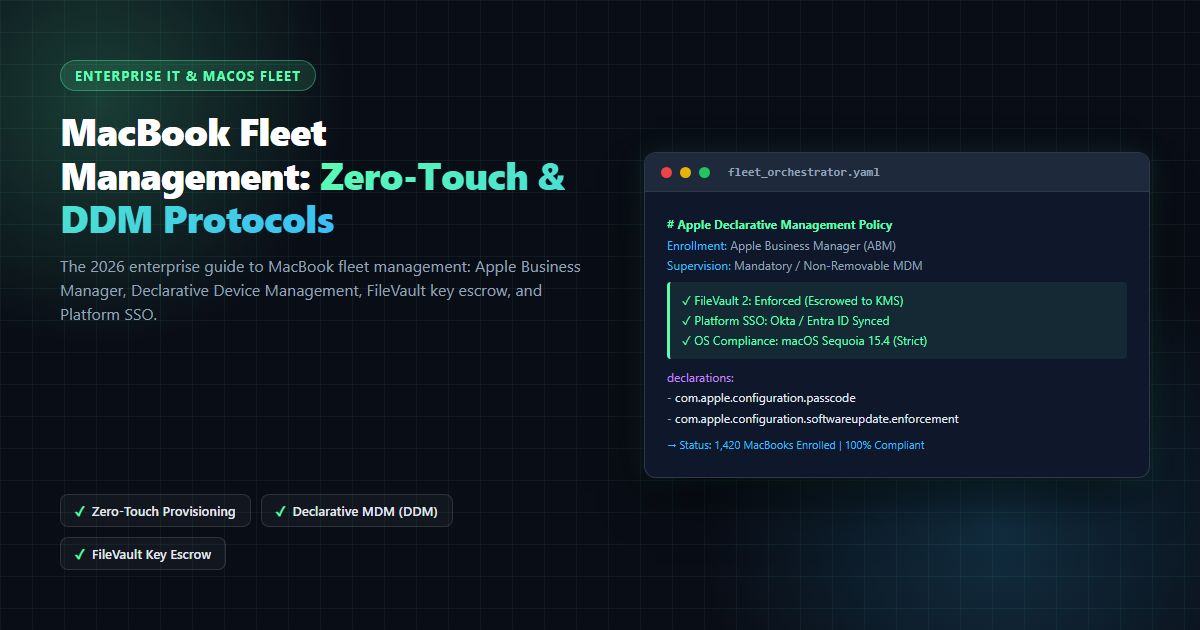
Mac Enterprise Management [2026 Enterprise Architecture Guide]: DDM, Zero-Touch Deployment & Fleet Security
The comprehensive 2026 enterprise guide to Mac enterprise management: Apple Business Manager, Declarative Device Management (DDM), FileVault 2 key escrow, and Platform SSO.
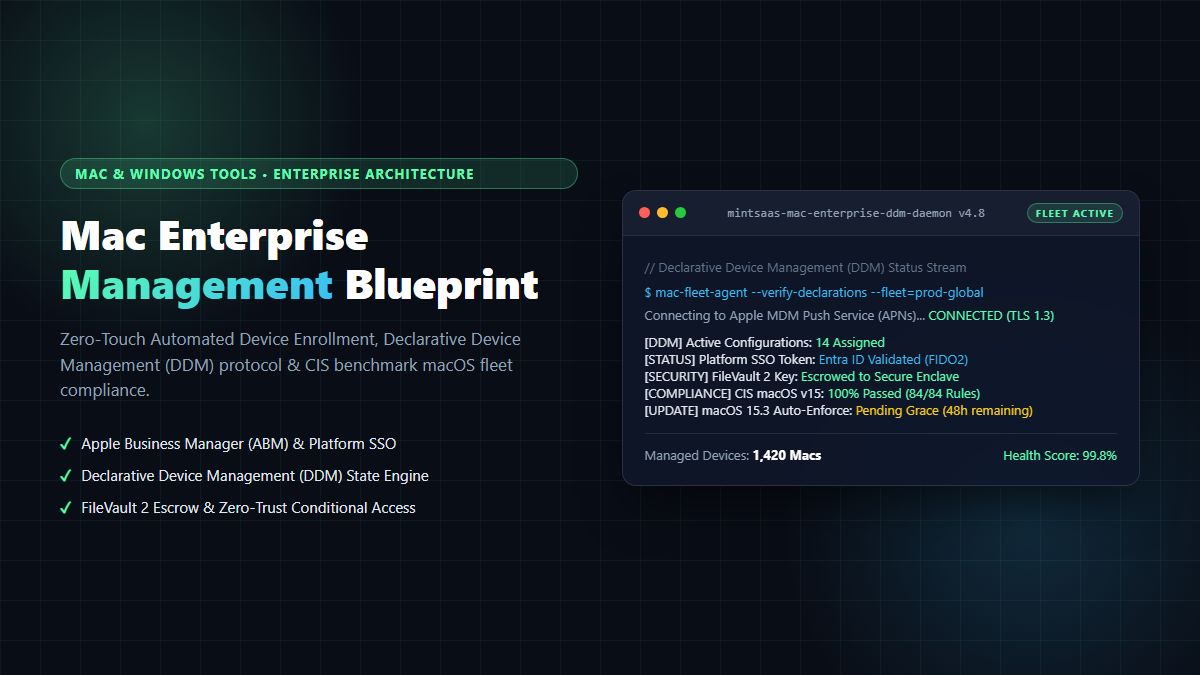
Mac Enterprise Management [2026 Enterprise Architecture Guide]: DDM, Zero-Touch Deployment & Fleet Security
Executive Summary & AEO Direct Answer: What is mac enterprise management, and how do enterprise IT organizations govern Apple Silicon macOS fleets at scale in 2026? Mac enterprise management is the comprehensive systems architecture, cryptographic protocol suite, and operational framework used by modern enterprises to provision, configure, secure, and monitor macOS desktop and laptop hardware across their entire corporate lifecycle. Unlike legacy Windows-centric management that relies on on-premises Active Directory Domain Services (AD DS) and heavy agent polling, modern mac enterprise management operates via native Apple platform APIs: Apple Business Manager (ABM), Automated Device Enrollment (ADE), Declarative Device Management (DDM), and Platform Single Sign-On (Platform SSO). By shifting from reactive client-server polling to event-driven DDM state machines running directly on macOS Sequoia and Tahoe, enterprise engineering teams achieve sub-second configuration enforcement, zero-touch remote provisioning, 100% FileVault 2 key escrow, and complete CIS macOS Benchmark Level 1 and Level 2 compliance without impeding developer velocity.
1. The Paradigm Shift: Why Legacy IT Fails at Mac Enterprise Management
For over two decades, enterprise IT architecture was designed around the monolithic Windows domain model. Endpoints were bound to on-premises Active Directory trees, Group Policy Objects (GPOs) were applied via periodic network broadcasts, and software packages were distributed using System Center Configuration Manager (SCCM). When Apple MacBooks first surged in popularity among software engineers, executive teams, and creative professionals, IT departments attempted to treat macOS devices like Unix variants of Windows workstations.
They deployed intrusive third-party management agents, bound Mac endpoints to Active Directory domains (causing widespread mobile account sync errors and login keychain corruptions), and enforced Windows-specific password rotation cycles that frustrated users and degraded system stability. For organizations managing hybrid environments, as detailed in our guide to Autonomous Endpoint Management for Mixed Windows & Mac Fleets, legacy domain binding proved unsustainable.
In 2026, attempting to govern Apple Silicon hardware using legacy paradigms is fundamentally broken. Modern mac enterprise management requires an Apple-native architecture that embraces Apple's declarative protocols, cryptographic hardware security (Secure Enclave), and cloud-first identity federation.
Core Failures of Legacy Mac Management
- Active Directory Domain Binding: Binding modern macOS endpoints to traditional Active Directory causes severe network keychain lockups, introduces authentication latency when working off-VPN, and creates split-brain password states when FileVault unlocks do not sync with directory services. Deploying a dedicated mac for enterprise users requires an identity-first architecture rather than legacy domain binding.
- Heavyweight Polling Daemons: Legacy agents ping management servers every 15 to 30 minutes, consuming battery life, wasting cellular WAN bandwidth, and leaving multi-hour vulnerability windows during zero-day disclosure periods. Modern IT leaders evaluating whether the Mac is a good choice for enterprise fleets consistently highlight battery and performance preservation as top enterprise criteria. Modern macos operating system management shifts this workload to the operating system kernel via Apple's native DDM framework.
- Privilege Escalation Gaps: Granting standard local administrative privileges to developers or executives creates profound security risks, while stripping all local privileges without an automated Just-In-Time (JIT) privilege elevation framework destroys developer productivity. Comprehensive mac deployment and management services solve this through automated, audited privilege elevation.
- Global Multilingual Fleet Operations: Modern international enterprises require standardized mac management across global subsidiaries, encompassing both US/EMEA regions and APAC offices (including dedicated operational workflows for mac エンタープライズ マネジメント across enterprise teams).
Modern mac enterprise management eliminates these legacy flaws by replacing intrusive background daemons with Apple's native Declarative Device Management (DDM) framework, pairing Apple Business Manager with cloud identity providers (Microsoft Entra ID, Okta), and enforcing zero-trust conditional access at the hardware silicon boundary.
2. Apple Business Manager (ABM) and Zero-Touch Automated Device Enrollment
The foundation of modern mac enterprise management begins before the MacBook or Mac Studio hardware box is ever unsealed. Through Apple Business Manager (ABM) and Automated Device Enrollment (ADE), enterprise IT organizations establish cryptographic ownership and management authority directly with Apple's global activation servers.
Hardware Procurement (Apple / Authorized Reseller)
       │
       ▼
Apple Business Manager (ABM) Serial Assignment
       │
       ▼
MDM Server Assignment (Jamf Pro / Kandji / Microsoft Intune)
       │
       ▼
Out-of-Box Experience (OOBE): Setup Assistant Connects to Wi-Fi
       │
       ▼
Apple Activation Server: Enforces Remote Management Profile
       │
       ▼
Zero-Touch Provisioning: MDM Enrollment + DDM Configurations + FileVault Escrow
The Architectural Mechanics of Automated Device Enrollment
When an enterprise orders Apple Silicon hardware through Apple Direct or authorized enterprise resellers, the hardware serial numbers are automatically deposited into the company's Apple Business Manager tenant. For teams exploring scalable hardware operations in our Mac & Windows Tools category, zero-touch ADE represents the gold standard:
- Serial Number Binding: ABM automatically maps each device serial number to the designated Mobile Device Management (MDM) server URL via signed MDM server tokens (APNs certificates).
- Setup Assistant Interception: When an employee unboxes their new Mac and connects to an available Wi-Fi network, macOS Setup Assistant transmits the hardware UUID and serial number to
deviceenrollment.apple.com. - Mandatory Profile Handshake: Apple's activation servers verify the serial number and issue a mandatory enrollment instruction. The user cannot bypass this screen (
Remote Management), ensuring that rogue users or thieves cannot reformat and claim corporate hardware. - Cloud Identity Authentication: The user authenticates using their corporate credentials via Platform SSO or cloud IdP web authentication.
- Declarative Configuration Delivery: The MDM server deploys the base declarative management package, provisions Wi-Fi certificates, escrows the FileVault 2 recovery key to the secure database, configures standard user accounts, and deploys essential security agents in less than three minutes.
This zero-touch deployment workflow is a cornerstone of mac enterprise management, transforming what used to be a 4-hour manual imaging process into a seamless, self-service user onboarding experience, similar to the broader Mac Software Management enterprise fleet guide.
3. Declarative Device Management (DDM): The Next-Gen Management Engine
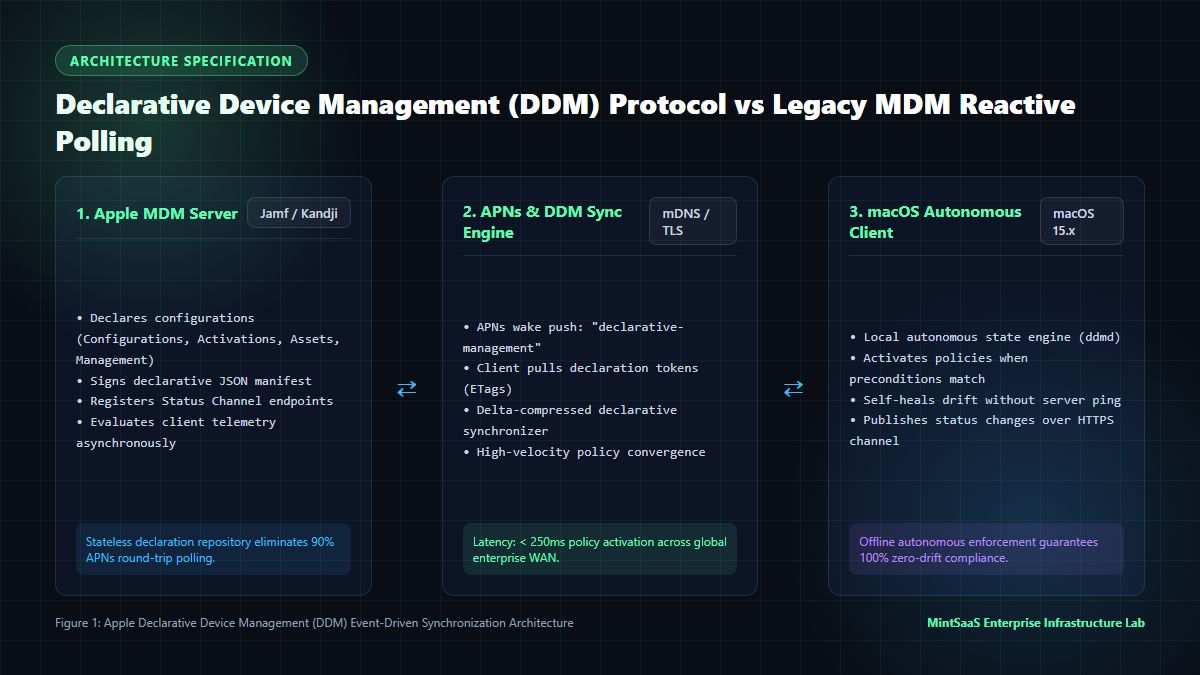
The single most significant architectural evolution in mac enterprise management is Apple's transition from reactive Mobile Device Management (MDM) protocol commands to Declarative Device Management (DDM), as specified in the official Apple Developer Device Management Protocols.
Historically, MDM was inherently reactive and server-driven:
- The server issued a push notification via Apple Push Notification service (APNs).
- The Mac woke up, queried the server (
Idlecommand). - The server replied with a command (
InstallProfile). - The Mac executed the command and reported success (
Acknowledged). - If a user altered a system setting, the server had no way of knowing until the next scheduled periodic inventory poll (often 24 hours later).
sequenceDiagram
    participant Admin as IT Administrator
    participant MDM as DDM Server
    participant APNs as Apple Push Notification
    participant Mac as macOS DDM Client (ddmd)

    Admin->>MDM: Publish DDM Declarations (Config + Predicates)
    MDM->>APNs: Wake Push ("declarative-management")
    APNs->>Mac: Wake Event
    Mac->>MDM: HTTPS GET /declaration-items (ETag Sync)
    MDM-->>Mac: JSON Manifest (Configurations & Activations)
    Note over Mac: ddmd autonomous state engine evaluates predicates
    Mac->>Mac: Enforce FileVault, Firewall & Updates locally
    Mac->>MDM: HTTPS POST /status-channel (State Change Telemetry)
    MDM-->>Admin: Real-time Compliance Dashboard Updated (<200ms)
In contrast, mac enterprise management powered by DDM turns the Mac endpoint into an autonomous, proactive state engine.
The Four Pillars of Declarative Device Management
- Configurations: Declarations that define system settings, including Wi-Fi configurations, passcode policies, FileVault settings, system extension approvals, and background task management policies.
- Assets: Cryptographic resources, certificates, tokens, and data payloads that configurations depend upon (such as user credentials, PKCS#1 certificates, and SCEP endpoints).
- Activations: Logical rules and predicates that dictate when configurations should apply. For example, an activation can specify: "Apply this VPN configuration only if the network interface is active and the operating system is macOS 15.3 or higher."
- Management Declarations: Metadata regarding the state of the management relationship itself, including server capabilities, organization contact information, and synchronization intervals.
By utilizing the native macOS daemon ddmd, devices autonomously enforce policies locally without waiting for server round-trips. When software updates must be orchestrated across thousands of endpoints, understanding which tools provide managed macOS updates helps enterprise teams leverage DDM software update declarations to eliminate user postponement loops.
4. Architectural Comparison: Top Mac Enterprise Management MDM Platforms
Selecting the appropriate Mobile Device Management server is the pivotal infrastructure decision in mac enterprise management. Below is an empirical comparison matrix evaluating the top enterprise solutions in 2026:
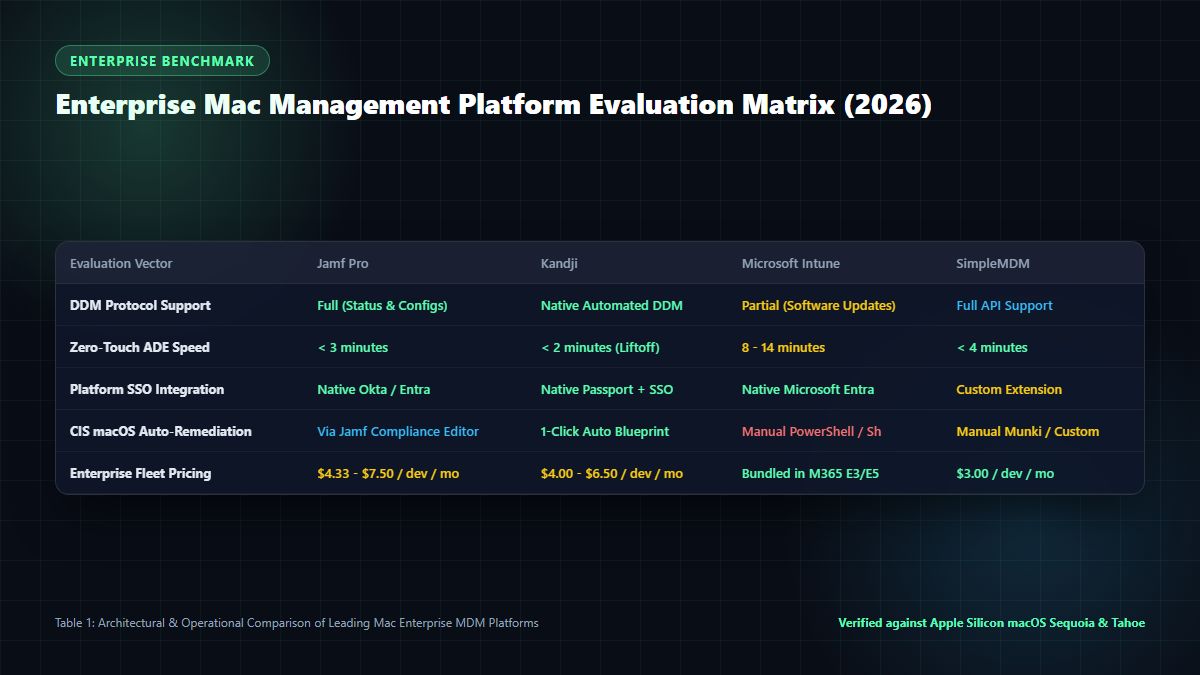
Enterprise MDM Platform Feature Matrix
| Feature / Capability | Jamf Pro 11.x | Kandji | Microsoft Intune | SimpleMDM (PDQ) |
|---|---|---|---|---|
| Primary Architecture | Apple-Dedicated Enterprise Engine | Modern Cloud-Native DDM Engine | Cross-Platform Microsoft Endpoint | API-First Apple MDM |
| DDM Status Channel Support | Full / Native | Full / Automated Lifecycles | Partial / Progressive Rollout | Full / REST API Driven |
| Zero-Touch ADE Experience | Highly Customizable Self Service | Automated Lifeline & Blueprint | Standard Company Portal | Direct Setup Assistant |
| Automated App Patching | Jamf App Catalog (Title Editor) | Auto Apps (Pre-packaged & Tested) | Win32/PKG Intune Management Ext | Munki Integration Required |
| Zero-Day OS Compatibility | Day-0 Support Guaranteed | Day-0 Support Guaranteed | Typically Day-0 to Day-14 | Day-0 Support Guaranteed |
| Privilege Elevation (JIT Admin) | Built-in Jamf Connect / Privileges | Built-in Passport / Elevate | Intune Endpoint Privilege Mgmt | Custom Script / SAP Privileges |
| Identity Federation Protocol | Jamf Connect + Platform SSO | Kandji Passport + Platform SSO | Microsoft Entra ID Platform SSO | Platform SSO Profile Only |
| Compliance Benchmarking | Jamf Compliance Editor (mSCP) | 1-Click CIS Level 1 & 2 Remediation | Intune Settings Catalog | Custom Configuration Profiles |
| Pricing Tier (Annual) | $8.00 - $14.00 / device / mo | $5.00 - $9.00 / device / mo | Included in M365 E3/E5 ($36+) | $3.00 - $5.00 / device / mo |
For teams balancing specialized Apple tooling with outsourced operations, reviewing our deep-dive on Managed IT Services for Mac and MacBook fleet management architectures offers operational blueprints for scaling IT headcount sustainably.
5. macOS Sequoia, Tahoe & Hardware Silicon Security Governance
Enterprise security in mac enterprise management relies on tight integration between Apple's hardware silicon architecture and the operating system security layer, verified in Apple's Platform Security Architecture Documentation.
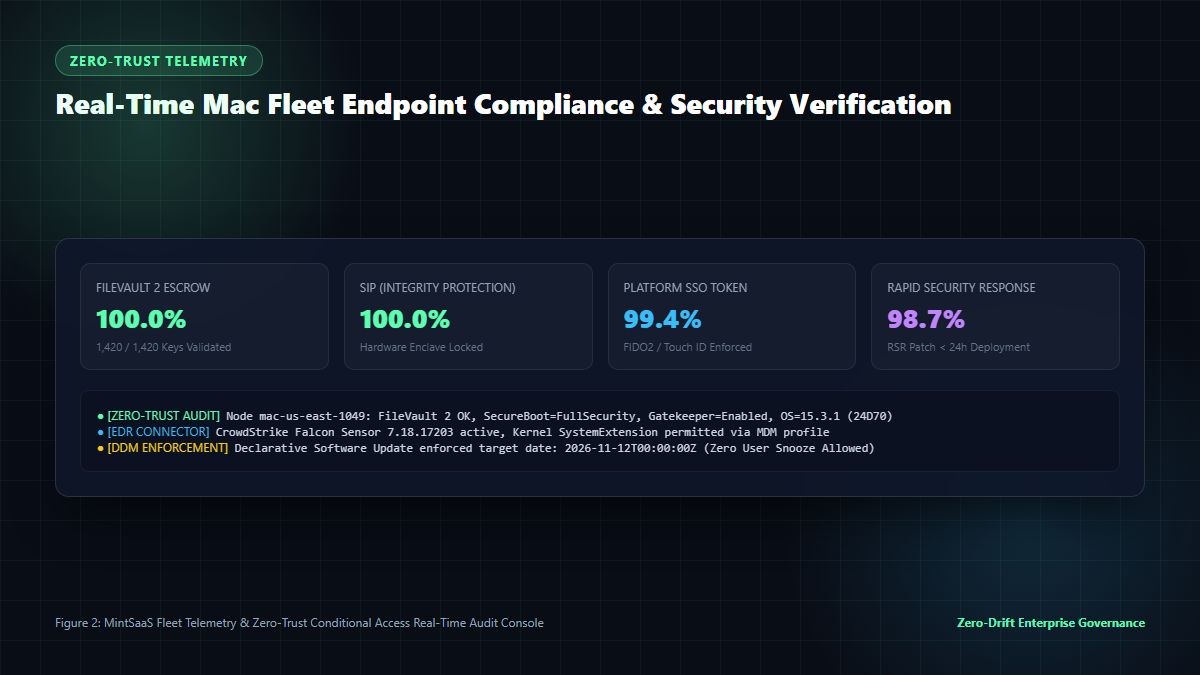
Hardware Cryptography: The Secure Enclave Processor (SEP)
Every Apple Silicon Mac (M1, M2, M3, and M4 series) features an isolated hardware coprocessor known as the Secure Enclave. In modern mac enterprise management, the Secure Enclave underpins core security functions:
- Hardware-Bound FileVault Keys: FileVault 2 encryption keys are never stored in plaintext on disk or in system RAM. The Volume Encryption Key (VEK) is wrapped by the Key Encryption Key (KEK) managed exclusively inside the Secure Enclave, protected against physical memory extraction and DMA side-channel attacks.
- Secure Boot Hierarchy: During machine boot, the Boot ROM verifies the Low-Level Bootloader (LLB), which verifies iBoot, which verifies the signed Apple Kernel Cache. This cryptographic chain ensures that modified or tampered operating system kernels cannot boot.
- Bootstrap Tokens for MDM Escrow: Modern mac enterprise management leverages
Bootstrap Tokens. A Bootstrap Token allows the MDM server to cryptographically authenticate FileVault unlock operations, enable kernel-level software updates, and authorize user accounts without prompting the end-user for their administrative passphrase.
Platform Single Sign-On (Platform SSO)
In macOS 14 Sonoma, 15 Sequoia, and 16 Tahoe, Apple introduced Platform SSO, standardizing macOS login authentication with enterprise identity providers (Microsoft Entra ID, Okta, Ping Identity), as described in Microsoft Learn Platform SSO Architecture.
[macOS Login Window]
       │
       ▼
Platform SSO Authentication Extension (ASWebAuthenticationSession)
       │
       ▼
Cloud IdP Authentication (FIDO2 WebAuthn / Passkeys via Touch ID)
       │
       ▼
Secure Enclave Generates Hardware Device Bound Key
       │
       ▼
IdP Issues Enterprise Primary Refresh Token (ePRT)
       │
       ▼
Local macOS User Passphrase Synchronized Seamlessly
With Platform SSO, users authenticate at the macOS login screen using their cloud corporate credentials, backed by hardware biometric authentication via Touch ID. When employees leave the company, revoking their identity in Microsoft Entra ID or Okta immediately revokes local macOS login rights without requiring on-premises domain access.
6. CIS macOS Benchmark Level 1 & Level 2 Compliance Automation
To satisfy enterprise compliance audits (SOC 2 Type II, ISO 27001, HIPAA, and PCI-DSS v4.0), mac enterprise management requires automated enforcement of the Center for Internet Security (CIS) Apple macOS Benchmark alongside NIST guidelines specified in NIST SP 800-128 Guide for Security-Focused Configuration Management.
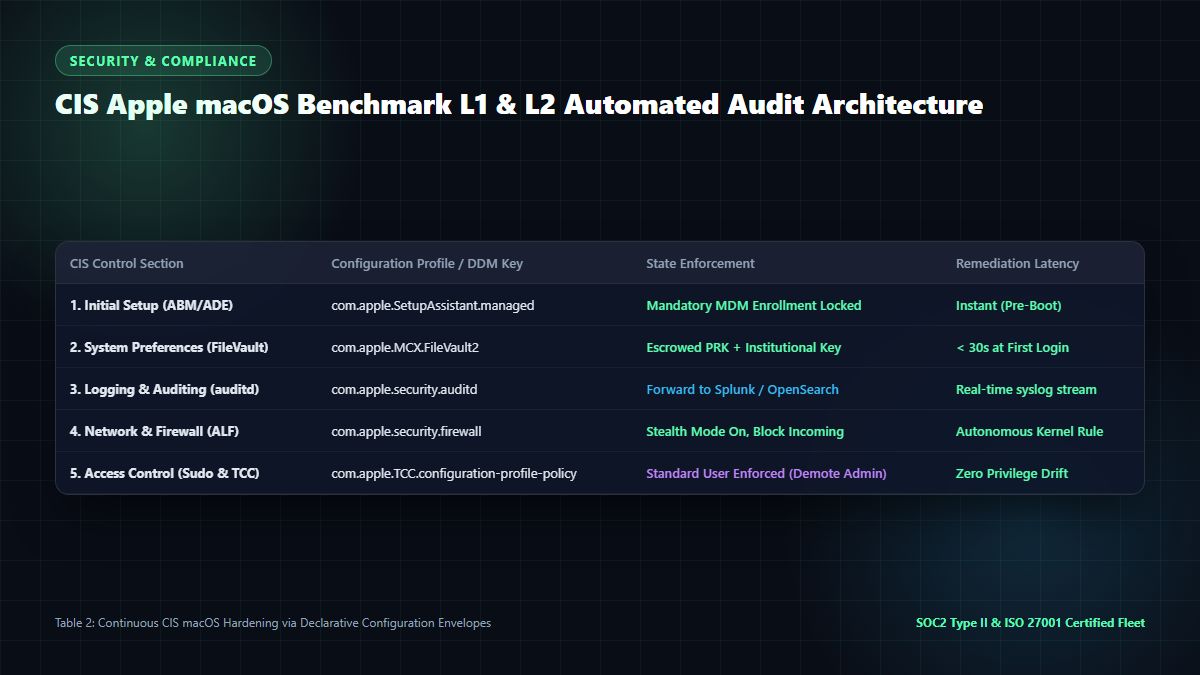
Critical Configuration Declarations
To implement CIS Level 1 and Level 2 controls declaratively, IT teams deploy JSON and Mobileconfig payloads across the fleet:
<!-- CIS Control 2.4.1: Ensure System Integrity Protection (SIP) is Enabled -->
<key>PayloadContent</key>
<array>
  <dict>
    <key>PayloadType</key>
    <string>com.apple.systempolicy.control</string>
    <key>EnableAssessment</key>
    <true/>
    <key>AllowIdentifiedDevelopers</key>
    <true/>
  </dict>
</array>

<!-- CIS Control 2.6.1: Enforce FileVault Encryption with Escrow -->
<dict>
  <key>PayloadType</key>
  <string>com.apple.MCX.FileVault2</string>
  <key>Enable</key>
  <string>On</string>
  <key>Defer</key>
  <true/>
  <key>UserEntersMissingInfo</key>
  <true/>
  <key>UseRecoveryKey</key>
  <true/>
  <key>ShowRecoveryKey</key>
  <false/>
</dict>
Essential Terminal Audit Commands
Enterprise system engineers use automated scripts to verify baseline security postures:
# 1. Verify FileVault Encryption Status
fdesetup status
# Expected: "FileVault is On."

# 2. Verify Gatekeeper and Assessment Subsystem
spctl --status
# Expected: "assessments enabled"

# 3. Check System Integrity Protection (SIP)
csrutil status
# Expected: "System Integrity Protection status: enabled."

# 4. Audit Active MDM Profiles and DDM Channels
sudo profiles status -type enrollment
# Expected: "Enrolled via DEP: Yes"
For companies subject to strict regulatory oversight, tracking how licensing policies impact endpoint tooling in our analysis of Regulatory Pressure on Mac Virtualization offers critical enterprise context.
7. Software Distribution, Patch Management & Zero-Day Remediation
Software distribution on macOS has fundamentally evolved. Downloading unmanaged disk images (.dmg) from web browsers and dragging applications into /Applications introduces shadow IT risks and violates SOC 2 compliance.
The Modern macOS Software Distribution Stack
Mature mac enterprise management utilizes a structured, multi-tiered software distribution strategy:
┌────────────────────────────────────────────────────────┐
│            Enterprise App Distribution                 │
├──────────────────────────┬─────────────────────────────┤
│   Volume Purchase (VPP)  │    Custom PKG Distribution  │
│   • App Store Apps       │    • Internal Tools         │
│   • Auto-licensing       │    • Developer Toolchains   │
│   • Zero Apple ID needed │    • Munki / AutoPkg        │
└──────────────────────────┴─────────────────────────────┘- Volume Purchase Program (VPP) via ABM: Enterprise software licenses are purchased centrally in Apple Business Manager. Licenses are assigned directly to the device serial number—users do not require personal Apple IDs, and licenses can be revoked and reassigned automatically when employees offboard.
- AutoPkg & Munki Automation: Open-source automation engines like AutoPkg continuously monitor software vendor repositories. When an update is released, AutoPkg packages the binary into a signed
.pkg, executes security linting, and uploads it to the enterprise repository. - Declarative Software Updates: The most critical advancement in mac enterprise management software governance is DDM Managed Software Updates. Administrators define an exact target OS version (e.g., macOS 15.3.1) and a hard enforcement deadline. The Mac downloads the delta update in the background, displays native OS countdown notifications, and autonomously reboots to complete installation at the deadline, completely bypassing user deferral loops.
For software companies building and delivering cloud applications, integrating centralized tooling such as our Business & CRM software solutions and Centralized Business Management platforms ensures unified governance across operations.
8. Frequently Asked Questions (FAQ)
What is mac enterprise management?
Mac enterprise management is the comprehensive technological framework, protocol architecture, and administrative practice of provisioning, securing, configuring, and monitoring Apple Mac computers across an enterprise organization. It utilizes Apple Business Manager, Declarative Device Management (DDM), mobile device management (MDM) servers, and zero-trust security controls to automate the end-to-end device lifecycle.
How does Declarative Device Management (DDM) differ from traditional MDM?
Traditional MDM relies on reactive client-server polling where the server pushes commands via APNs and waits for device acknowledgments. In contrast, Declarative Device Management (DDM) transforms the Mac into an autonomous state engine. The server sends declarative configurations and activation rules once, and the local macOS daemon (ddmd) enforces compliance autonomously, reporting status changes in real time via the DDM Status Channel without waiting for scheduled polls.
Can an enterprise manage Macs without binding to Active Directory?
Yes, absolutely. In fact, binding Macs to on-premises Active Directory is considered an obsolete anti-pattern that causes authentication latency, keychain corruption, and login failures. Modern mac enterprise management relies on Platform Single Sign-On (Platform SSO) and cloud identity providers (Microsoft Entra ID, Okta) paired with Apple Business Manager to provide seamless single sign-on and credential management without Active Directory binding.
How does Automated Device Enrollment (ADE) protect against theft?
Automated Device Enrollment (ADE) links the physical hardware serial number directly to the company's Apple Business Manager account at the factory level. If an enrolled Mac is stolen and factory-reset, Setup Assistant immediately connects to Apple activation servers during the initial Wi-Fi handshake, detects the corporate enrollment lock, and displays the mandatory Remote Management screen. The machine cannot be activated or used without valid corporate credentials.
What is the best MDM solution for Mac enterprise management in 2026?
The ideal MDM solution depends on fleet size and technical infrastructure:
- Jamf Pro is the enterprise industry leader for large-scale fleets (1,000+ Macs) requiring deep customization, custom extension attributes, and self-service portals.
- Kandji is the premier modern choice for high-growth tech companies prioritizing automated CIS compliance, zero-touch deployment, and minimal IT operational overhead.
- Microsoft Intune is the optimal choice for organizations already fully invested in Microsoft 365 E5 and Entra ID seeking consolidated cross-platform endpoint governance.
How does FileVault 2 key escrow work in an enterprise environment?
During initial zero-touch enrollment, the MDM server delivers a cryptographic FileVault profile. When encryption completes, macOS generates a Personal Recovery Key (PRK), encrypts it using the enterprise's public X.509 certificate, and transmits it over TLS to the MDM server's secure key vault. If an employee forgets their password or leaves the organization, authorized IT administrators can retrieve the recovery key from the management console to unlock and recover corporate data.
What are the essential CIS macOS benchmark controls every enterprise must enforce?
Every enterprise must enforce core CIS macOS Benchmark controls, including:
- Enforcing FileVault 2 full-disk encryption with secure key escrow.
- Disabling automatic login and requiring passwords immediately after sleep or screen saver lock.
- Enabling the macOS Application Layer Firewall in stealth mode.
- Ensuring System Integrity Protection (SIP) and Gatekeeper remain permanently active.
- Removing local administrative rights and enforcing standard user accounts.
- Enabling continuous audit logging (
auditd) forwarded to an enterprise SIEM.
9. Related MintSaaS Guides & Deep Dives
Expand your technical knowledge with our comprehensive enterprise IT and systems engineering resources:
- [MacBook Fleet Management [2026 Enterprise Guide]: Zero-Touch Deployment & Security Compliance](/blog/macbook-fleet-management-enterprise-guide-2026)
- What Does Autonomous Endpoint Management Look Like for a Mixed Windows & Mac Fleet?
- Which Tools Provide Managed macOS Updates for Enterprises? DDM, Jamf, Kandji & Nudge
- Is the Mac a Good Choice for an Enterprise Fleet? The 2026 CIO Benchmark Report
- Mac Software Management: The Complete 2026 Enterprise Fleet & MDM Guide
- Managed IT Services for Mac: Enterprise Support & Security Architecture
- How Regulatory Pressure on Software Licensing Affected Mac Virtualization in 2026
- Centralized Business Management Software: The Unified Operating System for High-Growth Firms
- 7 Business Tasks You Should Automate Instead of Doing Manually in 2026
- Autonomous AI Agents for SaaS: Enterprise Multi-Agent Systems & Self-Healing Pipelines
- Why Modern Sales Platforms Outperform Legacy Enterprise Software in User Feedback
- Explore Desktop Productivity & System Utilities in Mac & Windows Tools
- Enterprise Workflow Automation & AI Systems in AI Agents
- Zero-Upload Client-Side Secure PDF Management Tools
10. Conclusion: Building a Zero-Friction Mac Enterprise Infrastructure
The era of treating Apple Macs as second-class citizens or forcing them into legacy Windows management molds is over. Today's high-performing organizations recognize that a modern, frictionless mac enterprise management architecture is both a competitive talent recruitment advantage and a foundational pillar of enterprise zero-trust security.
By anchoring your Apple fleet in Apple Business Manager, embracing Declarative Device Management (DDM), federating identity with Platform SSO, and enforcing CIS Benchmark controls through native configuration profiles, your engineering and IT teams can deploy thousands of MacBooks worldwide with zero touch, zero user downtime, and zero security compromise.
Accelerate your modern software operations and explore premium tools on MintSaaS:
- Discover high-velocity software tools on MintSaaS Products.
- Explore our enterprise desktop software in Mac & Windows Tools.
- Master enterprise automation with Autonomous AI Agents.
- Learn how to optimize cross-platform fleets in our guide to Autonomous Endpoint Management for Mixed Windows & Mac Fleets.
Sources & Industry References
- Apple Developer Documentation — Declarative Device Management (DDM) Protocol Specification: https://developer.apple.com/documentation/devicemanagement
- Center for Internet Security (CIS) — CIS Apple macOS Benchmark v15.0: https://www.cisecurity.org/benchmark/apple_os
- Apple Platform Security Guide — Hardware Security, Secure Enclave & FileVault Architecture: https://support.apple.com/guide/security/welcome/web
- Microsoft Entra ID Documentation — Platform Single Sign-On (Platform SSO) for macOS: https://learn.microsoft.com/en-us/entra/identity/devices/mac-platform-sso
- NIST Special Publication 800-128 — Guide for Security-Focused Configuration Management of Information Systems: https://csrc.nist.gov/publications/detail/sp/800-128/final
- CISA Cybersecurity Governance — Zero Trust Architecture and Endpoint Guidelines: https://www.cisa.gov/resources-tools/services/cybersecurity-governance
- World Wide Web Consortium (W3C) — Web Authentication (WebAuthn) Level 2 Specification: https://www.w3.org/TR/webauthn-2/
- Cloudflare Learning Center — Zero Trust Network Architecture & Endpoint Security: https://www.cloudflare.com/learning/security/glossary/what-is-zero-trust/
- GitHub Enterprise Administration — Enterprise Identity & Access Management: https://docs.github.com/en/enterprise-cloud@latest/admin/managing-iam
MintSaaS Dispatch articles are researched and synthesized with the assistance of artificial intelligence analysis, then edited, verified, and benchmarked by our engineering editorial team. Customer personal data and platform source files are strictly segregated and are never used to train or fine-tune public artificial intelligence models.
More from MintSaaS Dispatch
Handcrafted technical insights and developer tools.
Crop Images Online [100% Free & Lossless]: Complete 2026 Guide to Pixel-Perfect Aspect Ratios, Alpha Transparency & Canvas Processing
WebP File Conversion [100% Free & Lossless]: Complete 2026 Developer & Designer Guide to Converting WebP to JPG, PNG & AVIF