How to Resize Images for Social Media: Platform-Specific Guide for 2027
Complete social media image size guide for Instagram, Facebook, Twitter, LinkedIn, TikTok, YouTube, and Pinterest. Exact dimensions and optimization tips for 2027.
How to Resize Images for Social Media: Platform-Specific Guide for 2027
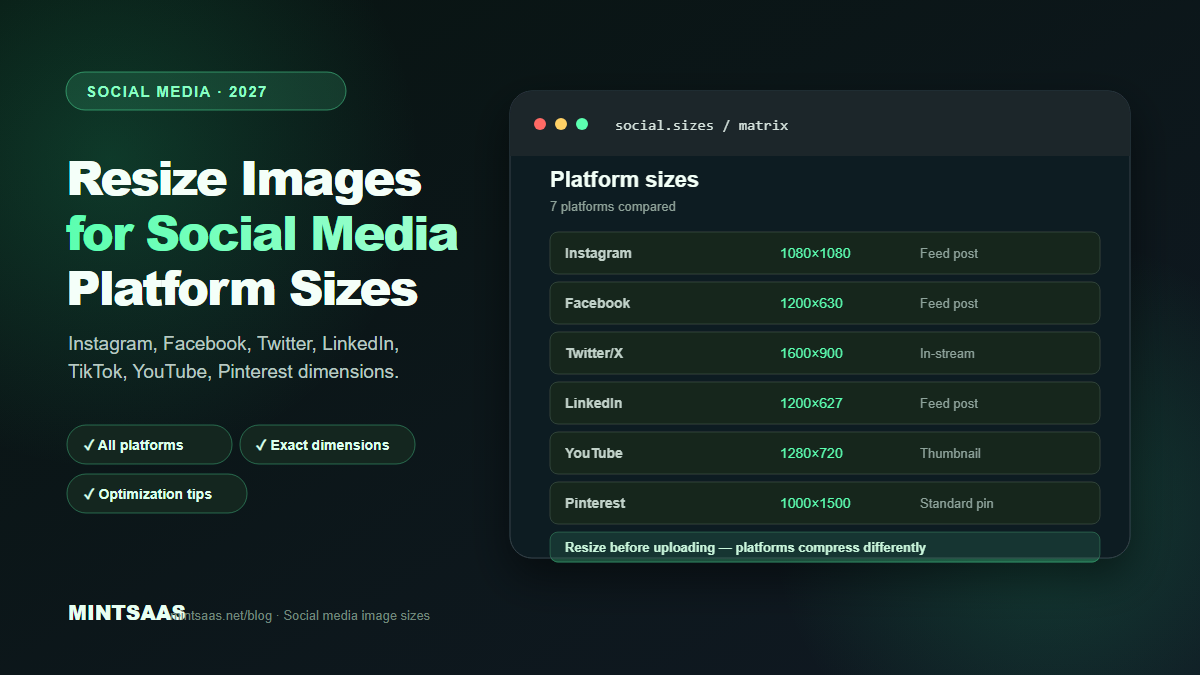
Quick answer: Resize images to each platform's recommended dimensions before uploading: Instagram feed posts 1080×1080 (square) or 1080×1350 (portrait), Facebook 1200×630, Twitter/X 1600×900, LinkedIn 1200×627, TikTok 1080×1920, YouTube thumbnail 1280×720, Pinterest 1000×1500. Use WebP or JPEG at quality 80–85, keep file sizes under 1 MB, and never let platforms auto-crop your images.[1][3]
Social media platforms compress and resize images automatically, often with poor results. A carefully crafted graphic can become blurry, cropped, or distorted after platform processing. The solution is to resize and optimize images to each platform's exact specifications before uploading.
This guide provides the definitive image size reference for every major social media platform in 2027, along with optimization tips to ensure your images look their best after upload.
Why platform-specific sizing matters
Each social media platform has different display dimensions, aspect ratios, and compression algorithms. When you upload an image that doesn't match the platform's specifications, the platform will:
- Resize the image to fit, often reducing quality
- Crop the image to match the aspect ratio, potentially cutting off important content
- Compress the image further, introducing artifacts
- Re-encode in a different format, which can shift colors
By resizing to the exact recommended dimensions before uploading, you maintain control over how your image appears. The platform's compression will still apply, but the starting point is optimal.[1][3]
Complete social media image size reference
| Image type | Dimensions | Aspect ratio | Max file size |
|---|---|---|---|
| Feed post (square) | 1080 × 1080 | 1:1 | 30 MB |
| Feed post (portrait) | 1080 × 1350 | 4:5 | 30 MB |
| Feed post (landscape) | 1080 × 566 | 1.91:1 | 30 MB |
| Story | 1080 × 1920 | 9:16 | 30 MB |
| Reels | 1080 × 1920 | 9:16 | 4 GB |
| Profile picture | 320 × 320 | 1:1 | 10 MB |
| Carousel | 1080 × 1080 | 1:1 | 30 MB |
Tip: Instagram compresses images aggressively. Use JPEG at quality 85 for photographs and PNG for graphics with text. Keep file sizes under 1 MB for best results.[1]
| Image type | Dimensions | Aspect ratio | Max file size |
|---|---|---|---|
| Feed post | 1200 × 630 | 1.91:1 | 30 MB |
| Cover photo | 820 × 312 | 2.63:1 | 100 KB |
| Profile picture | 170 × 170 | 1:1 | 100 KB |
| Event cover | 1920 × 1080 | 16:9 | 100 KB |
| Story | 1080 × 1920 | 9:16 | 30 MB |
| Ad (single image) | 1200 × 628 | 1.91:1 | 30 MB |
Tip: Facebook compresses images to approximately 85% quality. Upload at 1200×630 for feed posts to avoid double compression.[1]
Twitter / X
| Image type | Dimensions | Aspect ratio | Max file size |
|---|---|---|---|
| In-stream photo | 1600 × 900 | 16:9 | 5 MB |
| Header image | 1500 × 500 | 3:1 | 2 MB |
| Profile picture | 400 × 400 | 1:1 | 2 MB |
| Card image | 1200 × 628 | 1.91:1 | 5 MB |
| Ad (single image) | 1200 × 675 | 16:9 | 5 MB |
Tip: Twitter supports WebP and JPEG. Use JPEG at quality 85 for photographs. Twitter's compression is less aggressive than Instagram's.[1]
| Image type | Dimensions | Aspect ratio | Max file size |
|---|---|---|---|
| Feed post | 1200 × 627 | 1.91:1 | 10 MB |
| Cover photo | 1584 × 396 | 4:1 | 8 MB |
| Profile picture | 400 × 400 | 1:1 | 8 MB |
| Company logo | 300 × 300 | 1:1 | 8 MB |
| Article header | 1200 × 644 | 1.86:1 | 10 MB |
| Story | 1080 × 1920 | 9:16 | 10 MB |
Tip: LinkedIn compresses images moderately. Use JPEG at quality 85 for photographs. LinkedIn is B2B-focused, so professional, high-quality images perform best.[1]
TikTok
| Image type | Dimensions | Aspect ratio | Max file size |
|---|---|---|---|
| Video thumbnail | 1080 × 1920 | 9:16 | 50 MB |
| Profile picture | 200 × 200 | 1:1 | 10 MB |
| Ad (single image) | 1080 × 1920 | 9:16 | 50 MB |
Tip: TikTok is video-first. For static images (thumbnails, ads), use 1080×1920 vertical format. Use JPEG at quality 85.[1]
YouTube
| Image type | Dimensions | Aspect ratio | Max file size |
|---|---|---|---|
| Thumbnail | 1280 × 720 | 16:9 | 2 MB |
| Channel banner | 2560 × 1440 | 16:9 | 6 MB |
| Profile picture | 800 × 800 | 1:1 | 10 MB |
| End screen | 1280 × 720 | 16:9 | 2 MB |
Tip: YouTube thumbnails are critical for click-through rates. Use high-contrast images with large, readable text. Keep file sizes under 2 MB (YouTube's limit). Use JPEG at quality 90 for thumbnails (higher quality than other platforms).[1]
| Image type | Dimensions | Aspect ratio | Max file size |
|---|---|---|---|
| Standard pin | 1000 × 1500 | 2:3 | 32 MB |
| Square pin | 1000 × 1000 | 1:1 | 32 MB |
| Long pin | 1000 × 2100 | 1:2.1 | 32 MB |
| Profile picture | 165 × 165 | 1:1 | 10 MB |
| Board cover | 222 × 150 | 3:2 | 10 MB |
Tip: Pinterest favors vertical images (2:3 ratio). Use high-quality images with text overlays. Pinterest compresses less than Instagram, so quality 85–90 is appropriate.[1]
Optimization workflow for social media images
Follow this workflow for every social media image:
Step 1: Create at the recommended dimensions. Design your image at the exact platform dimensions. Don't create at a larger size and hope the platform resizes it correctly.[3]
Step 2: Export in the right format. Use JPEG at quality 80–85 for photographs. Use PNG for graphics with text, logos, or sharp edges. Use WebP if the platform supports it (Twitter, Facebook).[1]
Step 3: Compress before uploading. Run the image through a compression tool to reduce file size. Target under 1 MB for most platforms. Use the MintSaaS Image Compressor for client-side compression.[5]
Step 4: Preview before posting. Check how the image looks on both mobile and desktop. Verify that text is readable, faces are visible, and important content isn't cropped.[3]
Step 5: Upload and verify. After uploading, check the published post to ensure the image displays correctly. Some platforms crop differently on mobile vs desktop.[3]
Common mistakes
Uploading oversized images. A 4000×3000 image uploaded to Instagram will be compressed to 1080×1080, losing quality. Resize first, then upload.[3]
Ignoring aspect ratios. Instagram's 4:5 portrait format crops differently than 1:1 square. Design with the aspect ratio in mind.[1]
Using the wrong format. JPEG for photographs, PNG for graphics. Using PNG for photographs creates unnecessarily large files. Using JPEG for graphics with text creates blurry text.[1]
Forgetting mobile preview. 80%+ of social media users are on mobile. Always preview on a mobile device before posting.[3]
Not optimizing text overlays. Text on social media images must be large and high-contrast to remain readable after platform compression. Use bold fonts, high contrast, and keep text minimal.[3]
Frequently Asked Questions (FAQ)
What is the best image size for Instagram posts?
For Instagram feed posts, use 1080×1080 (square) or 1080×1350 (portrait 4:5). Portrait format takes up more screen space in the feed, potentially increasing engagement. For Stories and Reels, use 1080×1920 (9:16).[1]
Should I use JPEG or PNG for social media?
Use JPEG at quality 80–85 for photographs. Use PNG for graphics with text, logos, or sharp edges. JPEG produces smaller files for photographs; PNG preserves sharp edges for graphics. Some platforms (Twitter, Facebook) also support WebP.[1]
How do I prevent social media platforms from compressing my images?
You can't prevent platform compression, but you can minimize its impact. Upload at the exact recommended dimensions, use JPEG at quality 85 (so the platform's compression has less to do), keep file sizes under 1 MB, and avoid uploading images that are already heavily compressed.[3]
What image format does Instagram support?
Instagram supports JPEG and PNG. It does not support WebP or AVIF for feed posts. For Stories, it supports JPEG, PNG, and MP4 (for video). Always use JPEG for photographs and PNG for graphics with text.[1]
How do I resize images for multiple platforms at once?
Use a batch resizing tool. The MintSaaS Batch Image Converter can resize and convert multiple images at once. Alternatively, use Sharp (Node.js) with a script that generates multiple sizes for each platform.[5]
What is the best aspect ratio for social media images?
It depends on the platform. Instagram favors 4:5 (portrait) for feed posts. Facebook and LinkedIn use 1.91:1 (landscape). Pinterest uses 2:3 (vertical). TikTok and YouTube Shorts use 9:16 (vertical). Design for the platform where you'll post most frequently.[1]
How do I optimize images for social media ads?
For ads, use the platform's recommended ad dimensions (usually 1200×628 for Facebook/LinkedIn, 1080×1080 for Instagram). Keep text under 20% of the image area (Facebook's guideline). Use high-contrast, attention-grabbing visuals. Test multiple variations.[1][3]
Should I add text to social media images?
Yes, but sparingly. Text overlays increase engagement on platforms like Pinterest and Instagram. Use large, bold, high-contrast text that remains readable after platform compression. Keep text to 5–7 words maximum.[3]
Related reading on MintSaaS
- How to Grow on Instagram in 2027: A Practical Growth Guide
- How to Compress Images Without Losing Quality: The Complete 2027 Guide
- How to Convert Images Between Formats: The Complete Guide to WebP, AVIF, JPEG, and PNG in 2027
- How to Optimize Images for SEO: Complete Guide to Faster Loading and Higher Rankings
- How to Batch Compress Images Online: Bulk Workflow Guide for 2027
- Image Optimization for E-Commerce: Product Photos That Convert in 2027
- WebP vs AVIF: Which Image Format Wins in 2027?
- Best Image Compression Tools for Web Developers in 2027
- PDF Security: How to Protect Sensitive Documents Online in 2027
- SVG Optimization: How to Reduce Vector File Size for Web in 2027
- How to Optimize Images for Mobile: Responsive Image Guide for 2027
- Lossless vs Lossy Compression: When to Use Each for Images in 2027
- Image CDN vs Self-Hosted: Which Is Better for Performance in 2027?
- How to Use the HTML Picture Element for Responsive Images in 2027
- Image Lazy Loading: Implementation Guide for Web Performance in 2027
Sources
[1] Sprout Social — Social media image sizes: https://sproutsocial.com/insights/social-media-image-sizes-guide/
[2] Hootsuite — Social media image size guide: https://blog.hootsuite.com/social-media-image-sizes-guide/
[3] Buffer — Complete guide to social media image sizes: https://buffer.com/library/social-media-image-sizes/
[4] Canva — Social media image dimensions: https://www.canva.com/sizes/social-media/
[5] MintSaaS Image Compressor: https://www.mintsaas.net/products/image-compressor
Free tools on MintSaaS
Try our free tools to put this guide into practice:
MintSaaS Dispatch articles are researched and synthesized with the assistance of artificial intelligence analysis, then edited, verified, and benchmarked by our engineering editorial team. Customer personal data and platform source files are strictly segregated and are never used to train or fine-tune public artificial intelligence models.
More from MintSaaS Dispatch
Handcrafted technical insights and developer tools.